The Practical Guide to Kubernetes Image Scanning

Kubernetes changed how teams build, deploy, and scale applications. It also changed how security teams need to manage vulnerabilities.
In traditional environments, scanning a container registry may seem like the obvious place to start. If every container image lives in a registry, why not scan the entire registry and call it coverage?
Kubernetes makes that approach far more complicated. Teams constantly deploy, replace, and retire images. A single image may exist across multiple tags, clusters, and running replicas. Some images actively run in production. Others sit unused, outdated, or disconnected from any live environment. Registry scanning sees all of these images equally; it can’t tell you which ones are actually running.
It also misses an important distinction between internally developed workloads and externally sourced software. Kubernetes environments routinely run vendor, open source, and infrastructure images that teams do not build or directly maintain. These images may originate outside the organization’s registries, follow different update cycles, or fall outside existing security and compliance workflows.
That creates a simple but important question:
How do you make sure the container images that are actually running get scanned, prioritized, and understood in context?
The direct answer is to move beyond broad registry scanning and focus on the images that actually run. Registry scanning helps establish broad vulnerability visibility, while focusing on live workloads helps teams prioritize which findings affect production systems.
Effective vulnerability management starts by reducing the problem space. Instead of treating every image in every registry as equally important, teams should focus first on active workloads, then prioritize vulnerabilities based on exposure, workload sensitivity, and operational impact. The goal is not to scan more artifacts. The goal is to identify which vulnerabilities create meaningful risk in live environments.
There are several ways to approach image scanning. Each one comes with tradeoffs around coverage, deployment effort, resource usage, operational complexity, and runtime context.
This guide breaks down the main options.
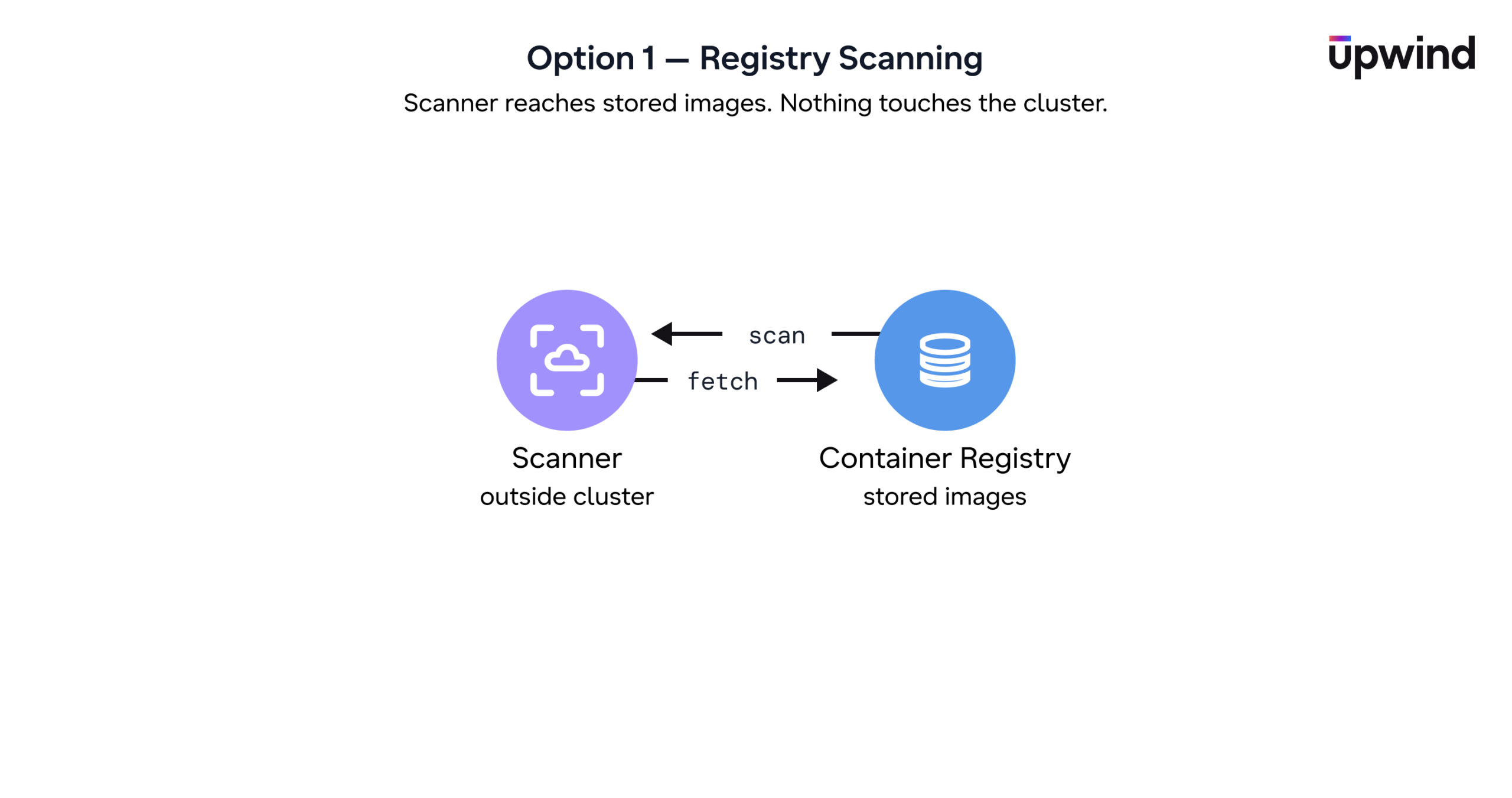
Option 1: Registry Scanning
Best for: Broad image inventory and vulnerability detection
Main advantage: Easy to start
Main limitation: No runtime context, high noise, and unnecessary scanning cost
Registry scanning analyzes stored images before deployment. It helps teams identify vulnerabilities early and gives broad visibility into the software artifacts available to developers.
But registry scanning does not show which images actively run in clusters. It may scan multiple versions of the same image, old images that teams no longer deploy, or development images that never reached production. As a result, teams gain visibility, but scanning cost and operational effort can increase as thousands of findings make it harder to prioritize the vulnerabilities that actually create production risk.
Bottom line: Registry scanning gives teams a useful starting point, but it should not serve as the long-term approach. Teams need scanning that’s anchored to what’s actually running, not just what’s stored.
Option 2: Agentless Runtime Scanning
Best for: Fast multi-cluster visibility with low deployment effort
Main advantage: Focuses scanning on deployed workloads without in-cluster components
Main limitation: Depends on Kubernetes API and registry access
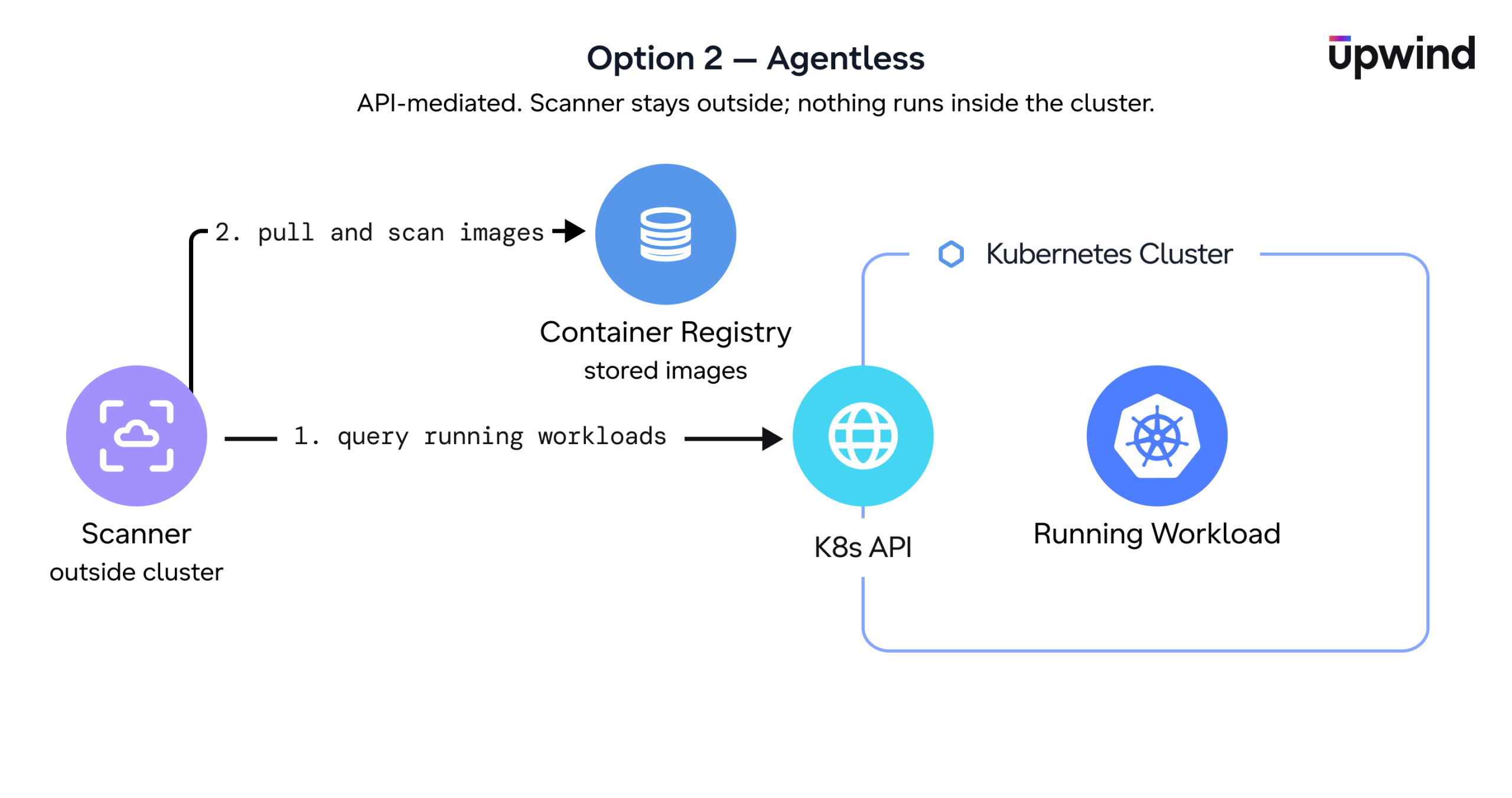
Agentless scanning identifies running workloads through the Kubernetes API, then scans the associated images directly from the container registry without deploying scanners inside the cluster. This approach reduces noise and cost by scanning only the workloads that are running, rather than everything stored across registries. It also simplifies onboarding across large Kubernetes environments by avoiding additional in-cluster components.
The tradeoff is depth, not accuracy. Agentless scanning reliably tells you which workloads are running and what vulnerabilities their images contain, but it sees the image as cataloged in the registry, not the live container. It has no visibility into runtime behavior: which processes actually execute, what’s loaded into memory, what’s reachable over the network, or how an attacker could move laterally. That’s the difference between knowing a CVE exists in an image and knowing whether it’s exploitable in production, which keeps agentless closer to vulnerability inventory than to runtime risk prioritization.
Bottom line: Agentless scanning helps teams quickly improve Kubernetes vulnerability visibility with minimal deployment overhead, especially across large or distributed environments. It’s a strong first layer that can reduce unnecessary scanning cost and noise, but it stops at vulnerability inventory, not runtime risk.
Option 3: In-Cluster Scanning
Best for: Prioritizing by real exploitability, not theoretical CVE count
Main advantage: See the live container and its runtime behavior, not just the cataloged image
Main limitation: Requires in-cluster components
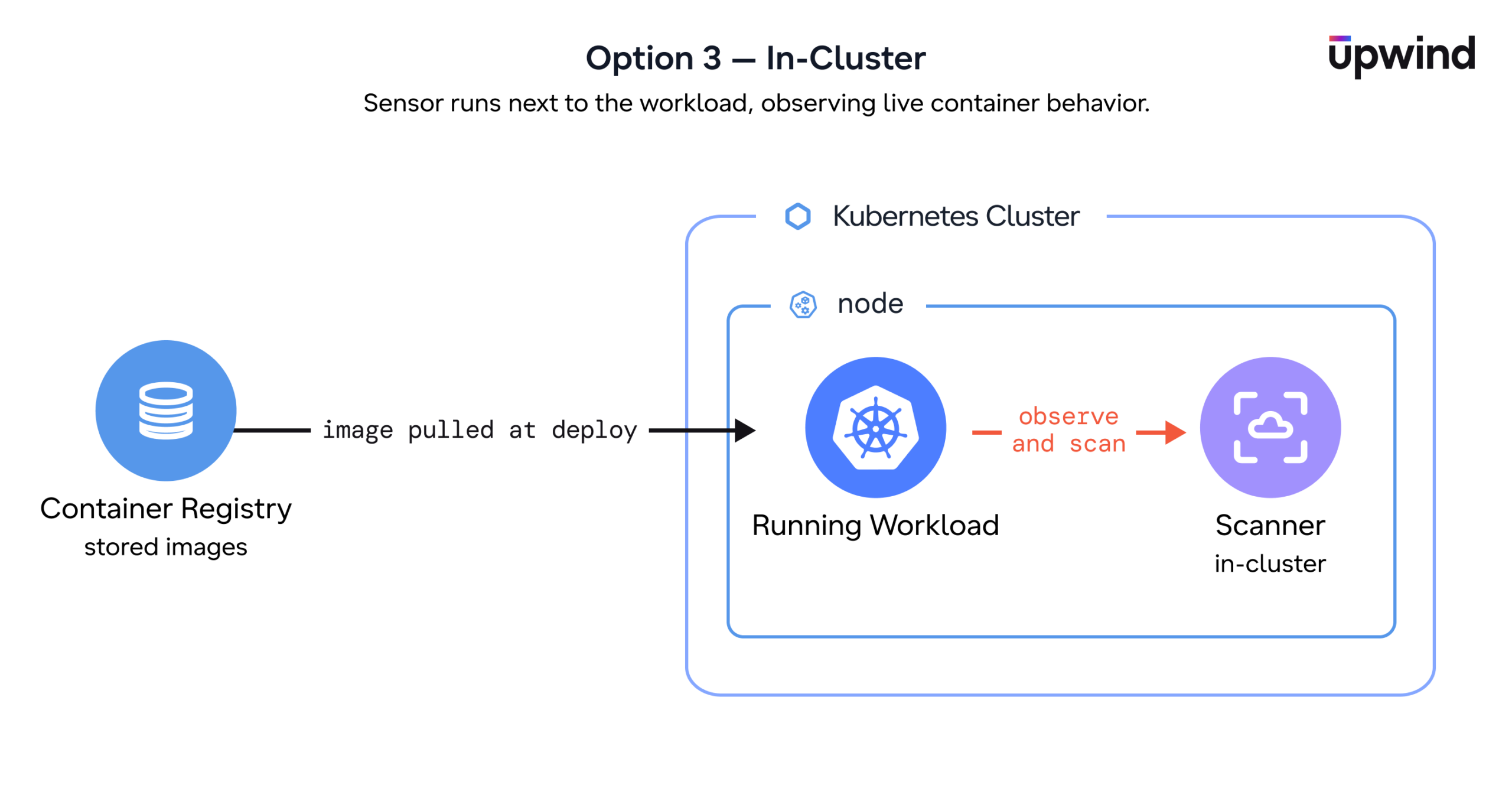
In-cluster scanning runs inside the Kubernetes environment itself, analyzing the containers that are actually running rather than images pulled from a registry. Because it sits next to the workload, it isn’t limited to what an image contains on disk – it can observe what the running container actually loads and executes.
That’s the capability the other approaches don’t have. Registry and agentless scanning can tell you a CVE exists in an image; runtime-aware in-cluster scanning can tell you whether the affected package is ever loaded into memory, runs on a live code path, or is reachable over the network. That’s what turns a long list of findings into a short list of things that actually matter.
The tradeoff is footprint. In-cluster scanning needs components running in the cluster. Mature implementations keep this light, scanning only the unique images in use, scheduling jobs on nodes with spare capacity, and tearing them down on completion rather than running continuously, but it’s still more moving parts than agentless.
Bottom line: In-cluster, runtime-aware scanning gives teams the deepest signal, exploitability and runtime context, not just inventory, at the cost of a larger operational footprint. It’s the model mature security programs converge on once breadth is no longer the bottleneck.
How to Choose the Right Approach
No single image scanning model fits every environment or organization.
The right approach depends on how your organization operates Kubernetes, how broadly clusters are distributed, and how much operational complexity teams are prepared to manage.
| Registry Scanning | Agentless | In-Cluster | |
| Deployment effort | Low | Medium | Medium |
| Runtime context | None | Partial | Full |
| Reachability / runtime behavior | No | No | Yes |
| Handles external/vendor images | Limited | Yes | Yes |
| Best for | Early/one-time hygiene | Fast broad coverage | Mature security programs |
For many organizations, the first priority is visibility. Agentless scanning can help teams quickly understand which workloads run across large Kubernetes environments without deploying additional in-cluster components.
As environments mature, the priority shifts from coverage to precision. In-cluster, runtime-aware scanning gives teams visibility into what each workload actually runs, so vulnerabilities can be prioritized by real exploitability rather than raw count, the difference between knowing a CVE exists and knowing whether it’s reachable in production.
The goal is not simply to collect more CVEs. Mature Kubernetes security programs focus on prioritization and operational relevance.
For example, a critical vulnerability may appear across dozens of images and versions in a registry, while only a small number of those images actively support production services. Runtime-aware analysis helps teams identify which findings affect exposed systems, sensitive workloads, or business-critical applications, strongly enough to justify immediate action.
That is where Kubernetes vulnerability management becomes significantly more effective.
How Upwind Helps
Each of these approaches answers part of the question, and most teams need more than one as they mature. The friction is usually tooling, breadth and depth end up in separate products that don’t share context. Upwind is built to span the whole range on one platform.
For breadth, Upwind’s agentless scanning identifies running workloads through the Kubernetes API and focuses findings on what’s actually deployed, fast coverage across large, distributed environments with nothing to install in the cluster.
For depth, Upwind’s eBPF-based runtime instrumentation turns reachability from a guess into an observation, so teams can see which vulnerabilities are actually live in production rather than merely present. You can start with breadth and add depth where it matters, without switching tools.
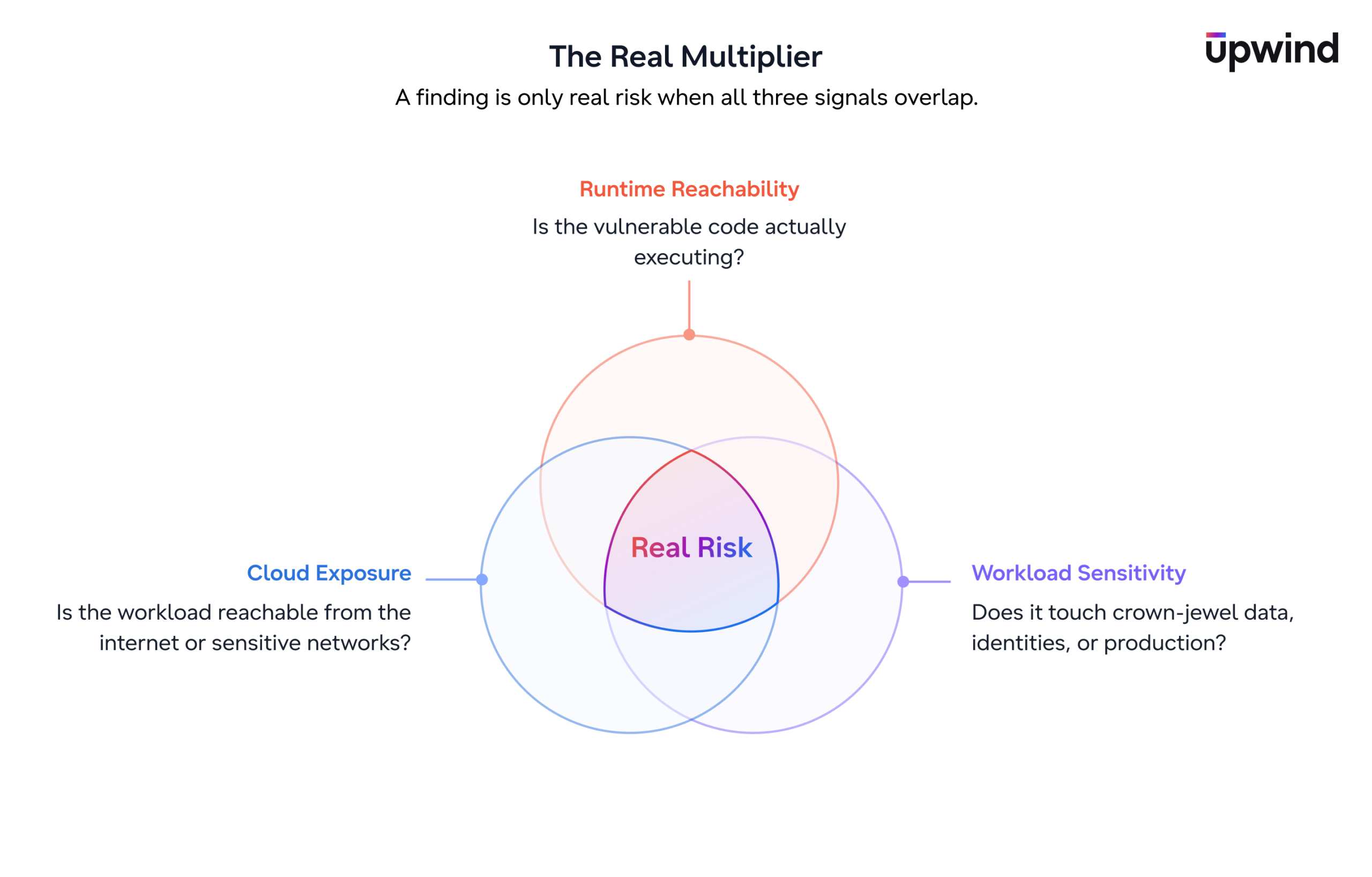
The real multiplier, though, isn’t any single scan. A CVE that’s reachable at runtime on an isolated internal service is a different risk than the same CVE on an internet-facing workload with broad cloud permissions.
Upwind correlates runtime reachability with cloud exposure, workload sensitivity, and live behavior, so prioritization reflects the full picture instead of one signal in isolation. That’s what collapses thousands of findings into the handful that are genuinely exploitable and exposed in your environment, which is exactly where remediation efforts belong.
Closing Thoughts
Kubernetes image scanning doesn’t follow a one-size-fits-all model. It evolves as teams mature.
Early on, the priority is speed and breadth. Agentless scanning helps teams quickly understand exposure across clusters without installing anything in the cluster, which makes it a natural starting point across large or distributed environments.
As environments mature, the priority shifts from coverage to precision. In-cluster, runtime-aware scanning provides it, visibility into what each workload actually runs, so vulnerabilities get prioritized by real exploitability rather than raw count. It carries more operational footprint than agentless, but for teams whose challenge has shifted from finding vulnerabilities to deciding which ones matter, that trade pays off.
The most important shift, though, isn’t between tools. It’s the move from static image inventory to operational risk prioritization. Because in Kubernetes, the question isn’t just:
Which images have vulnerabilities?
It’s:
Which vulnerabilities are reachable in production and on workloads exposed enough to create real risk?
That’s the question modern cloud teams need to answer, and it’s the one Upwind is built around.
Vectra AI’s Chris Long, Senior Director of IT Security and CISO, put it directly:
“One of the things I loved about Upwind immediately was that it was really focused on containerization. We can deploy into our Kubernetes management and then we immediately have visibility into all of our containers.”
That’s the shift from inventory to operational visibility. See how Vectra AI uses Upwind to reduce vulnerability noise and prioritize what’s actually running in production. Read the case study.