
As a design team, we spend a lot of time watching where users slow down, where they hesitate, and where the product makes them work harder than it should.
In cloud security, one pattern shows up again and again: A security engineer starts their day by opening the platform and scanning a long list of new findings. Some are marked critical. Others are medium or low. A few look familiar, maybe the same issue, just showing up in a different place. It appears under a specific asset, then again under vulnerabilities, sometimes again under APIs.
They click into one of them.
The information is there: package name, CVE, severity, maybe even a short description. But the real questions are still unanswered.
Is this actually running? Is it exposed to the internet? Is anything using it?
To figure that out, they move to another view. Then another. They open the asset page, check connections, try to understand how this resource fits into the bigger picture.
At this point, they’re no longer reviewing a finding. They’re reconstructing context.
This flow repeats throughout the day. Not because the data is missing, but because it’s scattered across different places, each showing a partial view. The system contains the answers, but it doesn’t present them in a way that supports how people actually work.
Instead of helping users decide what matters, the product requires them to investigate first. Every question becomes a small research task. Every decision depends on manually connecting pieces of information that were never brought together. Over time, this creates friction and uncertainty; users aren’t always sure they’re seeing the full picture, or whether something important is hidden elsewhere.
The Problem Wasn’t Missing Data
We kept seeing this pattern, and it led us to rethink how the experience should work.
In many systems, assets, APIs, identities, and findings are treated as separate domains, each with its own entry point and logic. Moving between them is expected.
But from a user’s perspective, these aren’t separate problems. They’re all part of the same question: what’s happening in this environment, and does it require action?
So instead of organizing the product around domains, we started organizing it around context.
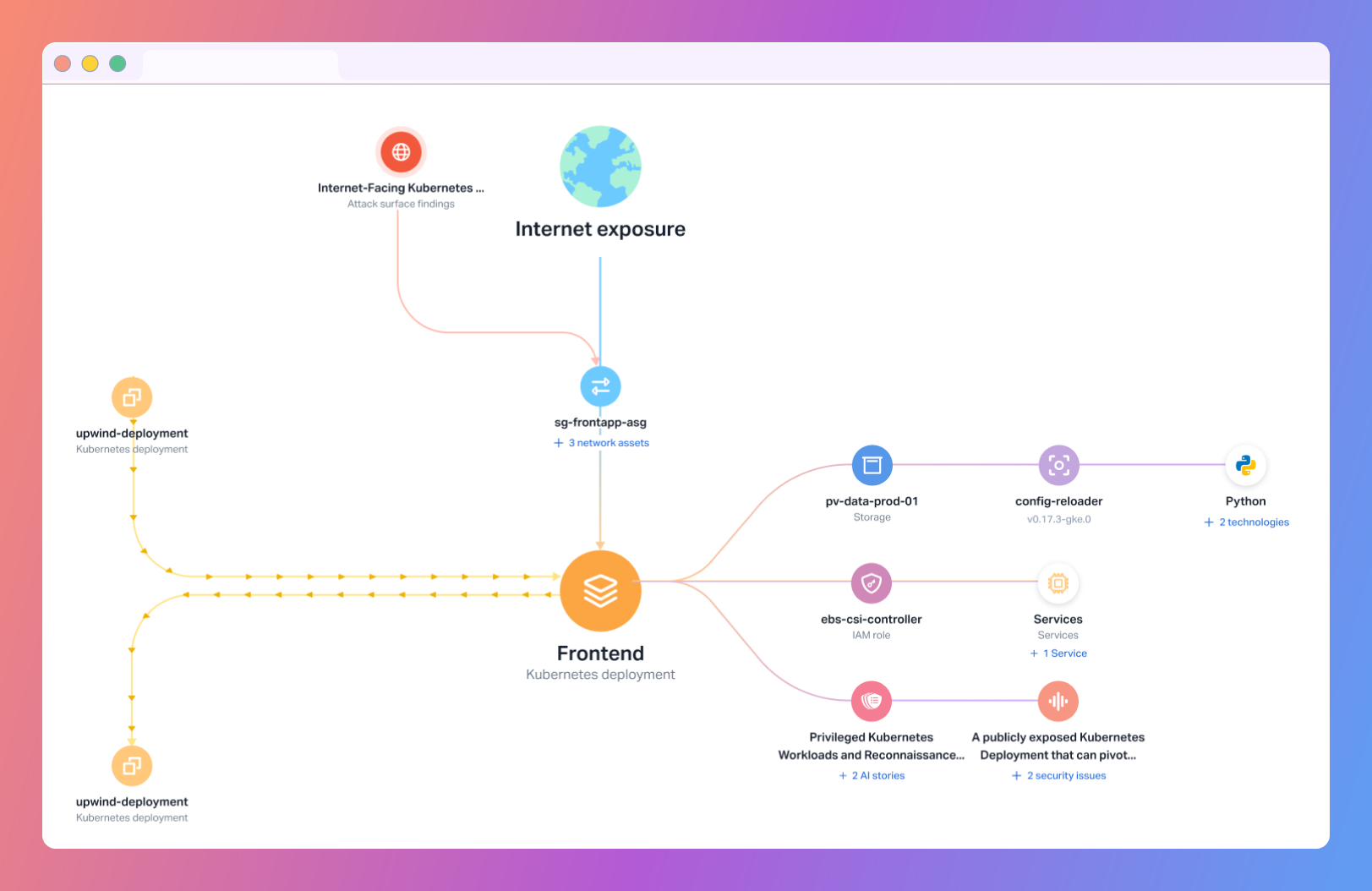
When you look at a resource, you don’t just see a list of issues. You see what’s running on it, how it connects to other services, whether it’s exposed, and what kind of activity is happening around it. The goal is to give people the context they need exactly where they need it, so they can stay focused on the task at hand.
Prioritization Breaks When Context Is Separate
Prioritization is another place where the experience often breaks.
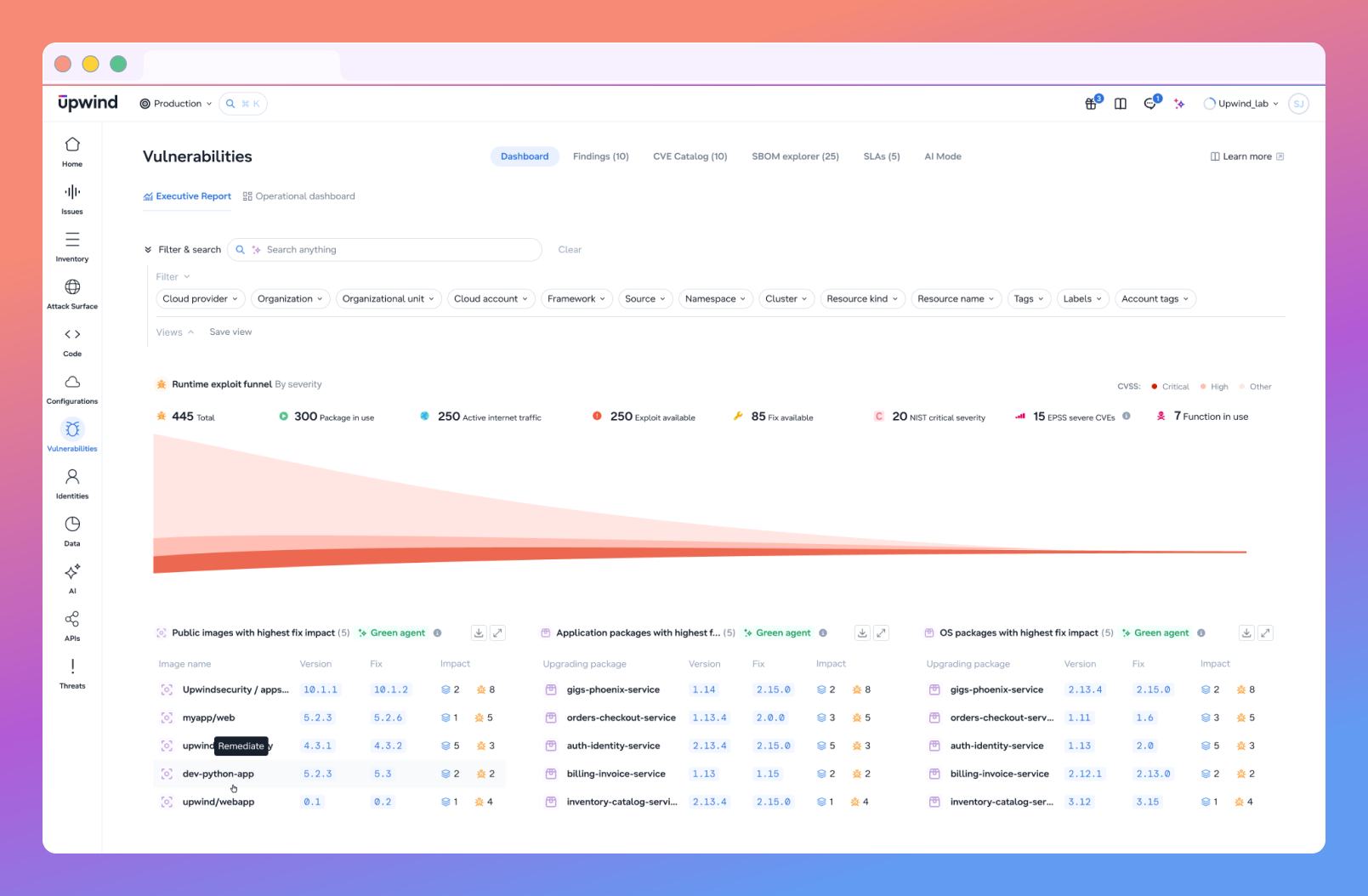
A long list of vulnerabilities, even when sorted by severity, doesn’t help users decide what to handle first. Severity describes potential impact, but not what’s actually happening. A critical vulnerability that isn’t running behaves very differently from one that is both active and exposed.
To address this, we brought runtime context into the same view. Instead of treating runtime as a separate layer, it becomes part of how information is presented. You can immediately see whether a component is in use, whether it has been accessed, and how it fits into the environment.
This doesn’t remove the need for investigation, but it reduces how often users have to leave their current context just to answer basic questions.
Not Every Signal Is an Issue
We also saw that users were spending time figuring out what actually requires action.
Lists of findings tend to mix everything: signals, potential risks, and real issues. Without a clear distinction, users either try to address everything or spend time filtering manually.
Separating signals from actionable issues made a noticeable difference. Findings remain as context, but issues represent what should be addressed.
That distinction helps users move from review to action faster. Instead of asking teams to interpret every signal from scratch, the experience helps them understand which risks need attention.
Agents Create a New Way to Experience Cloud Security
As cloud environments evolve, this challenge grows. The surface area is expanding, not just across infrastructure, but also across AI-driven components, pipelines, and integrations.
More data, more signals, and more potential risk paths.
This is where AI becomes part of the experience itself.
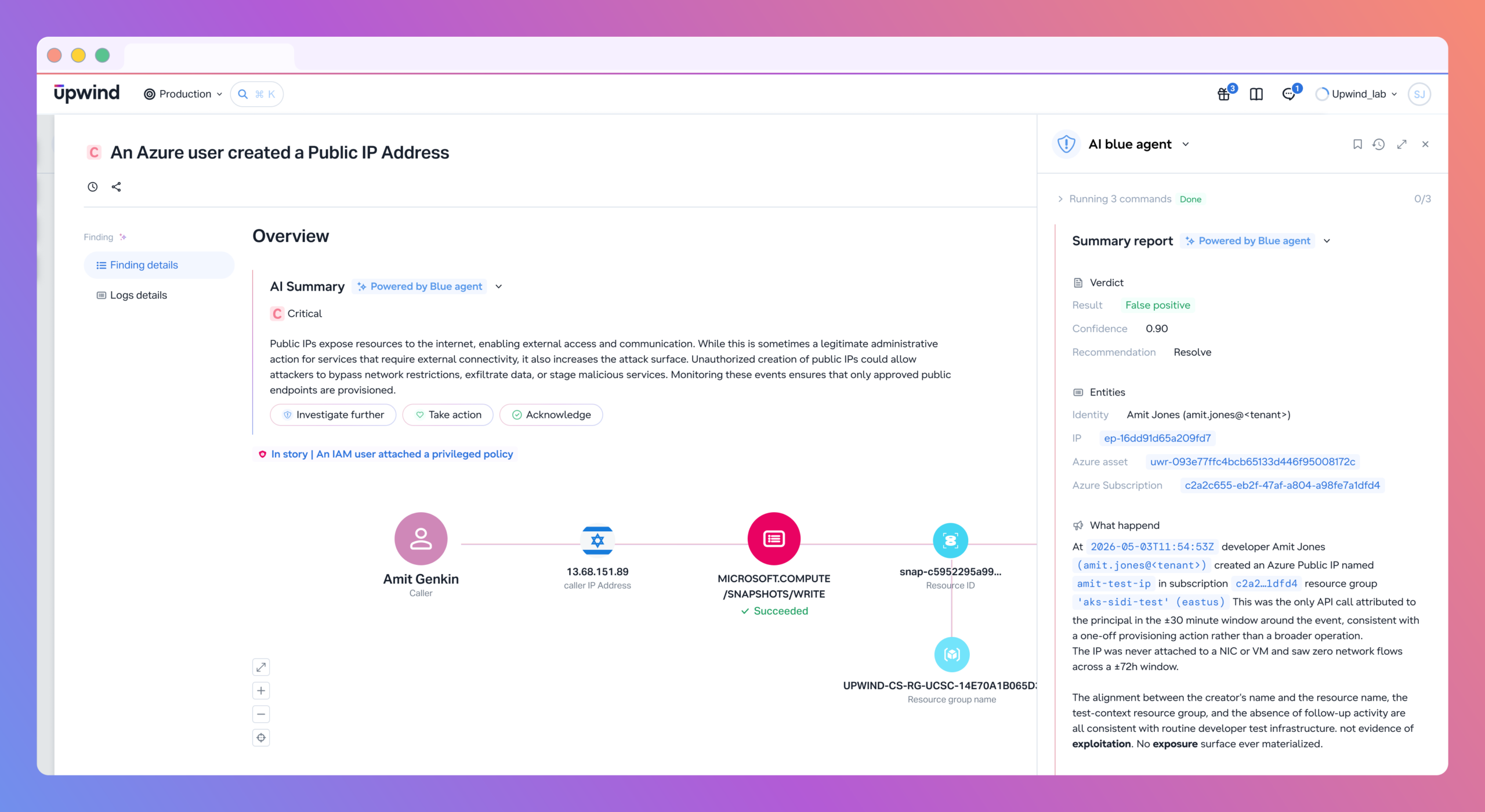
Instead of manually writing queries, users can ask complex questions and get answers that already combine multiple data sources. Instead of navigating across views, they can explore investigations in a more direct way.
AI also changes how actions are taken. Writing policies, creating detection logic, or defining rules no longer has to start from scratch. Users can generate and refine them based on intent, reducing the gap between knowing what needs to be done and actually doing it.
We’re also starting to see the role of agents emerge. Not as a replacement for users, but as a way to reduce repetitive investigation work. Users can ask direct questions, get structured answers, and move from insight to remediation in the same flow, understanding what to fix and, when appropriate, taking action.
But introducing AI into security workflows raises the bar for UX.
If the system provides answers or recommendations, users need to trust them. That means grounding every response in visible evidence, showing what data was used and how conclusions were reached. Without that, AI becomes another layer users need to verify, bringing us back to the same problem.
A Better Experience Brings Context to the User
What these changes have in common is not a new feature. It’s a shift in how the experience is structured.
Instead of expecting users to assemble context, the Upwind platform brings context to them. Instead of focusing on where data lives, it focuses on how decisions are made.
At Upwind Security, this is still an ongoing process. The complexity of cloud and AI environments isn’t going away. But the direction is clear: if users need to jump between multiple places to understand a single issue, the experience isn’t doing enough. If they need to interpret data before they can act, the system is adding friction.
A better experience doesn’t remove complexity. It organizes it around the way people actually work.
At Upwind, we see this as the next step in cloud security UX: not asking users to reconstruct the story from scattered signals, but helping them understand the full picture faster, with the evidence they need to trust each decision.