
Kubernetes environments move fast. Deployments happen constantly—through CI/CD pipelines, GitOps workflows, and direct kubectl commands. And when a misconfiguration slips in (a privileged pod, a missing required label, a deprecated API version), it can become a security incident in minutes.
Until now, most teams have relied on post-deployment scanning to catch these issues. The problem: by the time a scanner flags the risk, the workload is already running in the cluster—potentially exposed, reachable, or exploitable. Remediation becomes harder, incident response gets noisier, and teams lose time chasing findings after the fact.
That’s why we built the Upwind Kubernetes Admission Controller.Upwind’s Admission Controller adds a native enforcement layer at deployment time, evaluating workloads before they enter your Kubernetes cluster—so you can prevent misconfigurations instead of reacting to them later.
What is the Upwind Kubernetes Admission Controller?
Kubernetes Admission Controller is a new capability within Upwind’s Configurations module, delivered as an independent Admission Controller sub-module.
It evaluates Kubernetes resources in real time during deployment using an admission webhook. For every create or update request, it determines whether the workload should be:
- Allowed (meets requirements)
- Audited (allowed, but logged as a violation)
- Blocked (denied before it reaches runtime)
This means enforcement happens at the moment that matters most: when the workload is created.
Why We Built This
Modern Kubernetes security needs more than visibility—it needs control.
Security teams told us they need to answer questions like:
- What is being deployed into our clusters right now?
- Are teams consistently following security and compliance requirements?
- Can we stop risky deployments automatically—without slowing engineering down?
Post-deployment detection is valuable, but it’s inherently reactive. Admission Controller closes the gap by enabling:
- Proactive prevention of risky configurations
- Consistent governance across clusters and environments
Immediate feedback at deployment time so developers can fix issues fast
Key Benefits At A Glance
Shift left without friction
- Enforce security and configuration policies at deployment time—across CI/CD, GitOps, and manual workflows.
Define once, enforce everywhere
- Policies are created centrally and automatically enforced across clusters via the webhook—no per-cluster policy sprawl.
Predictable enforcement
- Choose Audit for observability or Block to prevent non-compliant workloads from being deployed.
Clear visibility and audit trails
- Every decision becomes an event you can investigate, filter, and review over time in the Upwind Console.
How It Works
Upwind’s Admission Controller is built around three core entities—Policies, Rules, and the Admission Webhook—plus Events for visibility and auditing.
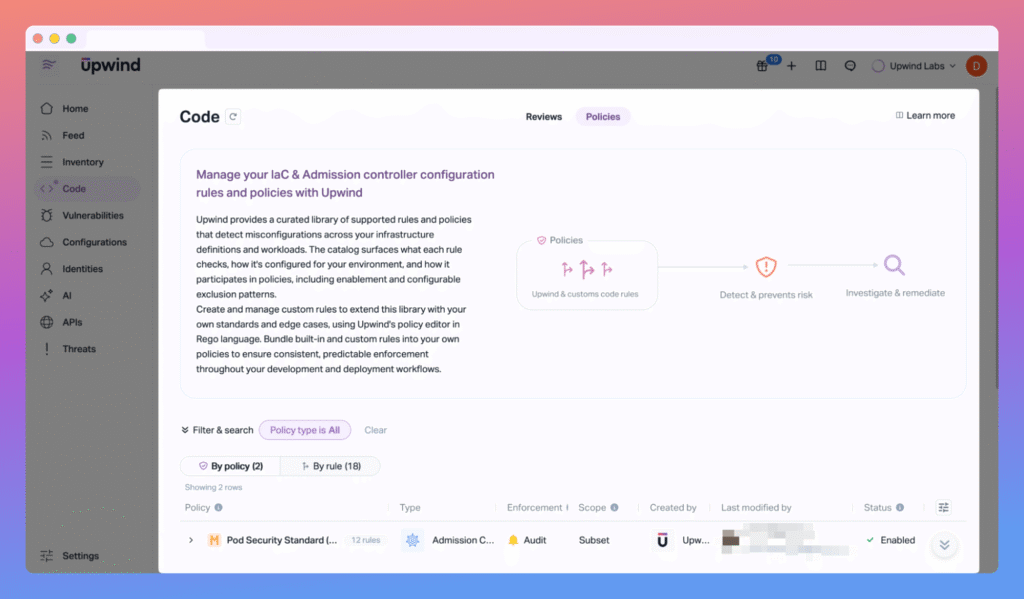
1) Policies: the “how” and “where”
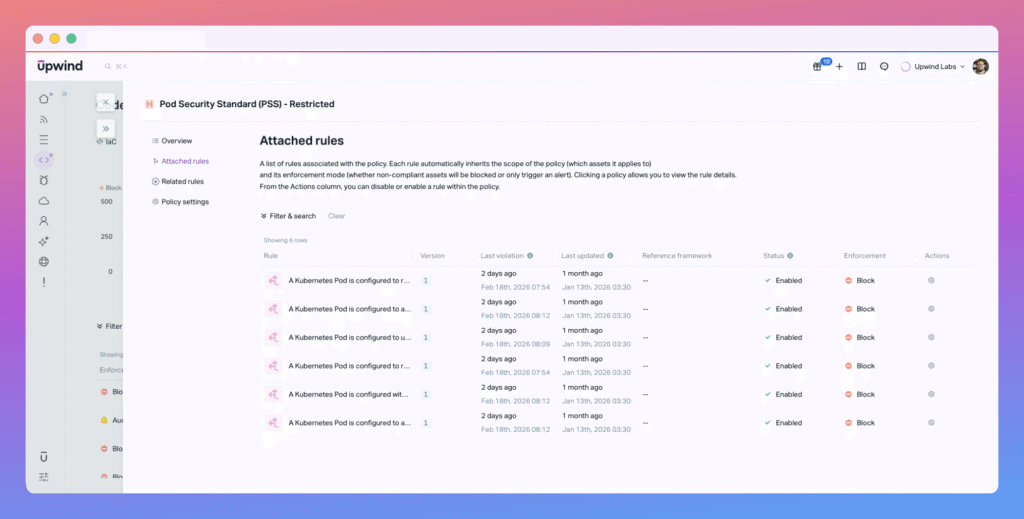
A Policy defines enforcement behavior and where it applies. Each policy includes:
- Enforcement mode: Audit or Block
- Scope: which clusters, namespaces, labels, and resource types are evaluated
Rules: the validations applied within that scope
All rules attached to a policy inherit the policy’s scope and enforcement mode.
2) Rules: the “what”
A Rule is written in Rego and checks a workload against a specific requirement. Rules can be reused across multiple policies and aligned to common frameworks (like CIS Kubernetes), depending on how your team structures governance.
Examples include:
- Disallow privileged pods
- Require specific labels
- Block deprecated API versions
3) Admission Webhook: the enforcement point
The admission webhook runs inside each Kubernetes cluster.
When a workload is created or updated:
- Kubernetes sends the request to the webhook
- The webhook loads the relevant policies and rules for that cluster
- Rules evaluate the manifest in real time
- The webhook returns a decision: Allow / Audit / Block
- If blocked, the workload never reaches runtime
4) Events: visibility you can act on
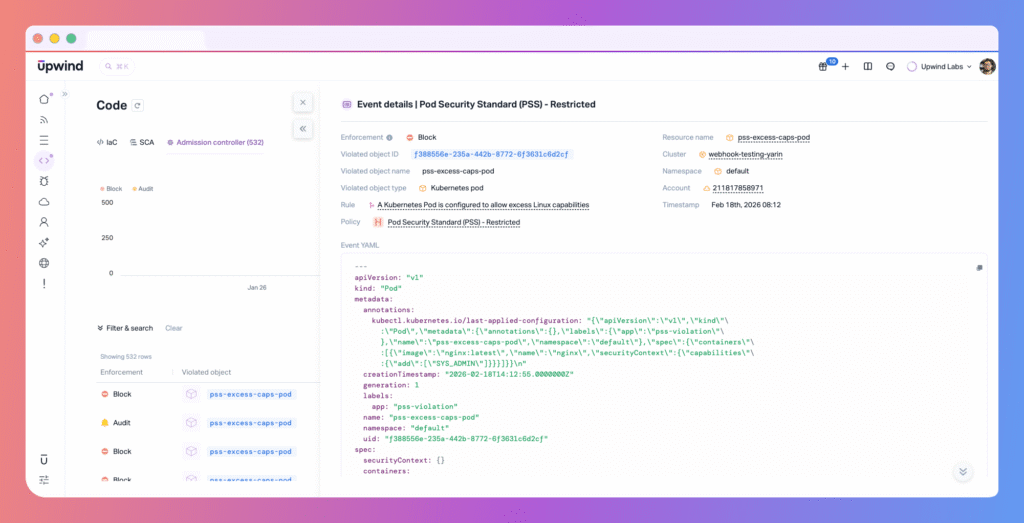
Every evaluation generates an Admission Event, which includes:
- The resource evaluated
- The policy and rule that triggered
- The outcome (Audit or Block)
- The reason for the decision
Where This Fits In The Upwind Platform
Admission Controller focuses on pre-deployment configuration validation.
Other types of risk—like runtime behavior, identity misuse, and network exposure—continue to be handled through Upwind’s existing layers, including Threats and CSPM.
Together, these layers let teams decide:
- What should be enforced before deployment (guardrails)
- What should be detected during runtime (continuous monitoring)
Who Benefits Most
Admission Controller is especially valuable for organizations running Kubernetes at scale—where multiple teams deploy frequently across shared clusters.
Security engineers & platform teams
- Define guardrails centrally
- Enforce standards consistently across environments
- Investigate block/audit decisions with full context
DevOps & engineering teams
- Get immediate feedback at deployment time
- Fix issues before they become CSPM findings or runtime alerts
- Maintain velocity while operating inside clear guardrails
Security leaders
- Gain measurable governance over what enters production
- Demonstrate consistent, deployment-time enforcement
- Track policy coverage and enforcement activity across clusters
See It It In Action
Kubernetes security can’t rely on “we’ll scan it after” anymore. With Upwind Kubernetes Admission Controller, teams can enforce the right guardrails at deployment time, gain centralized visibility into enforcement, and give developers fast, actionable feedback—without breaking existing delivery workflows.
If you’re already using Upwind Configurations, the Admission Controller becomes the missing deployment-time layer: prevent first, detect continuously, and investigate with context.
If you’d like to see how this feature fits into your environment – or to explore how Upwind can help you prioritize and remediate risk more effectively – schedule a customized demo with us. We’ll walk through your use cases, integrations, and security goals to show how Upwind delivers actionable cloud security at scale.