Circular diagram with a central orange scroll icon, surrounded by concentric circles of blue and pink dots. The upwind logo is in the top left corner.

Connect the Dots for Security Findings with Upwind’s Threat Stories

Joshua Burgin June 12, 2024

Connect the Dots for Security Findings with Upwind’s Threat Stories

We are excited to announce the release of Upwind’s “Threat Stories” – a GenAI-based capability designed to address the challenge of connecting the dots between seemingly isolated security findings.

By providing a unified narrative that consolidates and contextualizes events Upwind has determined to be related, Threat Stories enhance the comprehensiveness of our detections with detailed timelines.
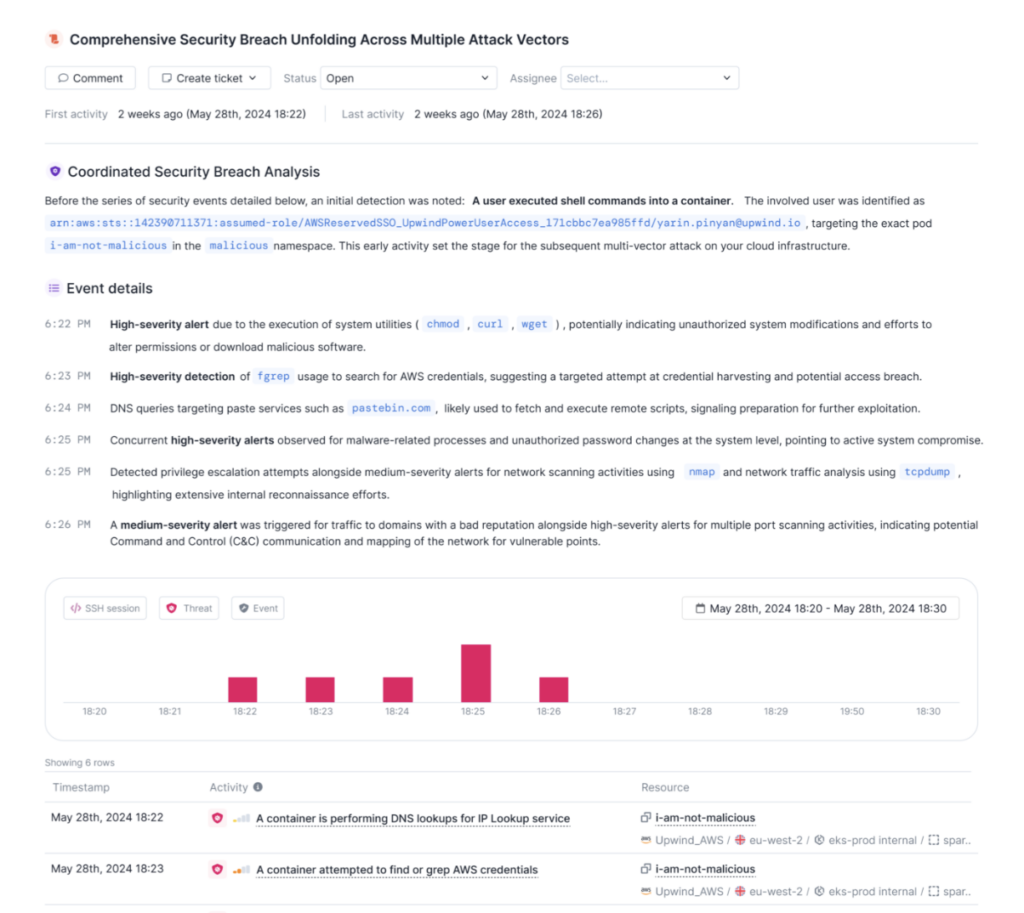
A detailed security report with a timeline and events log. It shows multiple security alerts, including a high-severity alert related to a user executing commands in a container identified as je-ne-suis-pas-malicious. Various actions and timestamps are displayed.

Threat Stories act as incident summaries, consolidating multiple detections, events, and SSH login activity. This unified perspective offers a deeper understanding of security events by detailing the sequence of events, their implications, and their impact within a single narrative. Attacks often begin with subtle reconnaissance actions that might be tagged as separate events. With Threat Stories, these events are contextualized as part of the full attack sequence, allowing for a clearer picture of how an incident unfolds. 

Threaat Stories transform security investigations by addressing alert fatigue, providing context, and enabling timely responses. By consolidating relevant data points into a clear narrative, Threat Stories allow teams to focus on the bigger picture and prioritize threats more effectively. They detail the sequence of events, including detections and login activity, giving a deeper understanding of the “why” behind an event. This comprehensive view streamlines investigations, allowing for faster and more efficient threat responses.

“Upwind Threat Stories has drastically reduced triage and investigation time by correlating runtime detections with audit logs and giving us end-to-end visibility. Understanding who did what, how, and when, at a single glance has been a major game-changer”

Dobromir Kosev, Security Engineer, Yotpo

Beneficial not only to security teams but also to developers and DevOps engineers, Threat Stories bridge the gaps between these domains, surfacing and contextualizing all relevant issues. This unified narrative enhances collaboration and strengthens the overall security posture.

To learn more about Upwind’s Threat Stories and risk prioritization, schedule a demo.

Contents

Further Reading

behind-the-curtain-part-03

What’s Behind the Curtain? AWS Bedrock AgentCore Runtime Tear Down – Part III

Recap In Part I and Part II, we: Networking and VPC Mode Network Isolation Testing The microVM is assigned an IPv6 address matching the value in the JWT. Across multiple runs, all addresses shared the same 2600:1f18::/32 prefix, but cross-microVM communication always failed. We attempted to reach the host EC2 IMDS by manipulating the route…
behind-the-curtain-part-02

What’s Behind the Curtain? AWS Bedrock AgentCore Runtime Tear Down – Part II

Recap In Part I, we explored the AgentCore Runtime microVM from the inside and discovered we weren't alone - four platform binaries were running alongside our code, and one of them was quietly shipping logs to an AWS-internal S3 bucket. We left off with a question: what can we learn from these internal components, and…
behind-the-curtain-part-01

What’s Behind the Curtain? AWS Bedrock AgentCore Runtime Tear Down – Part I

Introduction When you deploy an AI agent to AWS Bedrock AgentCore Runtime, your code runs inside a Firecracker microVM - but it doesn't run alone. In this three-part series, we tear down the platform internals, document what we found, and assess how well the isolation holds up. Setting the Stage AWS Bedrock AgentCore Runtime is…
Add the Upwind RSS Feed to Slack
Connect the Upwind RSS Feed to your Slack.
Follow the how-to here.
Threat RSS
Add the Upwind RSS Feed to Slack
Connect the Upwind RSS Feed to your Slack.
Follow the how-to here.
Main RSS