

Today we’re announcing AI Workload Fingerprinting, a new Upwind runtime capability built to find the AI your security team doesn’t know about. That’s the shadow AI in your cloud: agents and AI services that nobody declared or reviewed, and that never made it into anyone’s inventory. Fingerprinting identifies these workloads by what they do and what they hold on disk. Upwind automatically classifies each one as an AI workload and attaches the runtime evidence behind it.
Agents don’t announce themselves when they show up in your cloud. From the outside, an agentic workload looks like another EC2 instance or another container in a node pool. It has the same base image, instance type, owner tag and subnet, so the control plane lists it like any other workload.
The Shadow AI Blind Spot in the Cloud
Shadow AI is any AI that runs without security’s knowledge or review. Nobody declared or approved it, and it never made it into an inventory. It can be a model or an agent, as well as the AI service built around them. The familiar version is an employee pasting company data into a chatbot. That still happens at the endpoint, but a harder version now runs in your cloud, built by your own developers.
Building an agent doesn’t require new infrastructure, just an npm install and a handful of lines in a service that already exists. Once it has an API key, the workload starts talking to a frontier model, with no ticket to file and no security review to pass. The agent ships under a service account or IAM role that was created before the agent existed.
Managed AI services such as Amazon Bedrock and Google Vertex AI are different, and Microsoft Foundry works the same way. The models and agents you set up there are cloud resources with their own APIs and endpoints, so your cloud inventory already lists them. Shadow AI is what gets built outside those services, even when it calls a model hosted on one. It’s an agent framework in a container or a model served with vLLM on a GPU instance. Sometimes it’s an MCP server in a Kubernetes pod. To the control plane, each one is just another workload.
Security teams are left with a question their tools weren’t built to answer: which of these workloads is an agent, or has one running inside it?
Fingerprinting Agents by what They Do in Runtime
AI Workload Fingerprinting finds shadow AI by matching what a workload does against a set of fingerprints. When a fingerprint matches, Upwind automatically classifies the workload as AI.
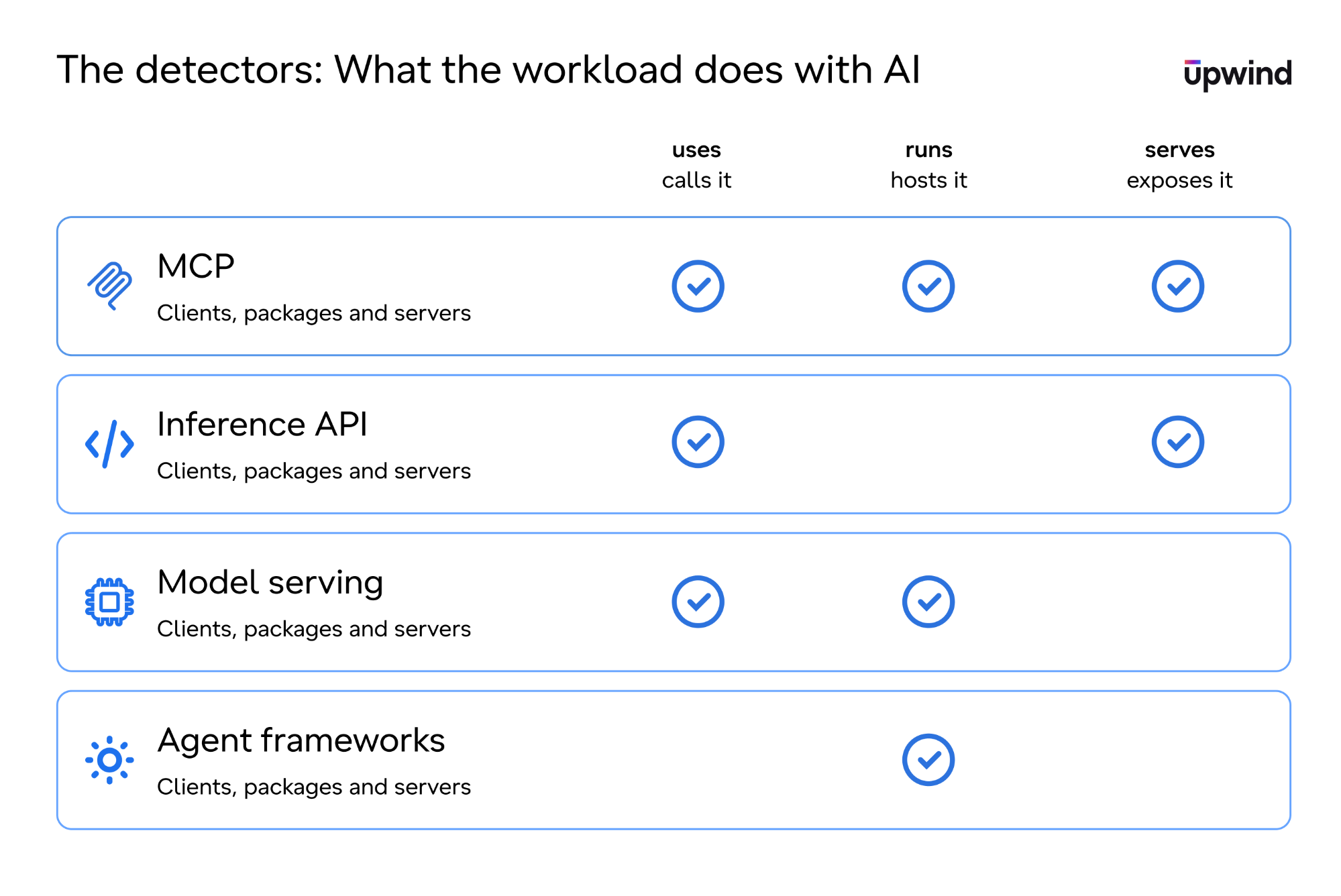
The Upwind Sensor reports each workload’s network flows and processes at runtime. In parallel, the Cloud Scanner reports AI artifacts it finds on host disks. A fingerprint matches when a workload:
- Runs a model server such as vLLM, Ollama or Triton
- Runs an agent framework such as LangChain, LangGraph or CrewAI
- Serves or calls an MCP server
- Serves or calls an inference API
- Talks to a GenAI provider such as OpenAI, Anthropic or Mistral AI
- Holds model weights, agent configuration or agentic code on disk
There is no need to tag anything by hand or annotate a repository. There’s no tagging convention to enforce and no registration step to remember. When the behavior stops, the fingerprint expires on its own.
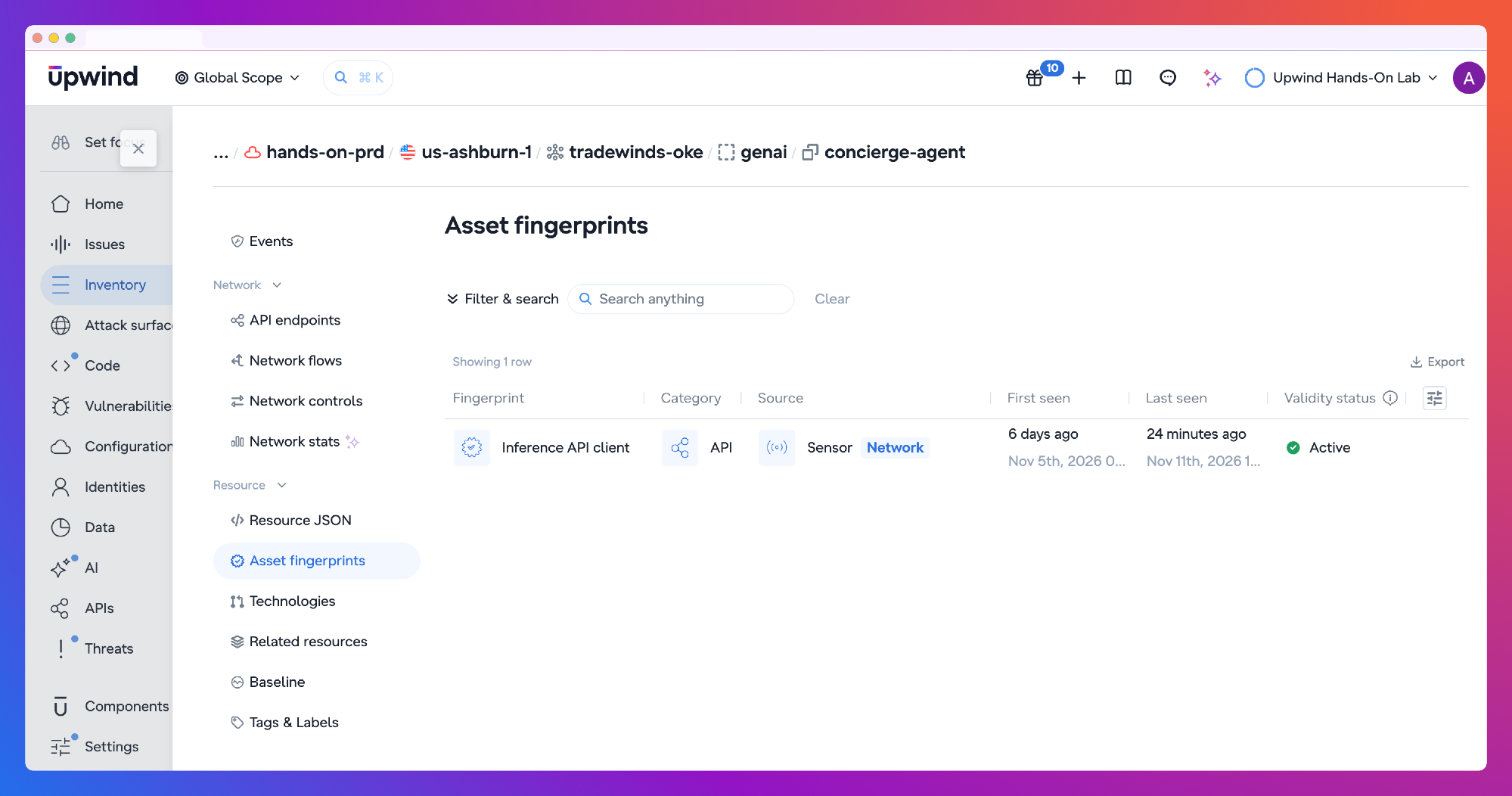
Every classification comes with its evidence. Security teams can see in the console exactly which runtime behavior caused a workload to be classified as agentic, and when it was first and last seen. That evidence settles disputes about a finding and answers the auditor who asks how the AI inventory was built.
What a Fingerprint Gives You
Each fingerprint feeds the three capabilities below.
Shadow AI Visibility: Build an AI-SBOM of Every Undeclared Agent
Fingerprinting produces an AI-SBOM that lists the deployments and code running agentic activity, including what developers never declared as AI. The AI-SBOM automatically updates as fingerprints match and expire. The first time you run it, the finding is the gap between what you thought you ran and what is actually running.
Governance: Apply AI Policies to Undeclared Agents
Once shadow AI is visible, you can apply policies and compliance frameworks built for AI workloads (such as the EU AI Act, NIS2, Databricks AI Framework, ISO/IEC 27002, ISO/IEC 42001, and more). Undeclared agents then fall under the same policies as sanctioned ones and every other workload that touches your data.
Context: See One Attack Chain Instead of Three Findings
The classification sits alongside the rest of what Upwind knows about the workload: identity and permissions, internet exposure, vulnerabilities and egress destinations. Take an agent that runs with an over-permissioned role on an image with a reachable CVE and sends traffic to an external model endpoint. Upwind shows that as one attack chain rather than three unrelated findings. Once a workload is classified as AI, the AI Artifact Scanner checks the MCP servers and skills it runs on, including their instructions. It looks for prompt injection and exposed secrets, along with the rest of the OWASP LLM Top 10 risks.
Why Runtime Context Matters for AI Security
Static views tell security teams which image a workload came from and which role it assumed. For an agent, the risk depends on what the workload does after it starts. It might reach a model endpoint and act on the response it gets. Until then, an agentic workload looks like any other container.
AI Workload Fingerprinting adds that runtime view. It places each agent’s behavior next to the permissions and internet exposure that Upwind already tracks for the workload, so security teams can assess the risk in context. When an auditor asks how you found the shadow AI in your inventory, the console shows the runtime behavior behind every entry and when it was first and last seen.
Get Started with What You Already Run
If you already run Upwind, your account team can turn on AI Workload Fingerprinting for your organization. It uses the Sensor and Cloud Scanner you have deployed, so there’s nothing new to install.
New to Upwind? Get a demo to find the shadow AI in your cloud.