

Updated on November 11, 2026
In a cloud-native ecosystem without perimeter walls to keep out threats, identity and access management (IAM) is a foundational brick in a more distributed “wall” that protects critical systems, applications, and data. While the basics of IAM — from password policies to user provisioning — are well understood, teams still wonder about deeper issues: how can it work across a multi-cloud environment? How does it address insider threats? How does it differ from managing privileged accounts? We’re breaking it down so you’re better prepared to meet the challenges of the current identity-centric threat landscape.
What is IAM Security?
IAM security ensures the right individuals and entities have appropriate access to resources. Beyond basics like user provisioning and password policies, it strategically supports Zero Trust, insider threat detection, and compliance in complex IT environments.
Key components of IAM include:
- User Authentication: Verifying user identities using methods like passwords, biometrics, or multi-factor authentication (MFA).
- Access Authorization: Assigning and enforcing permissions based on roles, attributes, or context.
- User Provisioning and Deprovisioning: Creating, updating, and removing user accounts and access rights when needed.
- Identity Governance: Monitoring and auditing user access so it aligns with organizational policies.
- Single Sign-On (SSO): Allowing users to access multiple systems with one set of credentials.
- Privileged Access Management (PAM): Securing and monitoring access to critical systems and sensitive information.
- Federated Identity Management: Enabling identity sharing across systems or clouds.
- Directory Services: Centralized repositories for storing and managing user identities.
- Access Reviews and Audits: Regularly validating access rights for compliance.
Most public cloud platforms offer built-in IAM tools as foundational components for managing access to their services, like AWS IAM, Microsoft Entra ID (formerly Azure Active Directory), and Google Cloud IAM. These tools are connected to their respective clouds and include features like role-based access control (RBAC), policy enforcement, and sometimes basic identity federation or single sign-on (SSO).
Organizations may add dedicated IAM solutions to address limitations in cloud-native IAM tools or to gain a unified approach across multiple environments.
While IAM is traditionally handled by tools like AWS IAM, Microsoft Entra ID, or third-party identity providers, comprehensive cloud security solutions, like CNAPPs, often replace third-party tools. They offer the following capabilities:
1. Integration with IAM systems to assess misconfigurations (e.g., overly permissive roles) as part of their CSPM capabilities.
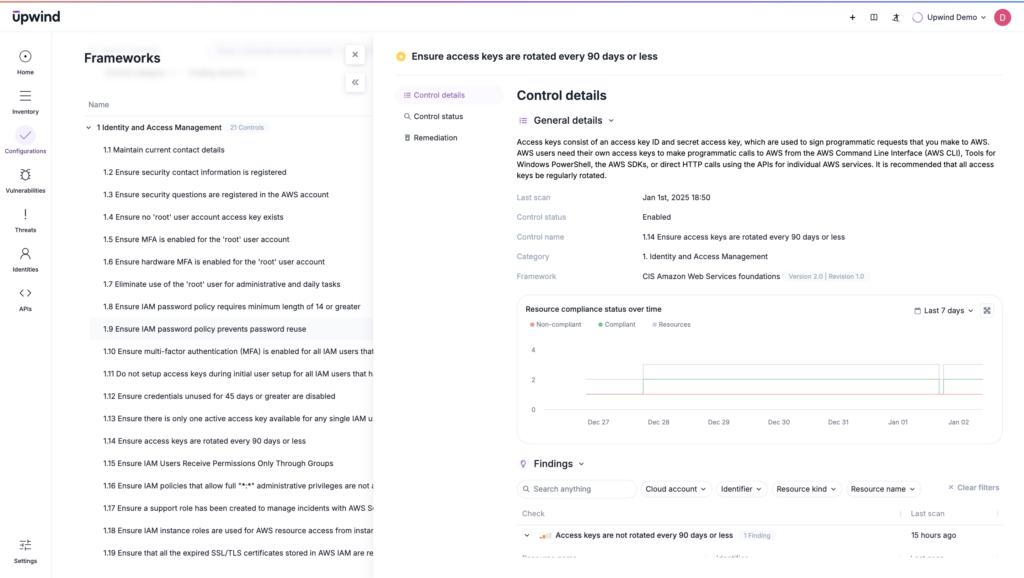
2. Visibility into IAM policies and usage, identifying excessive privileges, unused roles, or potential insider threats.
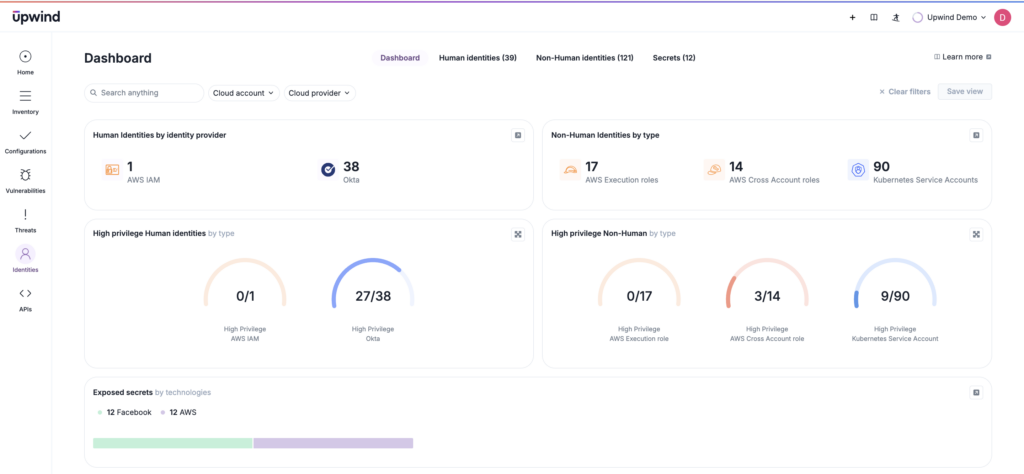
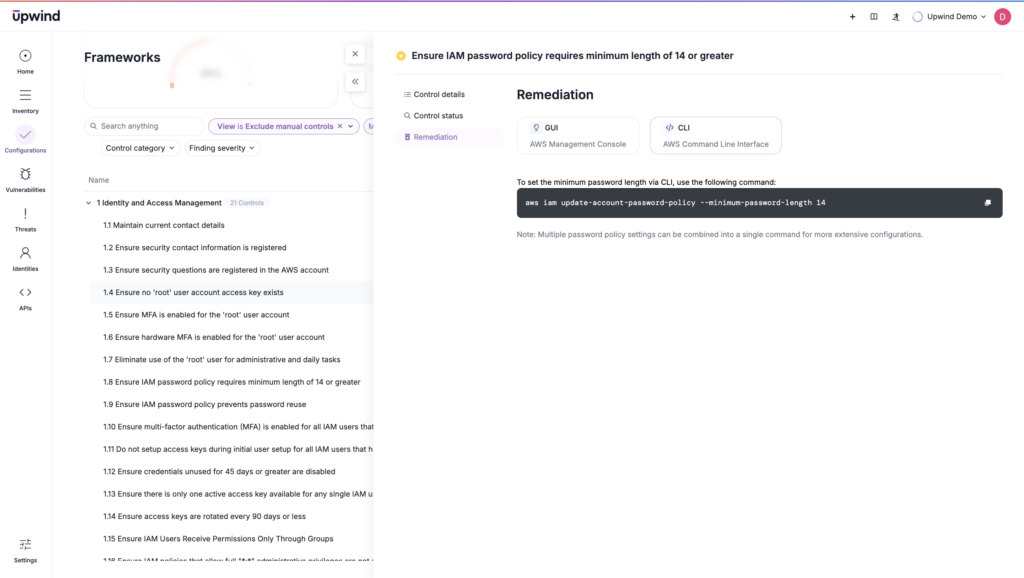
3. Enforcement of IAM best practices through compliance checks, ensuring IAM policies align with frameworks like NIST or CIS benchmarks.
NIST Cloud Security and How IAM Maps to It
NIST’s cybersecurity guidance lists identity and access management as its own topic area. In the cloud, IAM supports three of the six NIST CSF 2.0 functions: Identify, Protect, and Detect. It controls who can access cloud resources, enforces authorization rules, supports account and permission management, and contributes to continuous monitoring of security activity.
NIST-aligned guidance ties IAM to three areas:
- Access Control: Governing who and what can reach cloud assets.
- Identity Proofing and Authentication Context: Confirming identities through secure access enforcement.
- Continuous Monitoring: Treating access as part of ongoing risk management, not a one-time check.
IAM controls are commonly used to support these NIST outcomes:
- Least Privilege: Users and processes get only the access they need.
- Separation of Duties: Critical responsibilities are divided among different people or roles.
- MFA: Authentication is strengthened where appropriate within IAM controls.
- Logging and Monitoring: Access activity is observable, including login attempts and other IAM events.
- Periodic Access Review: Permissions are reviewed regularly, and access that’s no longer needed is removed.
IAM alone doesn’t satisfy NIST cloud security, though. NIST’s approach is broader. It also covers detection, security posture and configuration management, incident response, security assessment and testing, and recovery planning. IAM is an essential control layer. Aligning with NIST means pairing it with monitoring, detection, response, and recovery capabilities.
Benefits and Challenges of IAM in a Cloud-Native World
IAM is a foundational component of securing resources, and its implementation in a cloud-native environment helps protect against the potentially catastrophic consequences of security breaches, noncompliance, and operational slow-downs.
The global IAM market is growing; it’s estimated to expand at a compound annual growth rate of 10.5% from 2025 to 2034 (from $20.2 billion in 2025 to a projected $49.6 billion by 2034).
IAM is popular because its challenges are often reasonable trade-offs in a world where cybersecurity breaches can be devastating. More specifically, companies benefit from IAM in the following ways:
- Enhanced Security through Zero Trust Integration: IAM is foundational to Zero Trust, as it allows for continuous verification of users and devices to enforce least-privilege access.
- Simplified Compliance: IAM helps organizations meet regulatory requirements by centralizing identity governance, creating audit trails, and aligning policies with standards like NIST, GDPR, or HIPAA.
- Operational Efficiency: With tools like Single Sign-On (SSO) and automated provisioning, IAM reduces administrative overhead and streamlines user workflows.
- Unified Identity Management: By integrating across cloud-native and on-premises environments, IAM provides a consistent identity strategy, improving visibility and control.
- Risk Reduction for Privileged Accounts: Privileged Access Management (PAM) secures critical accounts, preventing unauthorized access to sensitive data and systems.
IAM isn’t a single solution, even in the realm of identity management. It creates new challenges for teams, who will need to contend with:
- Complexity Across Multi-Cloud Environments: Managing IAM across multiple cloud providers with different configurations can lead to inconsistencies.
- Scalability Issues: Identity sprawl, especially among non-human identities like service accounts, bots, application identities, and AI agents, is growing faster than periodic manual review, certification, and removal can keep up. Ticket-heavy review cycles are no longer enough. Teams need continuous discovery and monitoring, drift detection, and explicit owner mapping for every non-human identity.
- Addressing Insider Threats: While IAM tools provide access control, they often lack native capabilities to monitor and detect malicious insider activities.
- Overlapping Tools: Combining IAM tools to cover complicated environments may create redundancy or leave exploitable gaps.
- Balancing Granularity and Usability: Fine-grained access control policies can lead to operational bottlenecks and leave users without access.
IAM has the power to bridge the gap between secure access control and agility so teams can embrace Zero Trust and maintain compliance without sacrificing speed and access — in theory. And its use is growing for a reason: the consequences of lax identity management can be large.
Though its challenges can be trying, IAM remains a must-have and a strategic enabler. It is best integrated with broader security and revisited regularly to fine-tune the balance between accessible workflows (for both users and security teams) and security. How? The first step is to pay attention to overall security goals.
Navigating the Strategic Dimensions of IAM
While IAM offers significant benefits, it isn’t without technical hurdles and strategic considerations. Let’s look at core cybersecurity goals in light of the challenges that arise once teams are using IAM.
To realize their strategic goals, organizations must add to or adjust their IAM implementations to make their goals achievable.
| Cybersecurity Goal | Challenge | Strategic Outcome |
| Zero Trust Alignment | Implementing continuous authentication and least-privilege policies without disrupting workflows. | Adaptive access control that dynamically adjusts to users’ context while reducing risk of lateral movement. |
| Multi-Cloud Consistency | Ensuring IAM policies remain unified and consistent across different cloud providers. | Centralized identity governance with reduced risks of misconfigurations and policy drift. |
| Privileged Access Management | Balancing stringent controls with usability for critical accounts and sensitive data. | Secured privileged accounts with audit trails and reduced insider threats. |
| Insider Threat Detection | Monitoring behavioral anomalies and addressing malicious activity without excessive false positives. | Proactive detection of insider threats through behavior-driven analytics and UEBA integration. |
| Scalability in Dynamic Environments | Rapidly adapting IAM to changing workloads, roles, and user demands. | Scalable IAM policies that automate provisioning and minimize manual errors. |
| Access Friction vs Security | Managing the trade-off between stringent access controls and user experience. | Balanced access policies that enhance security without hindering operational efficiency. |
For example, modern IAM systems often have built-in capabilities that support Zero Trust principles, such as context-aware policies (as with Google Cloud Access Context Manager) to enforce access based on device posture, user location, or time.
For other goals, third-party solutions like a CNAPP make more sense. Those looking to stay compliant and centralize governance need unified platforms to minimize misconfigurations, create audit trails, and enforce policies, no matter where resources live.
So, while IAM manages many tasks, the challenges that extend past basic IAM use reinforce the reality that IAM doesn’t exist or manage these tasks in isolation — it is just a piece of the broader security ecosystem.
While IAM manages identities and access, its functions often overlap or integrate with other tools and solutions, and not all adjustments are simple, native fixes. Understanding how IAM compares to and integrates with other tools is the next step to crafting a comprehensive security strategy.
So, given these tech goals, how does IAM compare to related tools? Which do savvy teams need to add to IAM? Here are some key related tools that are often confused with, or used to complement, IAM, along with the overlap and distinct functions of each.
| Tool/Concept | Primary Focus | Integration/Overlap with IAM | Key Differences |
| Privileged Access Management (PAM) | Securing and monitoring access to high-privilege accounts (e.g., admin roles, root accounts). | Often works with IAM to enforce least privilege and monitor high-risk accounts. | PAM focuses solely on privileged users. IAM manages all users and entities. |
| User and Entity Behavior Analytics (UEBA) | Monitoring behavior to detect anomalies and potential insider threats. | UEBA tools can enhance IAM by flagging abnormal user behavior for identity governance or adaptive authentication. | UEBA focuses on analyzing behavior, while IAM focuses on granting and governing access rights. |
| Cloud Security Posture Management (CSPM) | Identifying and remediating misconfigurations in cloud environments. | CSPM tools integrate with IAM to identify overly permissive roles or unused accounts. | CSPM is environment-focused, addressing broader cloud misconfigurations, while IAM is user/entity-focused. |
| Identity Governance and Administration (IGA) | Automating and managing identity lifecycles and access certifications. | IGA overlaps heavily with IAM, particularly in provisioning, deprovisioning, and auditing access. | IGA emphasizes governance and lifecycle management, while IAM has a broader scope, including real-time enforcement. |
| Zero Trust Network Access (ZTNA) | Enforcing secure access to applications and services based on context and identity. | Relies on IAM for identity verification and access control enforcement as part of a Zero Trust strategy. | ZTNA is more application-centric, focusing on network-level access, while IAM is entity-centric, governing all access. |
| Endpoint Detection and Response (EDR) | Securing endpoints and responding to endpoint-level threats. | May use IAM policies to enforce secure access to endpoints (e.g., MFA for device login). | EDR focuses on devices and threat responses, whereas IAM governs identities across devices and applications. |
| Security Information and Event Management (SIEM) | Centralizing security data and providing insights through event correlation. | SIEM tools often ingest IAM logs to identify access anomalies and correlate them with other security events. | SIEM is a monitoring and analytics tool, while IAM enforces access policies and manages identities directly. |
| Multi-Factor Authentication (MFA) | Adding layers of authentication to verify user identities. | Often embedded within IAM solutions to enhance authentication processes. | MFA is a feature or tool, while IAM encompasses broader identity and access governance. |
Overall, IAM is a cornerstone of a cohesive security strategy, but its true strength lies in integrating with these tools when teams need to steer their toolkits toward specific technical security goals.
Here’s how understanding these relationships enhances security posture:
- IAM and PAM: Dividing Responsibilities for Comprehensive Access Control
While IAM governs access for all users and entities, PAM focuses specifically on safeguarding high-risk, privileged accounts. Together, they enforce least-privilege principles and secure critical systems against insider threats or credential misuse. - Behavioral Insights with UEBA
UEBA tools amplify IAM’s effectiveness. They detect anomalous behavior, such as unexpected access patterns or privilege escalations, to help identify insider threats and mitigate risks that IAM policies alone might miss. - IAM as the Backbone of Zero Trust
Tools like ZTNA rely on IAM to verify identities and enforce granular access policies, embodying Zero Trust principles of “never trust, always verify.” But without strong IAM integration, ZTNA cannot provide adaptive access control for the modern cloud. - Enhanced Cloud Security with CSPM
IAM’s integration with CSPM ensures that identity-related misconfigurations, such as overly permissive roles, are quickly identified and remediated. This collaboration strengthens security in multi-cloud environments. - Identity Governance vs. Real-Time Enforcement
While IGA tools overlap with IAM to manage identity lifecycles and review access, they lack real-time enforcement capabilities. Pairing IAM with CSPM (or runtime tools) provides immediate control over access. - IAM Data Fuels Security Analytics
SIEM and UEBA solutions rely on IAM logs to correlate access events with broader security incidents. This provides richer insights for detecting breaches, anomalous activity, or compliance violations, highlighting IAM’s critical role in threat intelligence. CNAPPs with runtime insights can also correlate misconfigurations with vulnerabilities for better forensics.
Working backward from tech goals, teams can pinpoint areas they’ll need to secure using IAM and those that require additional tools. This layered approach leverages IAM as a security foundation and adds complementary tools for more specialized tasks.
AWS Cloud Security Services and Where IAM Fits
In AWS, IAM is the access-control foundation. It manages who can access what through users, roles, policies, and permissions. Adjacent AWS security services handle the rest of the cloud security lifecycle, including monitoring, encryption, posture assessment, detection, investigation, and secrets management. Here are the main services teams expect to see beside IAM:
| AWS Service | Primary Focus | How It Relates to IAM |
| AWS IAM | Identity, access, and permissions. | The access-control foundation the other services build on. |
| AWS Organizations | Central environment management. | Organizes the environments IAM permissions apply to. |
| AWS KMS | Encryption key creation and key management. | Protects sensitive data with encryption, while IAM governs who can reach it. |
| AWS CloudTrail | Tracking user activity and API usage. | Records what identities actually do with their permissions. |
| Amazon CloudWatch | Monitoring. | Supports alerting and monitoring on activity, including access events. |
| Amazon GuardDuty | Threat detection. | Detects threats that access controls alone don’t catch. |
| AWS Security Hub | Centralized security checks and alerts. | Brings findings together in one place. |
| Amazon Detective | Analyzing security data. | Supports investigation of suspicious activity. |
| AWS Config | Auditing and evaluating resource configurations. | Supports posture and configuration assessment. |
| Amazon Inspector | Continual vulnerability management. | Covers vulnerabilities, which are outside IAM’s scope. |
| AWS Secrets Manager | Centrally managing secrets. | Keeps secrets in one managed place instead of scattered across code and configuration. |
| Amazon Macie | Sensitive data discovery. | Shows where sensitive data lives. |
| AWS Artifact | Compliance reports. | Provides reports used in compliance work. |
Non-Human Identities Now Need Continuous Governance
IAM scope can’t stop at human users. It now needs to explicitly cover non-human identities, such as service accounts, API-connected identities, workload credentials, and automation accounts. Current practitioner guidance centers IAM priorities on continuous discovery, lifecycle enforcement, and measurable identity resilience.
Periodic recertification still matters, but it can’t cover the blind spots between review cycles. So teams are advised to maintain a live inventory of these identities. Each entry should record an owner, a business purpose, and an expiry condition. Machine identities should be disabled as soon as the service, application, or pipeline they support is retired. Standing privileges that aren’t needed for the current task should be removed.
Watch for these warning signs that non-human identity governance is falling behind:
- Unclear Ownership: Service accounts with no clear owner.
- Exposed Secrets: Secrets stored in code or configuration instead of managed vaults.
- Infrequent Rotation: Credentials that go long periods without being rotated.
- Weak Offboarding: API keys that aren’t reliably revoked when they’re no longer needed.
Runtime Cloud Security Specifics
Runtime cloud security means monitoring and protecting what’s actually running after deployment. That includes live workloads, the identities acting on them, active sessions, and the API calls those identities make. Static checks, such as reviewing policies or scanning configurations, show what an identity could do. Runtime shows what it is doing.
That distinction matters for IAM. A permission that looks acceptable on paper can still be abused, and a role that looks risky may never be used. Runtime adds a layer that IAM alone doesn’t provide, so teams can detect:
- Active Misuse of Permissions: Legitimate access being used for illegitimate purposes, such as bulk data reads by an identity that normally reads a few records.
- Anomalous Role Assumptions: Roles assumed by unexpected principals, from unexpected places, or in unusual sequences.
- Token Abuse: Session tokens or temporary credentials used outside the workload or context they were issued for.
- Lateral Movement: An identity hopping across resources, accounts, or clouds in ways that don’t match its normal behavior.
- Privilege Escalation: Attempts to grant new permissions, attach policies, or create identities, as they happen.
Some concrete runtime signals that matter for IAM security include:
- Impossible Travel: The same identity authenticating from distant locations within a time window that rules out real travel.
- Unusual Service Account Behavior: A service account that normally calls one storage API suddenly listing resources or touching IAM settings.
- Abnormal API Calls: Spikes in enumeration calls, disabled logging, or API calls that an identity has never made before.
- Dormant Role Activation: A role or key that’s been unused for months suddenly becoming active.
- Credentials Used Off-Workload: Credentials tied to a specific workload being used from an outside network or an unfamiliar host.
Pairing these signals with posture findings helps teams prioritize. An overly permissive role that’s actively behaving abnormally is a far more urgent fix than one that’s sitting idle.
Upwind Secures Multiple Layers, Including Identity
Upwind complements IAM efforts with a suite of comprehensive tools that make the most of identity and access management. With runtime security and behavioral analysis, Upwind leverages insights into access patterns alongside vulnerabilities detected at runtime to pinpoint breaches as they happen and speed remediation. It offers teams insight into both human and non-human accounts across clouds (and hybrid and on-prem systems). This overarching visibility builds on IAM’s foundational capabilities to bring a higher level of access management to the cloud.
Whether it’s through uncovering gaps in privileged access management, enhancing anomaly detection, or simplifying access governance, Upwind empowers identity management teams better. Want to see how? Schedule a demo.
FAQ
What is the difference between IAM and SSO? What is the difference between IAM and authentication?
IAM is a broad framework that governs digital identities, access rights, and permissions. It includes capabilities like user provisioning, role-based access control, audit trails, and single sign-on.
Single Sign-On (SSO) is one feature within IAM that lets users access multiple systems with a single credential. While IAM refers to a wide range of identity governance tasks, SSO focuses specifically on improving user experience by minimizing logins.
Similarly, authentication is a subset of IAM.
Authentication refers to the process of verifying a user or entity’s identity, attempting to determine if the user is who they claim to be. Authentication uses multiple methods to verify identities, from passwords to biometrics and multi-factor authentication.
Where is IAM used?
IAM spans multiple environments, including on-premises, cloud, hybrid, and beyond.
Its applications extend from everyday enterprise operations to specialized use cases in cloud-native environments, hybrid infrastructures, and regulatory compliance. Here are some common use cases and environments where you’re likely to see IAM:
- Enterprise Resource Access: Governing employee access to internal systems like HR portals, ERP platforms, and collaboration tools.
- Cloud Environment Management: Securing access to multi-cloud platforms such as AWS, Azure, and Google Cloud.
- Privileged Account Protection: Managing and monitoring high-risk accounts with elevated permissions.
- Customer Identity Management (CIAM): Enabling secure access for customers to apps, portals, and services.
- Regulatory Compliance: Ensuring identity governance aligns with standards like GDPR, HIPAA, and SOC 2.
- Third-Party and Vendor Management: Controlling access for external partners.
- IoT Device Security: Managing machine identities and access for IoT devices and APIs.
IAM is foundational wherever secure, efficient, and governed access is required, adapting to diverse use cases across industries. But it’s especially important in highly regulated and cloud-centric spaces.
What are IAM permissions?
IAM permissions define what actions a user, system, or entity is allowed to perform on a specific resource. Permissions are typically granted based on roles or attributes and are enforced through access controls.
Some key components of permissions include:
- Action-Based Control: Permissions specify what operations (e.g., read, write, delete, execute) can be performed.
- Resource-Specific: Permissions are tied to specific resources, such as files, databases, or cloud services.
- Principals: Permissions apply to identities, including users, groups, roles, or non-human entities (e.g., applications or APIs).
- Granularity: They range from broad (e.g., admin access) to highly specific (e.g., read-only for a single folder).
- Conditions: Some permissions include conditions, such as time of access or IP address restrictions.
What are the 3 A’s of IAM?
The 3 A’s of IAM are authentication, authorization, and accounting. They represent the core functions of IAM, defining how identities are verified, granted access, and monitored. Here’s a breakdown:
Authentication: Verifying Identity
Authentication ensures that the entity attempting to access a resource is who they claim to be. It relies on various methods, including:
- Passwords: Traditional but less secure.
- Multi-Factor Authentication (MFA): Combines two or more factors like something you know (password), something you have (security token), or something you are (biometric).
- Biometrics: Fingerprints, facial recognition, or iris scans.
- Single Sign-On (SSO): A mechanism that allows users to log in once and gain access to multiple systems.
Authorization: Granting Access
Authorization determines what resources a user or entity can access and what actions they can take. It enforces policies including:
- Role-Based Access Control (RBAC): Permissions based on user roles (e.g., admin, editor).
- Attribute-Based Access Control (ABAC): Permissions based on user attributes (e.g., location, department).
- Least Privilege: Makes sure users only have access necessary for their role.
Accounting (or Auditing): Tracking Activity
Accounting, also called auditing, involves logging user activities to ensure compliance and detect anomalies. It includes:
- Access Logs: Recording login attempts, resource access, and changes.
- Behavioral Monitoring: Identifying unusual patterns.
- Audit Trails: Making activities traceable for regulatory compliance or forensic analysis.
How do IAM roles work?
IAM roles allow users, groups, applications, or even services to access resources and perform tasks. They’re assigned permissions through a role rather than directly as individual users. This approach simplifies permissions management and supports least privilege access for overall better IAM security. Here’s how they work:
- Role Definition: A role and a set of permissions are defined, including what actions can be performed on which resources. Permissions are often defined in policies.
- Role Assignment: Roles are assigned to identities or services. For instance, a user might assume a role temporarily to gain access.
- Temporary Credentials: Many systems, such as AWS, issue temporary credentials when a role is assumed, reducing the risks associated with long-term credentials.
- Scoped Access: Roles can be crafted for specific resources, ensuring granular control (for instance, a role can be scoped for accessing a single database or storage bucket).
The goal of IAM roles is to create secure and scalable permission management in the cloud.
How should I compare IAM vendors?
There isn’t one universal “best” IAM platform. The right choice depends on the identity risks you need to address. Evaluate platforms across privileged access management (PAM), identity governance and administration (IGA), workforce access, and machine or non-human identity. Weigh measurable business outcomes, adoption, and organizational alignment over feature depth. Vendors tend to specialize: SailPoint is known for identity governance and compliance in large enterprises, Saviynt for cloud-first governance, and Okta for SSO and MFA. When a single suite doesn’t meet your needs, you can combine specialized products, with clear ownership and governance keeping that integration manageable.
What should an IAM security policy include?
In AWS, for example, most IAM policies are JSON documents built from a few core elements:
- Effect: Whether the statement allows or denies access.
- Action: The operations the statement covers.
- Resource: The objects the statement applies to.
- Version: Set to “2012-10-17”, which tells AWS which policy language rules to use and enables all available policy features.
Policies are attached to users, groups, or roles, which determines who they apply to. A wildcard (“*”) in Action or Resource covers every action or every resource, so a policy with both is effectively administrator access. Scoping each element narrowly keeps a policy closer to least privilege.
What are the risks of using cloud IAM?
The most common cloud IAM risk is excess permissions. Under pressure to unblock releases, teams often grant identities more access than they need and plan to “fix it later,” which rarely happens. Microsoft’s State of Cloud Permissions Risks Report found that the vast majority of permissions granted in the cloud go unused.
The most dangerous permissions are the ones that let an identity manage IAM itself. An identity with them can create new identities, grant more permissions, or remove access that legitimate administrators need.
Because cloud permissions change every day, these problems accumulate quickly. Each provider also handles identities and permissions differently, which makes them harder to manage across multiple clouds.
How do organizations implement IAM in a multi-cloud environment?
Each cloud provider has its own identity framework, access controls, and authentication standards. To manage that, organizations aim for centralized identity governance: a single source of truth for identities and access policies, applied consistently across platforms. This also simplifies offboarding, since a single workflow can revoke a departing user’s access everywhere.
Federation standards like SAML, OAuth, and OpenID Connect (OIDC) let users authenticate once and reach multiple systems. MFA should be enforced on every platform, with SSO simplifying the experience.
Teams also need visibility into effective permissions, not just direct assignments. That includes access granted indirectly through group memberships or inherited permissions, so excessive privileges and privilege escalation risks don’t go unnoticed.
What are IAM security best practices?
Start by defining clear IAM goals, auditing existing and legacy systems, and mapping which users, contractors, and partners need access to what. Then apply least privilege with detailed RBAC and, where needed, ABAC roles. Back that up with Zero Trust, universal MFA, strong password policies, SSO, and just-in-time access for privileged tasks. Finally, centralize logs, remove orphaned accounts, automate provisioning and deprovisioning, use PAM, integrate IAM with tools like SIEM, align controls with regulations like GDPR, HIPAA, and PCI-DSS, and train employees on their role in protecting data.