
Databricks permissions now trace to the cloud resources they actually reach.
Ask a Databricks admin who can read a given catalog and you’ll get an answer. Ask what that access reaches in your cloud account and nobody can tell you, because Databricks doesn’t track it.
Unity Catalog ends at the storage credential, and what sits on the other side belongs to the cloud provider: the IAM role, the bucket, the security group in front of the cluster, the key on the data at rest. That’s where a lakehouse is actually exposed.
The same boundary runs through the AI layer, where models get registered, endpoints get served, and vector indexes get built on proprietary data. Those assets carry the sensitivity of everything behind them without the controls that protected it. Databricks governs them well inside the platform. It does not govern the cloud infrastructure they run on, because that belongs to AWS, Azure or GCP, and for most teams the gap between the two permission models is reviewed by hand, if at all.
Today Upwind is launching Databricks Security, with asset inventory, security posture checks, and graph coverage across accounts, workspaces, and Unity Catalog. Databricks assets connect to the cloud resources Upwind already protects, so the lakehouse stops being a separate review and becomes part of the environment you already secure.
And because Upwind starts from what’s running rather than from configuration, Databricks risk arrives ranked by real exposure. Configuration tells you what could be true in theory. Runtime tells you what’s true right now, so a live endpoint taking traffic outranks one that was registered and forgotten.
What Databricks Security covers
Visibility into Databricks permissions
Finding out who can read a catalog usually means asking a Databricks administrator. Unity Catalog runs its own permission model, separate from cloud IAM, so a grant that looks narrow on the Databricks side can be considerably wider once you follow it into the cloud account. Delta Sharing adds external access to the same review: which data is shared, who receives it, and whether those credentials ever expire.
Upwind collects the Databricks control plane in full: workspaces and metastores, catalogs and schemas, grants, storage credentials, external locations, Delta Sharing shares and recipients, and the identities behind them, resolved across both account and workspace levels.
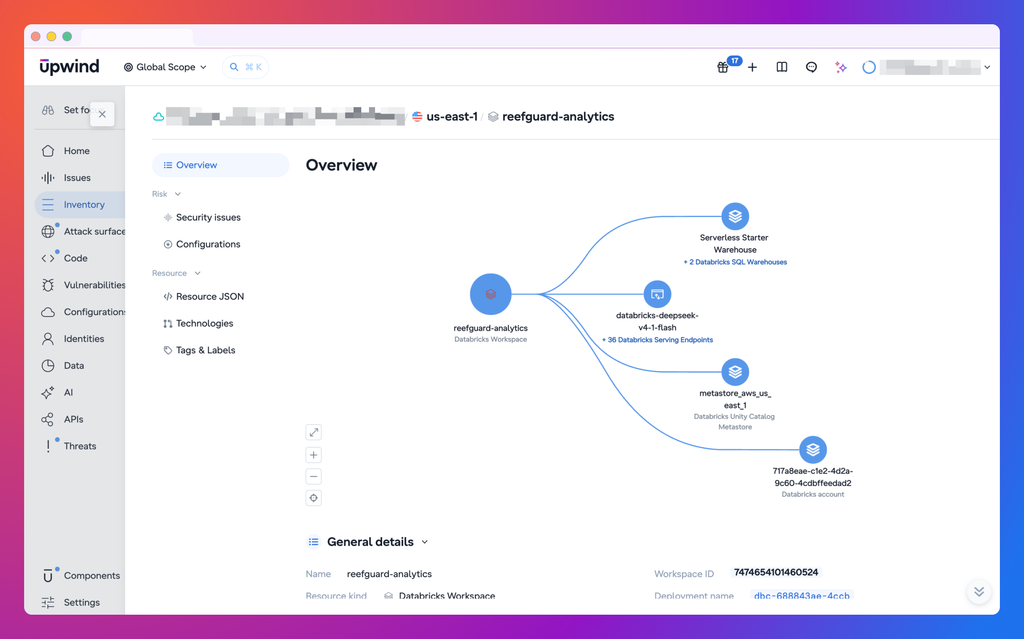
The same inventory holds the AI layer. Model serving endpoints, vector search indexes and registered models appear beside the models and endpoints running elsewhere in your cloud. One AI footprint, not one per platform.
Connecting grants to cloud resources
Unity Catalog grants inherit down the catalog hierarchy and are usually assigned to groups. This is the seam where access quietly widens: a grant scoped to one catalog, backed by a storage credential attached to a role that reaches far more than the catalog.
Upwind connects storage credentials to IAM roles, clusters to their compute resources, network configuration to VPCs and security groups, and encryption configuration to KMS keys. A team reviewing a group’s SELECT access can follow it from the catalog to the storage credential to the bucket underneath, in one graph that holds both the Databricks permissions and the cloud resources.
Findings and remediation
Databricks findings land in the same severity queue, framework reports and workflows as everything else in your cloud, each scoped to the workspace, metastore or account that owns the fix. No second console, no second triage process.
What gets flagged:
- Data granted to every user in the account, and catalogs bound to every workspace.
- Storage credentials with more reach than the data they serve, and access tokens that never expire.
- Workspaces and clusters exposed to the internet or running outside governance.
- Secrets any user can read.
- Delta Sharing recipients holding long-lived credentials.
Each finding arrives with the path behind it, so whoever picks up the ticket can see the blast radius before deciding what to change, instead of opening the Databricks console, the cloud console and the IAM console to reconstruct it.
Get started
Databricks Security is available today to all Upwind customers. Connecting takes a few minutes: add your Databricks account under Components > Integrations, grant Upwind read access, choose the workspaces and metastores in scope, and the inventory starts filling. Full setup, field reference and troubleshooting are in the Databricks Security documentation.
The lakehouse was always part of your cloud attack surface. Now it is part of the same review.
Already using Upwind? Connect your Databricks account in Components > Integrations. New here and want to see what your catalog grants actually reach? Book a demo.