

Upwind pioneered a method to streamline patch management and significantly reduce vulnerabilities for Upwind users through leveraging runtime data. When it’s challenging to eliminate unneeded binaries and artifacts from applications, there are two strategies available:
- Lightweight Linux Image: Utilizing compact distributions like Alpine Linux (around 4 MB) helps shrink image size and boost performance.
- Distroless: Coined by Google, the term ‘distroless’ signifies an “empty” Linux distribution with no OS packages. Distroless images contain only the runtime and application components, removing every unnecessary component.
Both approaches aim to minimize image size and reduce the attack surface, while Distroless images require no patching, no upgrading and no OS packages.
Understanding the Distroless Idea
Distroless images are built with three key components to optimize their functionality:
- No More OS Packages: Providing only a platform for the runtime and application, with no vulnerable packages such as vim, Curl, and zlib.
- Software Framework: The runtime necessary for running applications, depending on the programming language used.
- Application Source Code and Dependencies: Chosen based on development needs and capabilities.
While a typical container image often includes unnecessary tools and binaries, distroless images focus on essentials, enhancing security and efficiency. Here is a comparison between what a typical container image structure looks like, in comparison to a distroless image.
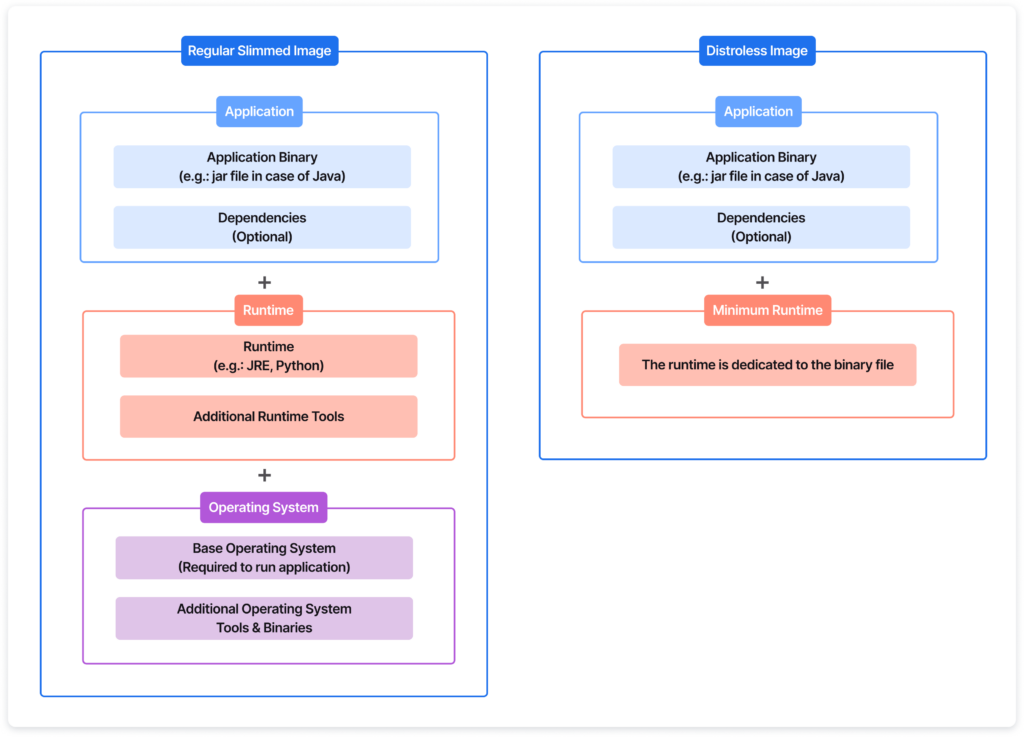
The idea behind distroless is to remove unnecessary artifacts and binaries to reduce the size of the image and improve security.
In distroless images, there are no OS packages or unnecessary framework packages that produce an attack surface for an attacker to use. A distroless image represents a well-tuned container setup that strikes a good balance between efficiency, security, and performance.
Benefits Of Distroless
- Reduced Attack Surface: Fewer components mean less code, and functionalities leading to fewer potential vulnerabilities and limited exposure that attackers could exploit.
- Enhanced Security: Selecting a well-maintained Linux distribution can significantly enhance the security of containerized applications.
- Improved Resource Efficiency: Smaller images lead to quicker downloads, quicker container startup times, and more efficient resource utilization.
- Simplified Maintenance: Focus on application dependencies, streamlining updates, and reducing compatibility issues.
- Immutable Infrastructure: Distroless supports a stable and predictable deployment environment.
Mass Reduction in Action
According to Upwind’s internal data, up to 47.6 percent of container packages are part of the container operating system, and 68.1 percent of the vulnerabilities we discovered came directly from operating system packages.
We use distroless images in our Upwind sensor as a best practice allowing us to deploy with no more OS packages.
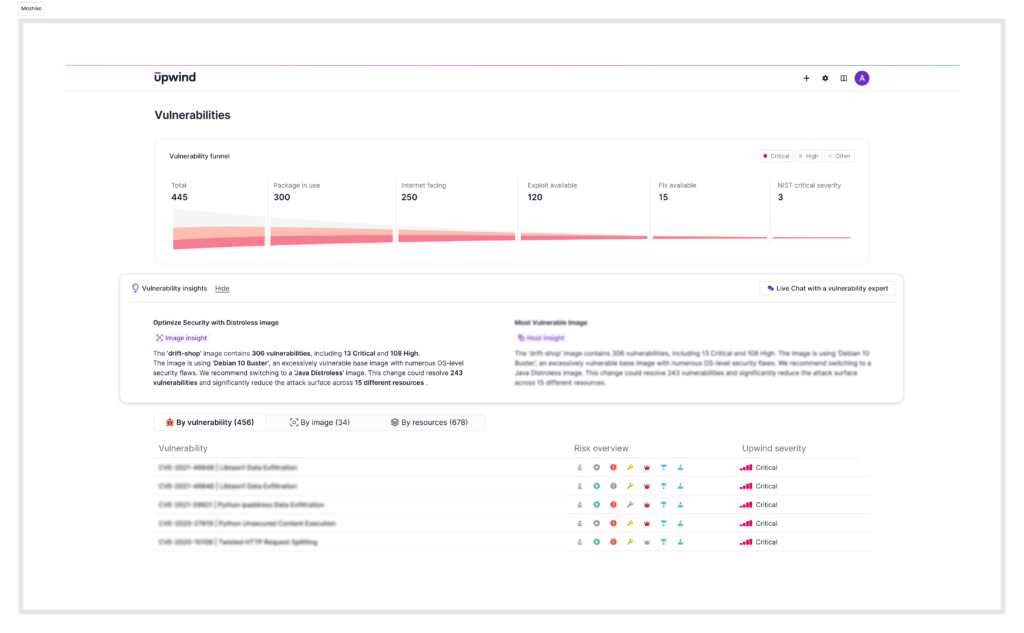
While an up-to-date container image could reduce risk in the long-term, it takes significant effort to continuously update the image. For larger organizations, it is often easier and safer to migrate to static and distroless images. This process of moving to static and distroless images is baked into the Upwind platform, which indicates you of unused images and notifies you about a similar framework you can use instead.
Migrating to Distroless: Best Practices
When migrating to Distroless images in cloud environments, it is crucial to follow a set of best practices to ensure a seamless and secure implementation:
- Start by conducting an inventory of your existing container images to understand the scope of the transition.
- Prioritize applications that handle sensitive data or have high exposure to potential threats.
- Educate your team about the fundamentals of distroless images, highlighting the difference from traditional container images and the specific security advantages they offer.
- Begin with a small, non-critical application to gain hands-on experience and gather insights.
- Ensure compatibility of your applications with Distroless images, as they may require adjustments due to the absence of certain packages and shell access.
- Lastly, integrate monitoring and logging tools to keep track of the system’s health and security posture.
By adhering to these best practices, organizations can effectively reduce their attack surfaces and enhance the overall security of their cloud environments with Distroless images.
Integrating Distroless into the Build Process
Let’s see how you can use distroless images in your platform. We’ve prepared sample Docker files for different programming languages to guide you through this process.
For Go Applications:
# Start by building the application.
FROM golang:1.18 as build

WORKDIR /go/src/app
COPY . .

RUN go mod download
RUN CGO_ENABLED=0 go build -o /go/bin/app

# Copy the compiled Go app into your distroless image.
FROM gcr.io/distroless/static-debian11
COPY --from=build /go/bin/app /
CMD ["/app"]
For Python Applications:
#Select python distroless image
FROM gcr.io/distroless/python3-debian12
#Copy your python application and execute it.
COPY . /app
WORKDIR /app
CMD ["main.py", "/etc"]
For Node.js Applications:
FROM node:20 AS build-env
COPY . /app
WORKDIR /app

RUN npm ci --omit=dev

# The distroless NodeJs latest version is 20
FROM gcr.io/distroless/nodejs20-debian11
COPY --from=build-env /app /app
WORKDIR /app
CMD ["index.js"]
For Java Applications:
#Your original java compile process
FROM openjdk:openjdk:22-ea-17-bookworm AS build-env
COPY . /app/examples
WORKDIR /app
RUN javac examples/*.java
RUN jar cfe main.jar examples.HelloJava examples/*.class

#Copy your java binary to the distroless container
FROM gcr.io/distroless/java17-debian12
COPY --from=build-env /app /app
WORKDIR /app
CMD ["main.jar"]
For Rust Applications:
FROM rust:1.41.0 as build-env
WORKDIR /app
COPY . /app
RUN cargo build --release

FROM gcr.io/distroless/cc
COPY --from=build-env /app/target/release/rustApp /
CMD ["./rustApp"]
For Executables:
FROM gcc:6 AS build-env
COPY . /app
WORKDIR /app
RUN cc main.c -o binary

FROM gcr.io/distroless/cc
COPY --from=build-env /app /app
WORKDIR /app
CMD ["./binary"]
In this first part of our series, we’ve looked into how using Distroless images can make our software safer and more efficient by doing the following:
- Choosing smaller, simpler Linux images to reduce risks and improve how applications run
- Examining the basics of Distroless images and their advantages, giving practical steps for using them in different programming environments
- Looking at how this approach helps in cutting down unnecessary parts, making systems more secure and easier to handle
In Part 2, we’ll discuss upgrading kernel versions in VMs to keep systems safe and up-to-date – looking at how to handle these upgrades smoothly to ensure security and performance.