
When something changes in your cloud security platform, the first question is almost always the same:
What happened and who did it?
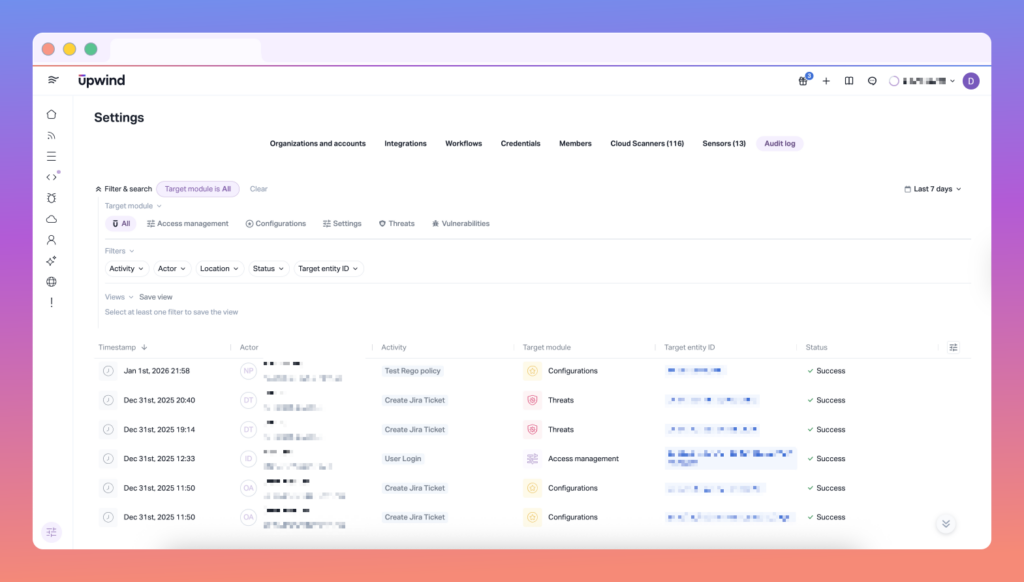
Upwind Audit Logs gives security and platform teams a centralized, searchable record of user-driven actions across the Upwind platform, including activity performed through the UI or Public API. The result is clearer accountability, faster investigations, and a stronger foundation for compliance and governance.
What Upwind Audit Logs captures
Audit Logs is designed to answer the “who / what / where / when” of operational and security changes.
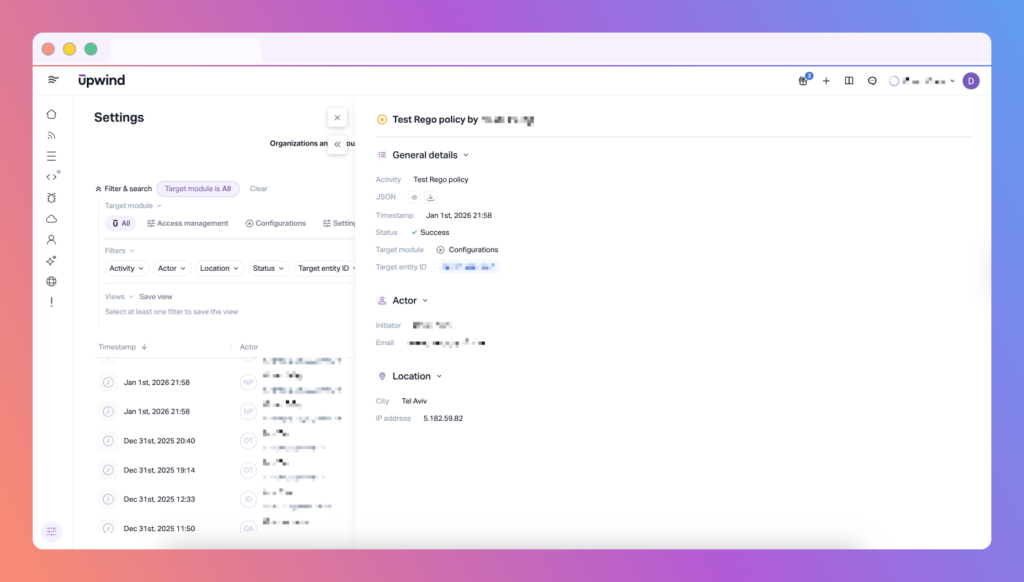
Each audit entry includes:
- User identity: email, role, and relevant identifiers
- Action type: the operation performed (e.g., create/update/delete actions)
- Context: where it occurred in the Upwind console (module/location)
- Timestamp: exactly when it happened
Note: Read actions are currently excluded from logging. We’re evaluating adding support for them in a future version.
Why it matters
Audit Logs is not just about visibility — it’s about control.
With Audit Logs, teams can:
- Track user activity across environments to understand how security posture evolves over time
- Investigate configuration changes or unexpected behavior with a reliable source of truth
- Strengthen accountability and support internal audits by proving what happened and when
This is especially valuable for organizations operating under compliance frameworks (SOC 2, ISO 27001, HIPAA, PCI-DSS) or internal governance requirements where you need to show evidence — not assumptions.
Time-based search: find the exact moment something changed
Upwind Audit Logs includes time-based filtering so you can quickly narrow results to the period that matters.
Filter audit entries by:
- Last hour
- Last 24 hours
- Last 7 days
- Last 30 days
- Custom time range
Whether you’re investigating a sudden policy shift or validating change activity during a maintenance window, you can pinpoint actions within the exact timeline of interest.
Going beyond visibility: trigger notifications from audit events
For many teams, logging is only step one. The next step is responding in real time when high-impact actions occur.
Upwind extends Audit Logs with a dedicated Audit Logs workflow trigger, enabling you to automatically notify the right people when specific actions are performed — especially actions that could impact protection coverage or governance posture.
Event-driven notifications, tailored to your needs
You can create workflow rules that trigger notifications based on audit events, with optional filters such as:
- Actor name (selected from organization members / credentials)
- Actor email (selected from organization members)
- Activity name (dropdown of all supported actions from the database)
- Target module (dropdown of all supported modules from the database)
- Status: success / error / missing permissions
Full lifecycle management + governed access
Workflow rules support full CRUD (create, read, update, delete), and align with Upwind governance standards:
- RBAC-aware permissions (consistent with other workflow definitions)
- Auditability of the workflow itself: every workflow CRUD action generates an audit event (separate from the events being monitored)
Notification delivery options
Alerts can be sent through:
- Slack
- Custom webhook (including integrations like Datadog and Splunk)
- Email
And importantly: notification content includes the full event payload, so responders get complete context without needing to pivot across tools.
See It It In Action
If you’d like to see how this feature fits into your environment – or to explore how Upwind can help you prioritize and remediate risk more effectively – schedule a customized demo with us. We’ll walk through your use cases, integrations, and security goals to show how Upwind delivers actionable cloud security at scale.