

Kubernetes environments move fast. Workloads appear and disappear, container images change continuously, services are exposed, permissions evolve, and development teams deploy updates throughout the day.
But most cloud security platforms force practitioners to investigate Kubernetes risk through interfaces designed for the broader cloud, leaving teams to manually filter the noise before they can begin investigating what matters.
Upwind’s new Containers & Kubernetes Focus Mode streamlines visibility. It’s a dedicated workspace that brings Kubernetes inventory, vulnerabilities, misconfigurations, exposures, and runtime activity into one contextual view, scoped to your clusters and workloads.
But the “Focused View” is just the front door. Behind it sits a full Kubernetes security platform built to prevent risky deployments, prioritize real vulnerabilities, catch runtime threats, and connect every finding back to the workload it actually affects.
Get Everything You Need
Focus Mode brings together everything a Kubernetes team needs in one place:
- Kubernetes security dashboards and analytics
- Cluster and workload inventory
- Container image vulnerabilities
- Kubernetes configuration findings
- Runtime-informed risk prioritization
- Internet exposure and attack-path context
- Kubernetes audit activity
- Investigation and remediation workflows
The value is in the drill-down. You can go from a fleet-wide view of your container environment down to one cluster, namespace, workload, image, or vulnerability, and the context connecting them never breaks. No re-pivoting to another tool to figure out if that CVE actually matters.
Unified Kubernetes Security Workflow
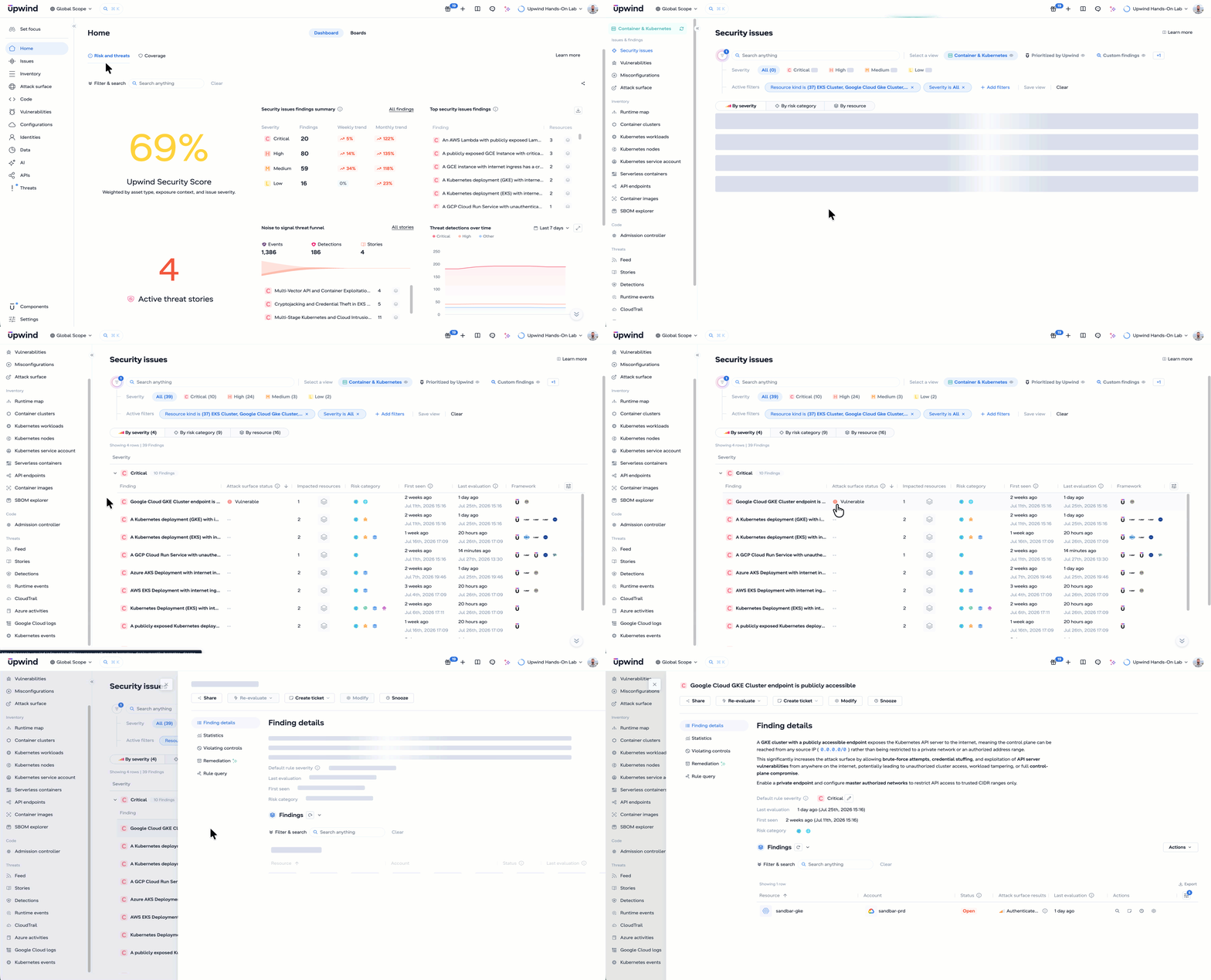
A focused interface only matters if what’s behind it is complete. Upwind combines Kubernetes posture, vulnerability management, exposure analysis, admission control, infrastructure-as-code security, audit logs, and runtime detection in one platform.
That’s what lets teams answer the questions that actually determine urgency:
- Is the workload actually running?
- Is it exposed to the internet?
- Is the vulnerable package loaded or used at runtime?
- Is the affected service communicating with sensitive systems?
- Does the workload have elevated cloud or Kubernetes privileges?
- Is it processing sensitive data?
- Has suspicious activity already occurred?
- Who owns the vulnerable image layer or deployment configuration?
Other tools treat these as separate findings. Upwind connects them, so a Kubernetes issue gets triaged by what it actually touches, not just what it is.
Start With a Real Inventory of Your Kubernetes Environment
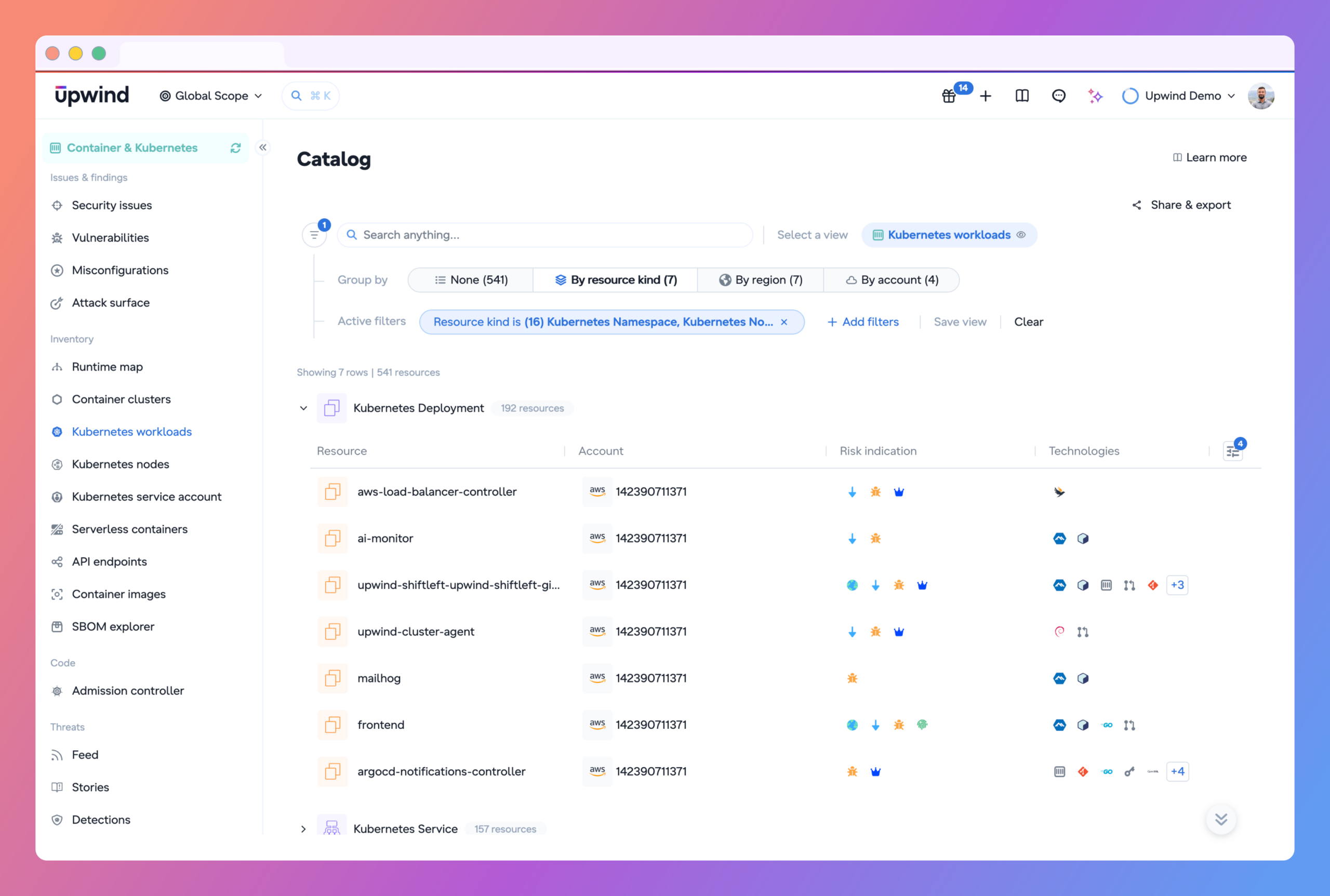
Kubernetes security starts with knowing what’s actually running. Upwind continuously discovers clusters and everything inside them: deployments, pods, DaemonSets, StatefulSets, services, namespaces, container images, ingress resources, load balancers, service accounts, and Kubernetes and cloud identities.
That inventory gets enriched with cloud and runtime context. So you’re not just seeing what exists, you’re seeing how it behaves: which workloads are active, what processes they run, what they talk to, which images they use, how they’re exposed, what privileges they carry.
That’s the difference between a static asset list and a live map of your environment.
Reduce Vulnerability Noise and Improve Prioritization
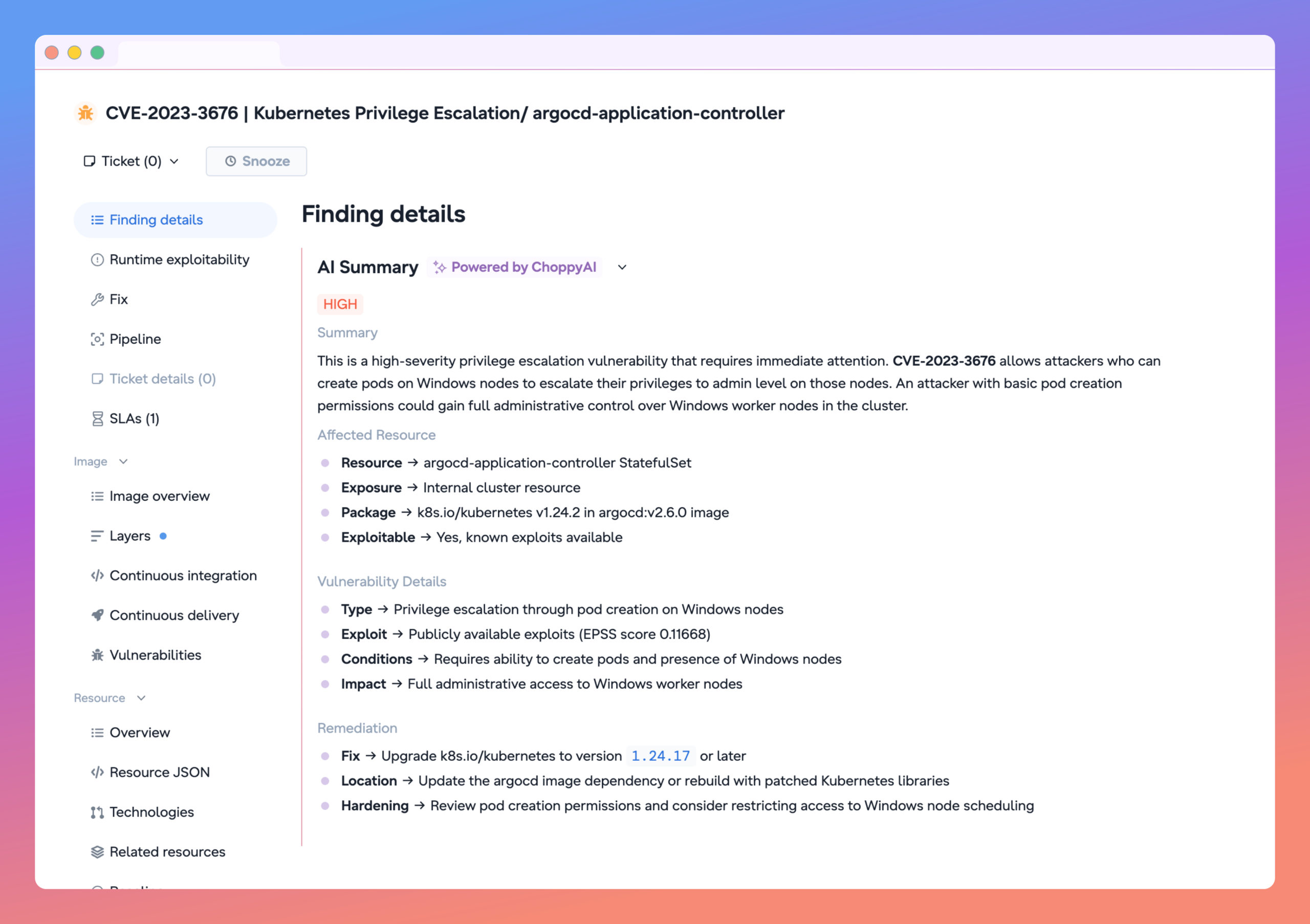
A container image can carry hundreds of vulnerabilities. Most of them are noise: packages that exist in the image but never load, never execute, never get anywhere near production traffic. Treating every CVE the same way just piles up backlog and burns engineering time on issues that were never exploitable.
Upwind adds runtime context to figure out what’s actually worth fixing first:
- Is the image currently deployed?
- Is the vulnerable package present in a running workload?
- Is the vulnerable function actually being used?
- Is the workload internet-exposed?
- Does it talk to sensitive services or hold access to secrets and privileged identities?
- Is there a known exploit available?
That’s how a critical CVE sitting in a dormant package stops competing for attention with a critical, exploitable vulnerability on an internet-facing production workload handling sensitive data. They’re not the same risk, and they shouldn’t get the same ticket priority.
Individual findings rarely tell the full story on their own, though. A public workload isn’t automatically dangerous. A vulnerable image isn’t automatically exploitable. A service account with broad permissions might be doing exactly what it’s supposed to. But stack these conditions together and you get a real path to compromise, the kind attackers actually use:
- An internet-facing deployment with a critical, exploitable CVE
- A public workload processing sensitive data with a privilege escalation path
- A CI/CD deployment holding secrets and elevated cloud permissions
- A vulnerable workload talking to the cloud instance metadata service
- A public AI workload carrying exposed CI/CD credentials
Upwind surfaces these toxic combinations automatically by correlating Kubernetes, cloud, identity, vulnerability, data, and runtime signals. That’s also how exposure gets validated instead of assumed. A config might say a service is publicly reachable, but Upwind confirms it against real ingress controllers, load balancers, and cluster endpoints (EKS, AKS, and beyond), so “theoretically exposed” and “actually reachable” don’t get treated as the same finding.
When a confirmed-exposed workload also has a critical, exploitable vulnerability, that’s not a ticket buried in a backlog. That’s an escalation, with the evidence already attached.
Identify Exactly Where Vulnerabilities Were Introduced
Finding a vulnerability is only the beginning. Someone still needs to fix it.
Container images are assembled from multiple layers, often combining a base image maintained by a platform team with application dependencies installed by developers. Without build-layer context, it can be difficult to determine who owns a vulnerability or where remediation should begin.
Upwind Image Layers gives you a layer-by-layer view of the container image:
- The exact layer where a vulnerable package was introduced
- The Dockerfile instruction associated with that layer
- Whether the issue originated in the base image or application layer
- A software bill of materials for each image layer
- Layer context within findings, reports, APIs, and Jira tickets
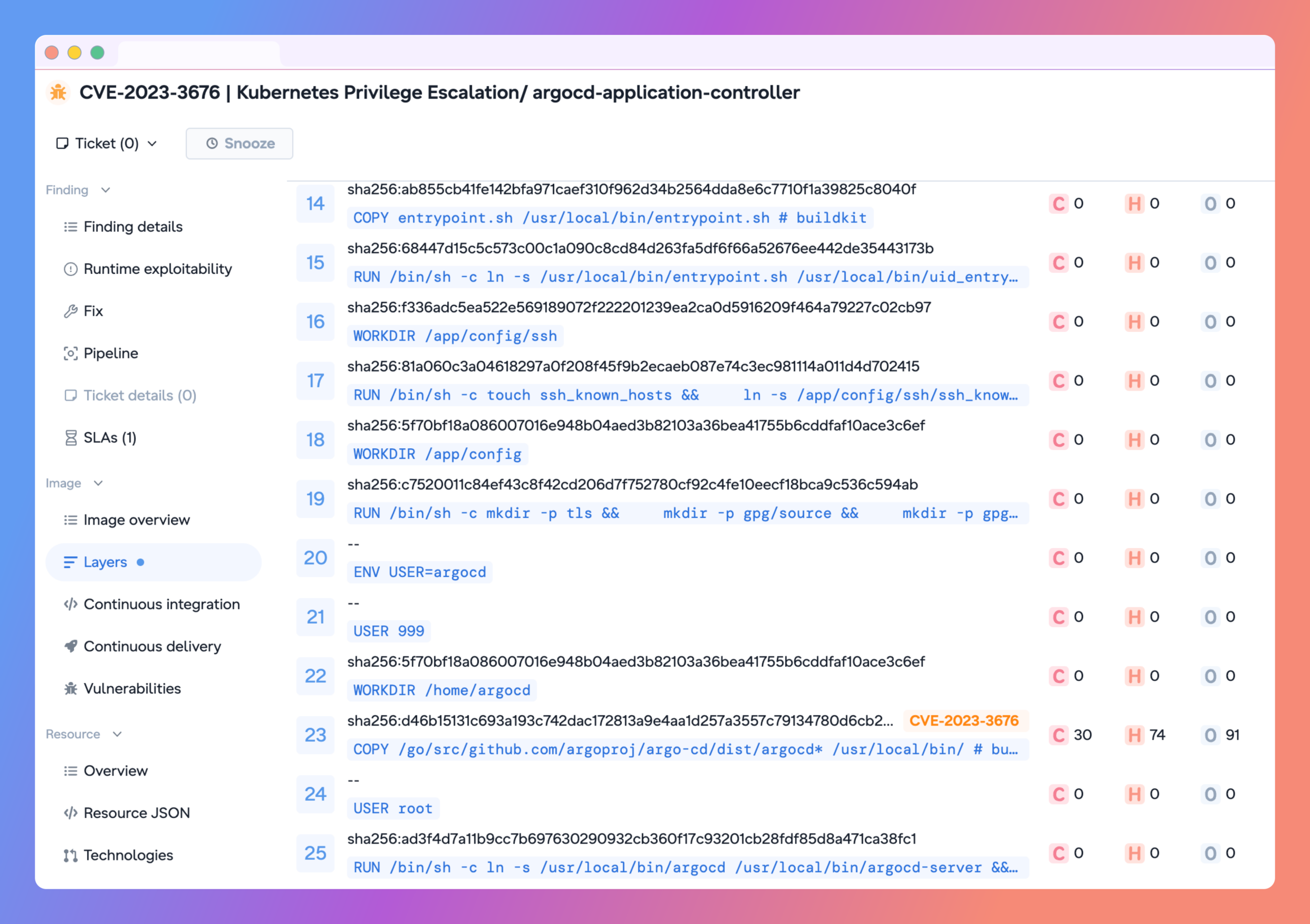
This helps organizations route vulnerabilities to the correct owner immediately.
Platform teams can address outdated base images, while application teams can remediate packages introduced during the application build. Fewer tickets sit unassigned, and remediation actually moves.
Catch Misconfigurations Before They Reach Production
A Kubernetes misconfiguration caught after deployment costs more to fix. Now you need another dev cycle, security and platform teams coordinating, maybe a rollback or an emergency patch.
Upwind IaC Security catches it earlier. It scans Kubernetes YAML and Helm charts against 600+ security rules and evaluates infrastructure changes automatically when a developer opens a pull request. Findings show up right in the Git workflow, flagging things like:
- Containers running with excessive privileges
- Privilege escalation enabled
- Missing resource limits
- Insecure host namespace access
- Dangerous Linux capabilities
- Containers running as root
- Writable root filesystems
- Missing security contexts
- Exposed services
- Weak workload isolation
Developers can review and remediate the issue before the configuration is merged or deployed.
Security shifts left to where infrastructure decisions actually get made, and remediation gets cheaper because it happens before something’s running in production.
Enforce Kubernetes Security at Admission Time
Shift-left scanning cuts risk, but not every resource goes through your pipeline. Manual changes, third-party tools, emergency updates, config drift: all of it can still introduce risk after the fact.
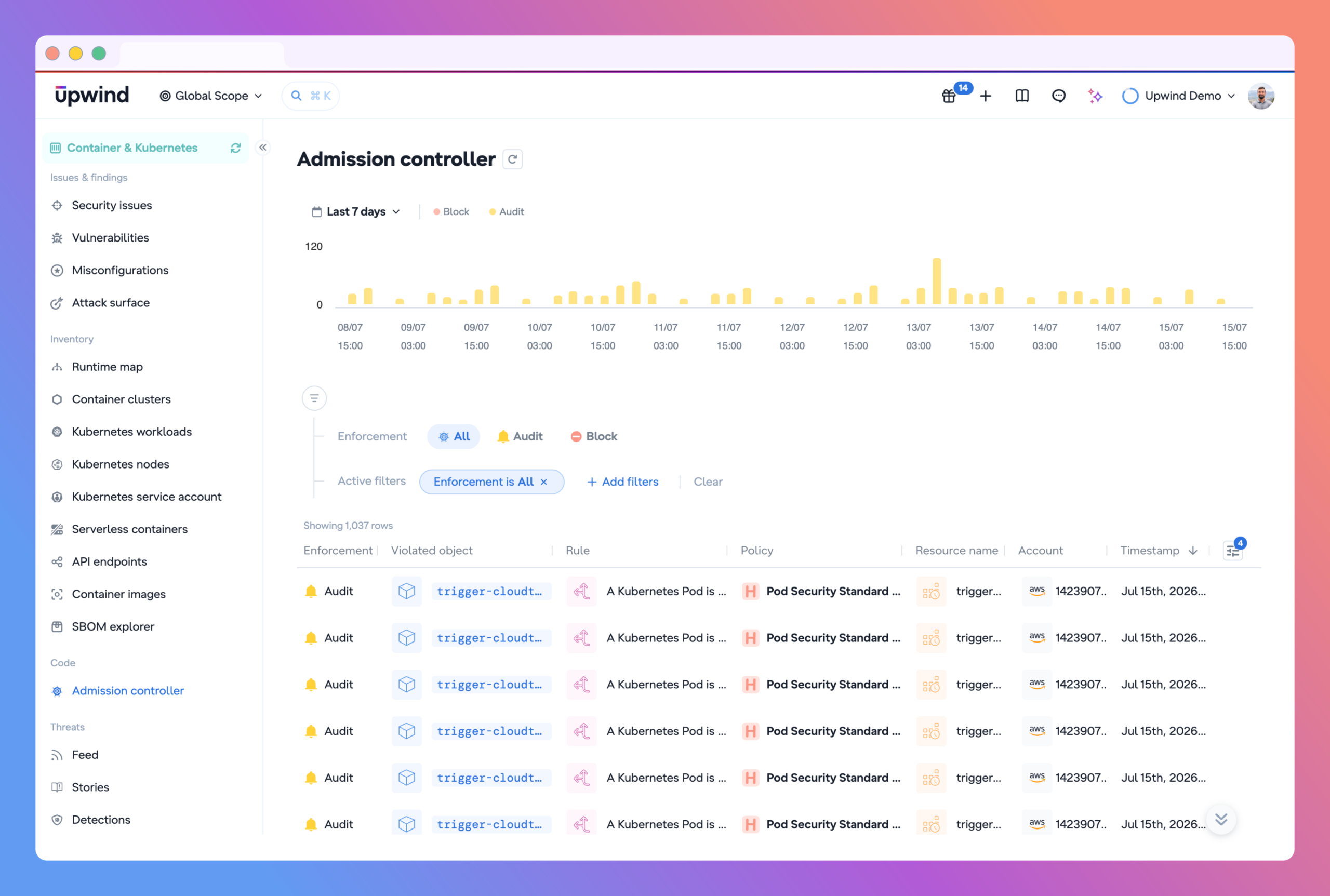
Upwind’s Kubernetes Admission Controller catches what the pipeline misses. It evaluates resources as they’re submitted to the API server, using OPA-based policies to validate workloads before Kubernetes lets them run. Managed policies include:
- Pod Security Standards Baseline
- Pod Security Standards Restricted
- CIS Kubernetes Benchmark controls
You can run it two ways. Audit Mode logs violations without blocking anything, useful for understanding a policy’s impact before you flip it on. Block Mode rejects noncompliant resources outright. Either way, policies can be scoped by cluster, namespace, or label, so you can enforce differently across dev, staging, and production.
Combined with IaC Security, that’s two layers of prevention: catch risky configs in the pull request, then block anything that still slips through at the cluster gate.
Monitor Kubernetes Workloads at Runtime
Security doesn’t stop at deployment. A configuration scan shows you how a resource is defined. Runtime monitoring shows you what it’s actually doing.
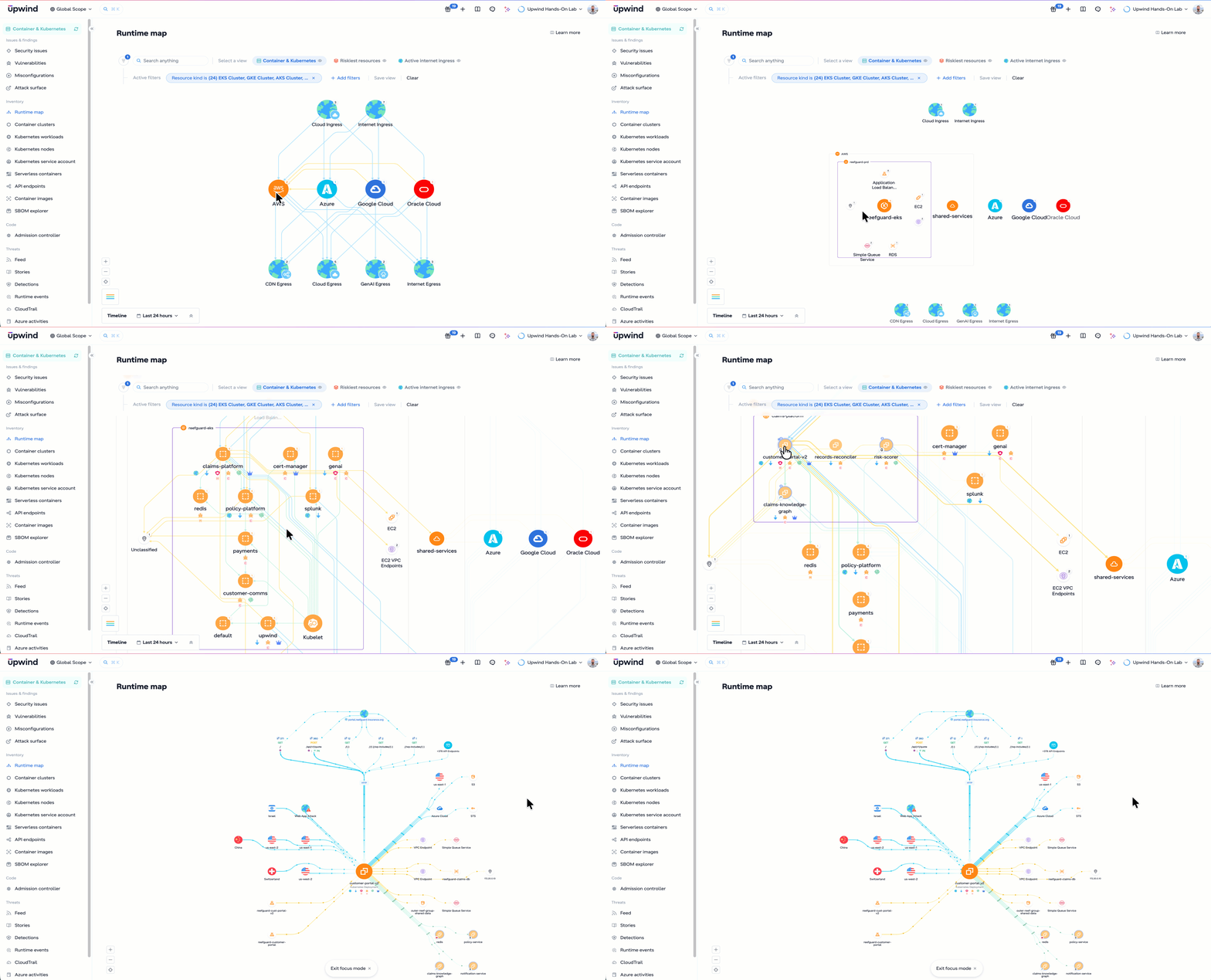
Upwind watches workload behavior directly: process execution, network communication, file activity, system calls, binary usage, service-to-service connections, runtime application behavior. That telemetry establishes a baseline for normal, so deviations that look like an attack or a compromise stand out.
In practice, that means catching things like:
- Unexpected shells launched inside containers
- Suspicious processes running in production pods
- New outbound network connections
- Access to sensitive files
- Connections to unusual external destinations
- Workloads talking to the instance metadata service
- Unexpected service-to-service communication
- Runtime use of vulnerable functions
And because runtime activity is already tied to posture, vulnerabilities, identities, and exposure, analysts investigate the event in place. No jumping between five tools to rebuild context that should’ve been there already.
Investigate Kubernetes Control-Plane Activity
The Kubernetes API server runs the cluster. Every deployment update, permission change, secret request, resource deletion, and kubectl exec passes through it. Audit logs are the record of all of it.
Upwind pulls audit events from EKS and GKE control planes, plus Admission Controller events, into one investigation view. Analysts filter by cluster, namespace, Kubernetes verb, username, source IP, user agent, resource type, resource name, or response status. A histogram flags unusual spikes in control-plane activity, and a visual query builder means you’re not hand-writing complex queries to find them. Need more detail? Pull the raw event payload.
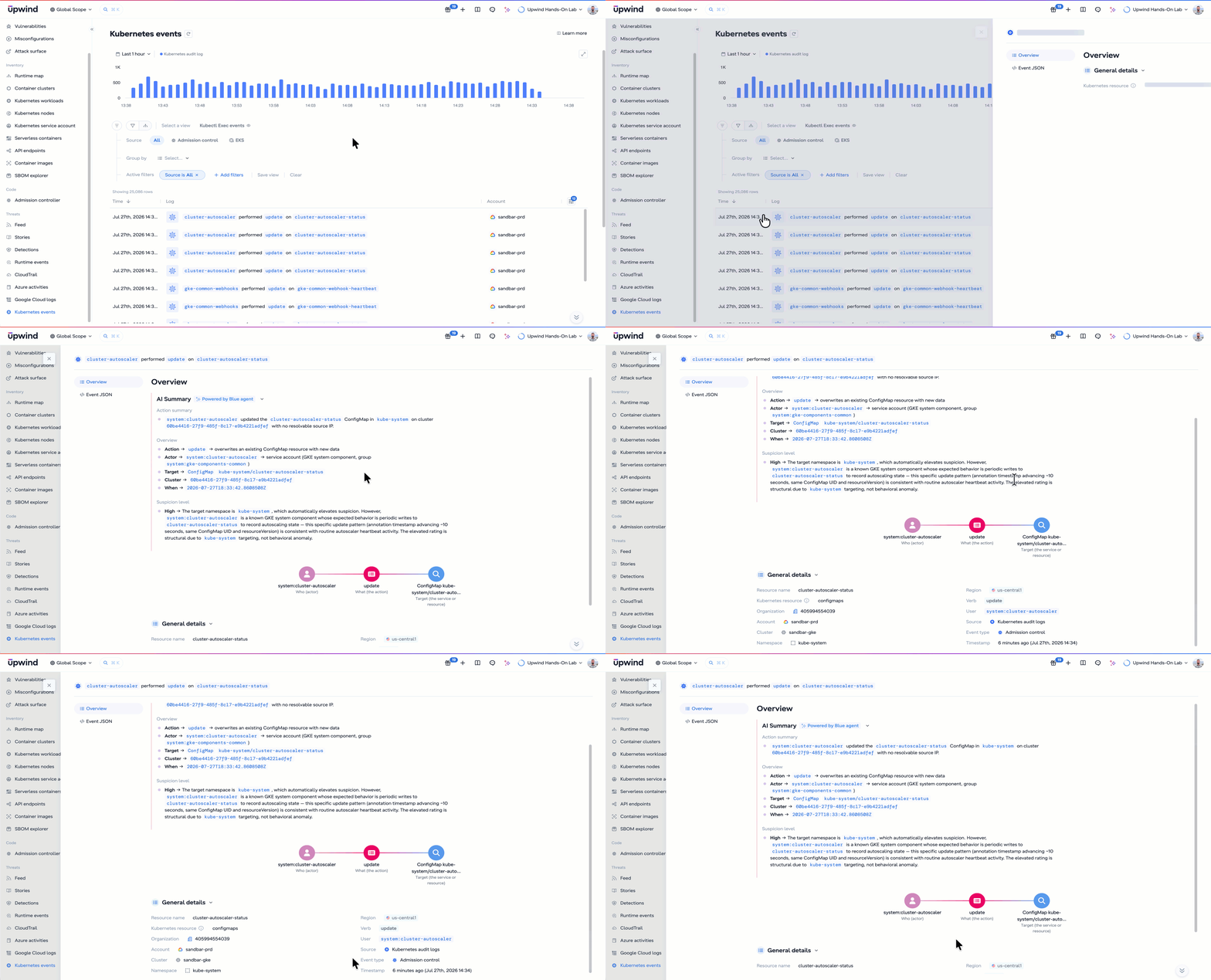
That’s what gets incident response answers fast:
- Who changed the deployment?
- Which identity created the new role binding?
- Where did the request originate?
- Was a service account token accessed?
- Who executed a command inside the pod?
- Which resources were modified or deleted?
- What happened right before and after the suspicious activity?
Tie that to runtime behavior, and you get the full picture of an incident, not just half of it.
Maintain Continuous Kubernetes Compliance
Compliance can’t be a once-a-year checkbox. Namespaces get created, roles get updated, policies drift, new services ship, all the time.
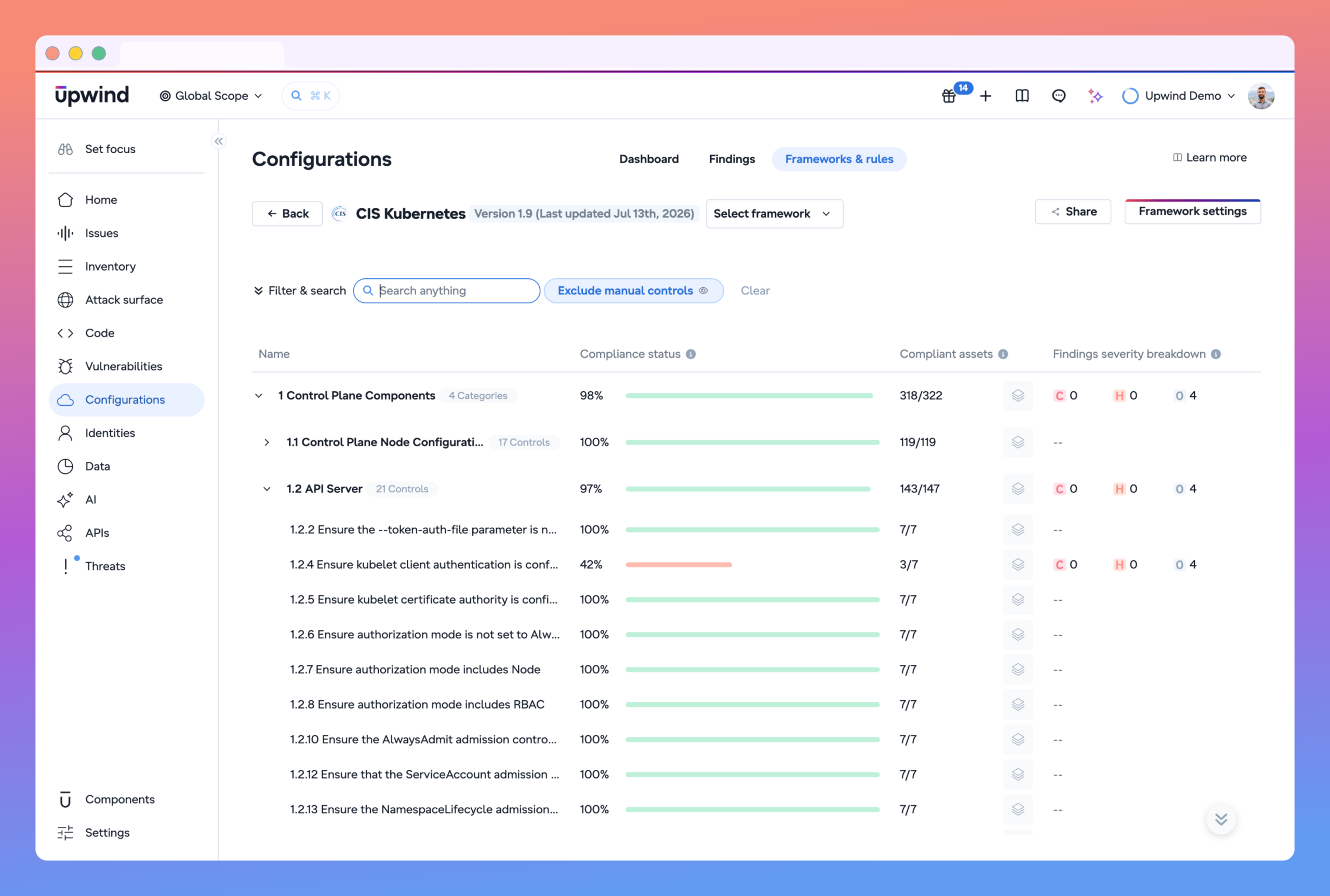
Upwind continuously evaluates your environment against Kubernetes-specific CIS controls and broader frameworks like NIST and PCI DSS. That gives you a live read on misconfigurations, drift, and policy violations, plus the evidence trail you need when an audit shows up.
Runtime context is what makes it actionable: it’s the difference between an inactive misconfiguration on a workload nobody’s using and a live policy violation on a production system serving real traffic.
Complete KSPM: From Pull Request to Production
A developer flags a misconfiguration in a pull request. The Admission Controller stops that same issue from ever reaching production if it slips through anyway. Runtime visibility shows whether the workload is even active and exposed. Audit logs show who changed it. Image Layers shows who owns the vulnerable dependency.
None of that works as disconnected tools. It works because it’s one system.
Kubernetes teams don’t need another dashboard piling on more alerts. They need to know what’s actually exposed, what’s actually exploitable, and who owns the fix. Focus Mode gives you a place to see that. The runtime-powered platform behind it is what makes the answer accurate.