
Securing a modern Google Cloud environment demands both breadth and depth: broad visibility across services, and deep insight into workload behavior. However, gaining this level of coverage without introducing operational overhead is often a challenge—especially in environments where deploying runtime agents is difficult or impractical.
While there are other ways to get started quickly with Upwind, our Agentless Cloud Scanners are a powerful complement to the Upwind Sensor. They scan your environment and provide a fast, easy way to gain deep context, ensure compliance, and detect risks – particularly in scenarios where deploying the Upwind Sensor may not be feasible or preferable. This makes our Cloud Scanners ideal for jumpstarting visibility, validating configurations, or supplementing runtime data when full instrumentation isn’t possible.
Upwind’s Agentless Google Cloud Scanner is designed to provide security teams with quick visibility into misconfigurations, vulnerabilities, and threats—without requiring direct access to workloads. When combined with Upwind’s eBPF-based runtime sensor, teams gain unified, layered protection across their infrastructure, regardless of complexity or deployment model.
Why Agentless Cloud Scanners for Google Cloud?
While Upwind’s runtime sensor offers deep observability and threat detection, there are situations where an agentless approach is better suited – particularly in early-stage environments or for workloads where runtime instrumentation isn’t practical.
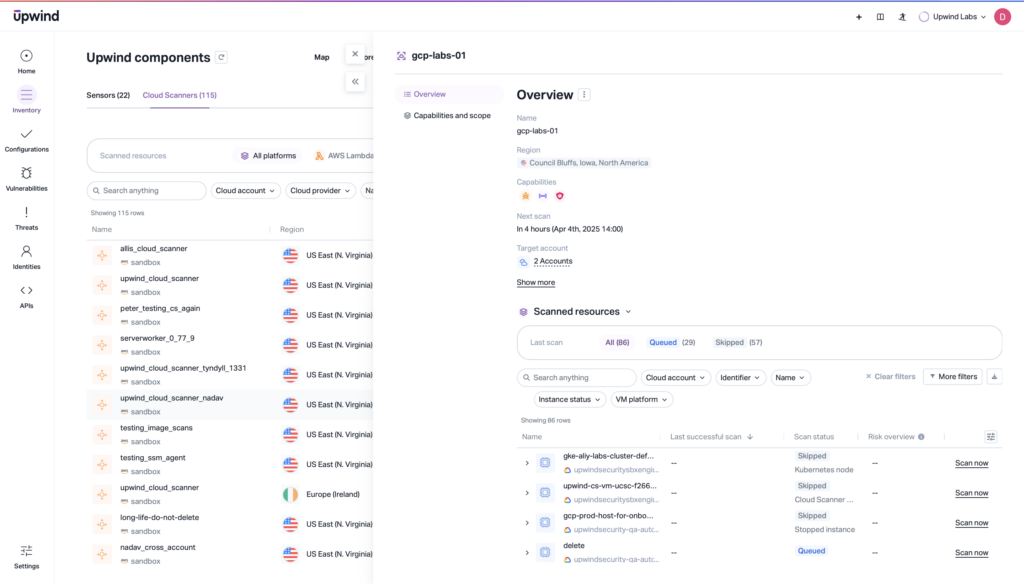
Common scenarios include:
- Establishing immediate visibility in new or growing Google Cloud projects
- Scanning legacy or third-party-managed workloads where runtime sensor deployment isn’t feasible
- Validating posture and compliance across regions, services, or accounts during audits or onboarding
- Supplementing runtime insights with configuration-level data for context and prioritization
The Upwind Agentless Google Cloud Scanner allows teams to assess risk and uncover exposures, quickly and at scale.
Deep Coverage Without Overhead
Upwind’s Agentless Cloud Scanners integrate directly into the Upwind platform. Findings are automatically surfaced in the same modules used for runtime insights, reducing friction and unifying your security workflows.
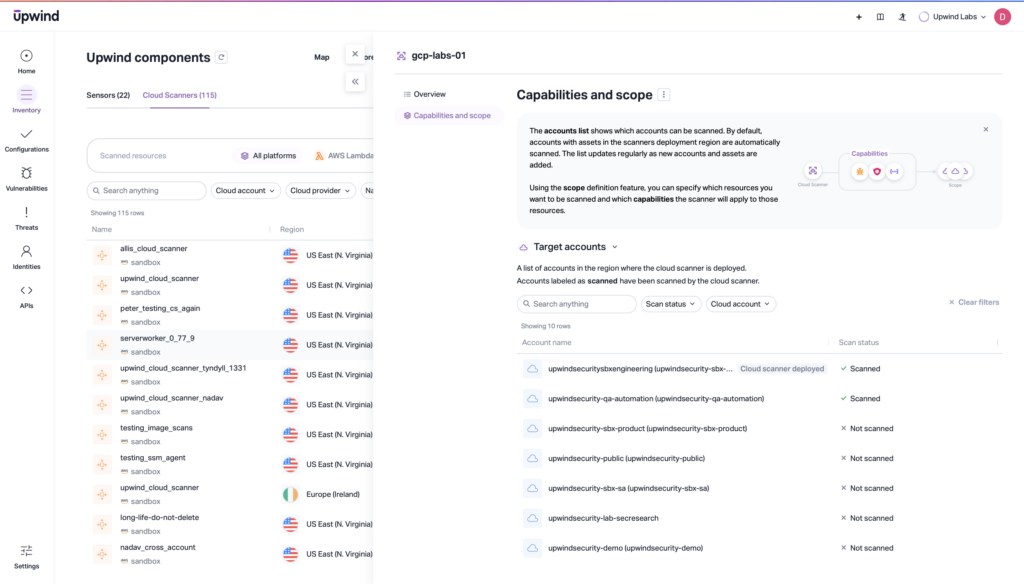
Key capabilities include:
- Discover vulnerabilities faster: Identify OS and package vulnerabilities across compute and services in Google Cloud, with results shown alongside runtime findings for unified prioritization.
- Detect threats with confidence: Spot malware or malicious files in Google Cloud storage and workloads—automatically integrated into Upwind’s Threats module.
- Strengthen cloud posture (CSPM): Uncover exposed secrets, risky permissions, and insecure configurations across Google Cloud resources, mapped directly to the Posture module.
- Gain full cloud visibility: Automatically discover & catalog every cloud resource, and track scan activity and health through the Inventory module.
Unified Protection with Runtime Sensors + Agentless Cloud Scanners
Agentless Cloud Scanners complement, rather than replace, Upwind’s runtime sensor. Used together, they offer a layered approach that strengthens coverage, context, and flexibility.
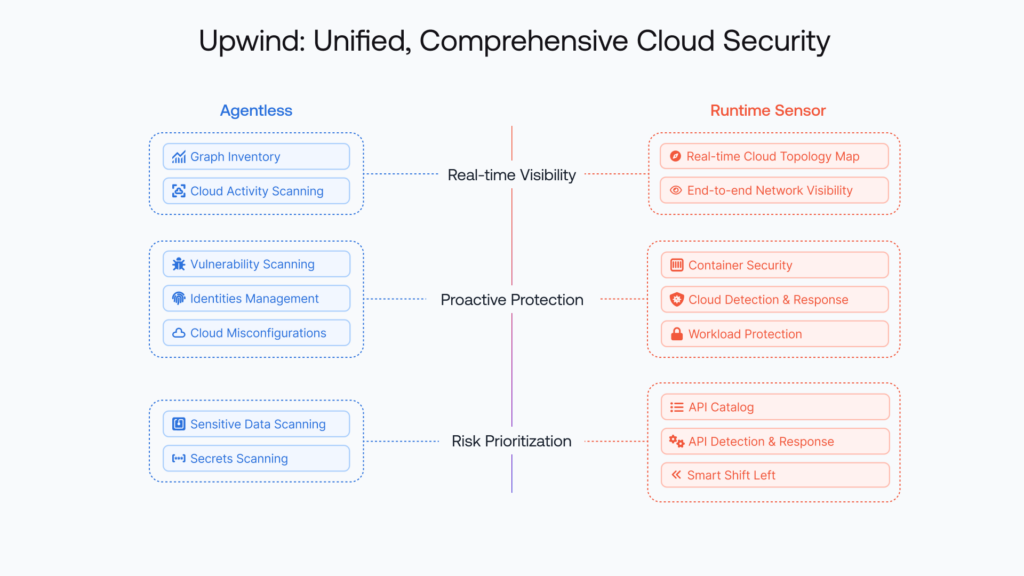
Combined benefits:
- Full-spectrum visibility: Runtime sensors capture in-process activity, network behavior, and syscall-level telemetry. Agentless scanners provide infrastructure-level context—covering services, APIs, and cloud configurations. Together, they deliver continuous observability across your stack.
- Prioritized, correlated risk: Findings from both sources are automatically standardized and presented within the same platform, enabling consistent analysis and streamlined prioritization. This helps security teams differentiate between theoretical risk and active exploitability – making prioritization more accurate.
- Operational flexibility: Teams can deploy the scanner quickly using Terraform to cover environments where sensors are not practical, such as legacy applications, third-party workloads, or environments with strict operational or compliance constraints, then layer in runtime coverage as environments mature.
This dual-layer approach gives you complete coverage across your Google Cloud environment – ensuring that workloads, services, and identities are continuously discovered, analyzed, and protected.
How to Get Started with Upwind’s Agentless Cloud Scanners for Google Cloud
The Upwind Agentless Google Cloud Scanner is designed to be a quick, easy to operate, and efficient, way to supplement the Upwind eBPF sensor in order to create a powerful combination of runtime-powered insights and lightweight scanning capabilities, regardless of the complexity of your environment. Although we suggest the aforementioned deployment scenario with our eBPF Sensor, the Upwind Google Cloud Scanner can also be used as an easy way to get up and running with the Upwind Platform for people using Google Cloud services.
To Deploy:
- Access the Cloud Scanners tab: From the Upwind Console, go to Inventory → Cloud Scanners, then click “Deploy Cloud Scanner.”
- Select Google Cloud and Enable Cloud Scheduler API: Choose Google Cloud as your provider and enable the
Cloud Scheduler APIin your selected project. - Configure
OAuthCredentials: Either reuse existing credentials or generate new ones via the Upwind Console. These credentials allow secure access to metadata and scan targets. - Name and Configure Scanner: Assign a unique name to the scanner instance. Default settings include vulnerability, secret, and malware scanning.
- Deploy with Terraform: Copy the provided Terraform code into a
main.tffile. Then configure required variables and runterraform init && terraform apply - Test Connectivity: After deployment, use “Test Cloud Scanner Connectivity” in the console to verify the configuration. Once successful, the scanner will begin scheduled operations automatically.
Managing Upwind’s Agentless Cloud Scanners for Google Cloud
Once connectivity tests pass, your Upwind Google Cloud Scanner is fully deployed and operational. Like all Upwind Scanners, the Google Cloud Scanner can be monitored via the Inventory section of the Upwind Platform, where you can find every deployed scanner in your environment and drill down into each one to review:
- Deployment status and health
- Scan history and result logs
- CPU and memory usage of the scanner
- Last run and next scheduled execution
Scanners auto-scale within their assigned regions and can be updated or reconfigured at any time via the UI.
Learn More
Upwind’s Agentless Google Cloud Scanner extends the platform’s coverage into areas where sensor-based monitoring may not be possible. It delivers rapid insight into posture, misconfiguration, and exposure—while integrating seamlessly into existing Upwind modules for threat detection, vulnerability management, and inventory tracking.
When combined with the Upwind eBPF sensor, security teams gain both the context and depth needed to protect their cloud environments in real time—without compromise.
Secure your Google Cloud environment in minutes – visit the Upwind Documentation Center (login required), schedule a demo, or drop us a line at [email protected]