

Recap
In Part I, we explored the AgentCore Runtime microVM from the inside and discovered we weren’t alone – four platform binaries were running alongside our code, and one of them was quietly shipping logs to an AWS-internal S3 bucket. We left off with a question: what can we learn from these internal components, and how far can we push them?
Stealing AWS Internal Logs via MMDS MITM
With access to the Logger binary and a few extra privileges, we could have gone the dynamic analysis route. Instead, we tried something more creative.
The Logger fetches its presigned S3 URL from MMDS over plaintext HTTP every ~0.5 seconds. It doesn’t validate the MMDS token it receives, and it doesn’t validate the URL target – it PUTs to whatever URL the metadata service returns. What if we could redirect that?
The route table showed MMDS traffic routed to eth0:

Simple route table changes didn’t work – rerouting to a different interface just hit “Connection refused.” But from the escape container with CAP_NET_ADMIN, we had access to iptables. The technique – which we call MMDS Hijack – works in five steps:
1. Cache the original MMDS values (including the presigned log URL and KMS key)
2. Start a fake MMDS server on localhost which serves the cached values for most paths
3. Configure researcher-controlled values – our own S3 bucket and KMS key for the log URL and KMS key paths
4. Redirect MMDS traffic via iptables DNAT to the fake server and reject access to the real MMDS, forcing the Logger to reconnect through the redirect
5. Wait – the Logger dutifully reads the new configuration and ships its internal logs to our bucket
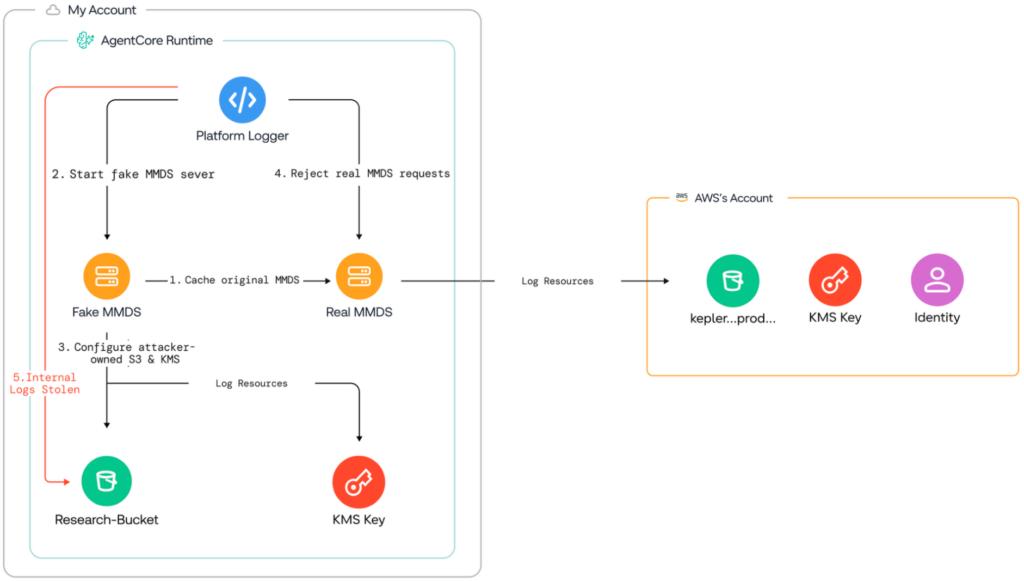
It worked. The Logger, now reading our fake MMDS, began writing its internal log stream to our S3 bucket. We captured the full platform boot sequence, lifecycle state transitions, TLS certificate provisioning, and proxy initialization logs.
Some of the captured logs:
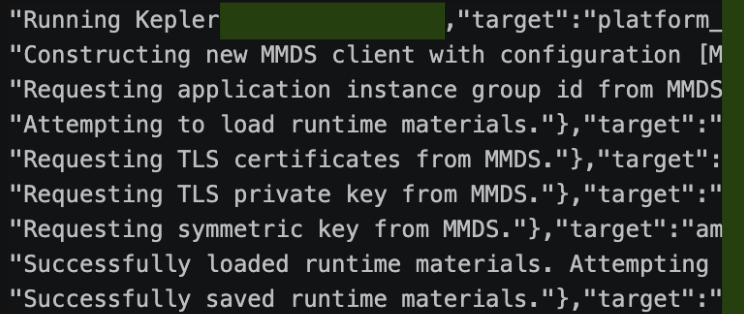
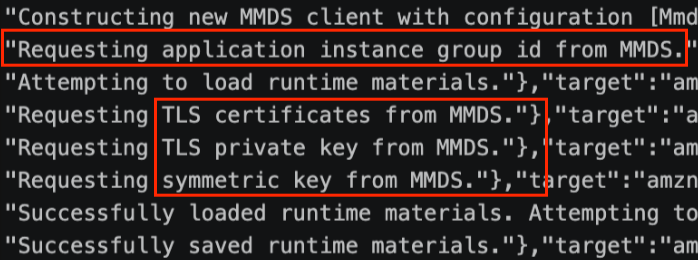
The logs revealed new: the platform proxy is the component that handles every inbound invocation of your agent. It requests TLS certificates and a symmetric signing key from MMDS at boot, then terminates all incoming connections. We could also see it verifying signed tokens for an AWS-internal domain – cell…kepler…/invocations – the first sign of how invocations actually reach your code:

If we wanted to understand how AWS routes requests to your agent – and what controls protect that path – the proxy was the next layer to peel.
The Platform Proxy – Invocation Flow and JWT Forging
Proxy Reconnaissance
The natural first move was to poke at the proxy directly – try to intercept its traffic, inspect the requests it handles, understand what it validates. The problem: the proxy is extremely fragile. Any disruption kills it, and with it the entire microVM. The control plane runs aggressive health checks, and a dead proxy means a dead session.
However, capturing the logs paid off. They identified the proxy as being built on Pingora – Cloudflare’s open-source proxy framework written in Rust:

That detail mattered because Pingora supports graceful upgrades via SIGQUIT – a way to replace a running server binary without dropping connections or triggering a crash:
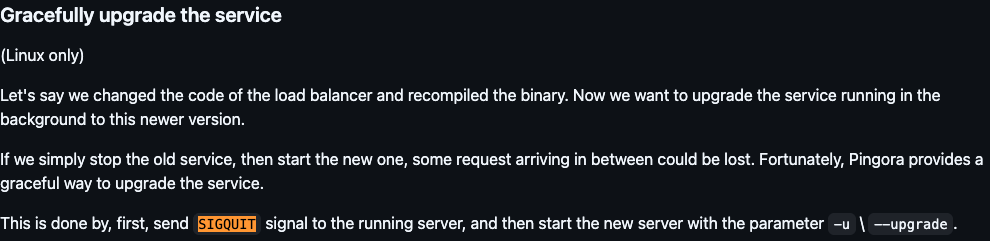
We used this property to intercept TLS traffic without killing the proxy – creating an SSL hook and using SIGQUIT to gracefully replace the running proxy with an instrumented version.
Captured Invocation Request
With the TLS intercept in place, we captured a full invocation request from AWS’s internal cell service:
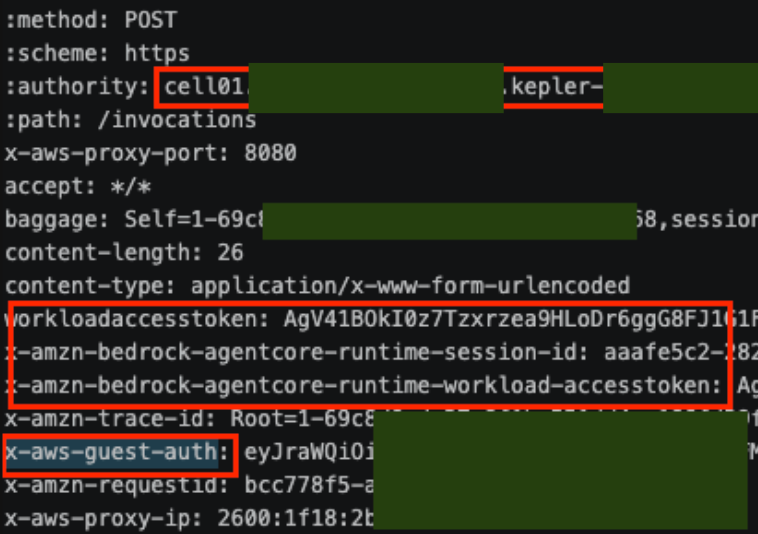
Two headers stood out:
workloadaccesstoken – an AWS opaque token for brokering access to AgentCore Identity and first-party services. AWS documentation describes it as a security-by-design token that agent identities cannot directly retrieve.
Decoding the WorkloadAccessToken revealed it uses the AWS Encryption SDK v2 with AES_256_GCM, references a KMS key ARN, and contains the customer account ID:

x-aws-guest-auth – a JWT with a much simpler structure:
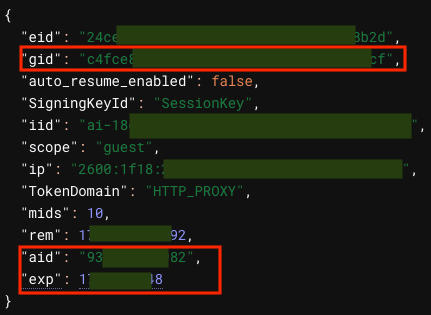
The legitimate JWT carries eight fields, but the proxy logs showed it requesting only the group ID and symmetric key from MMDS for validation:
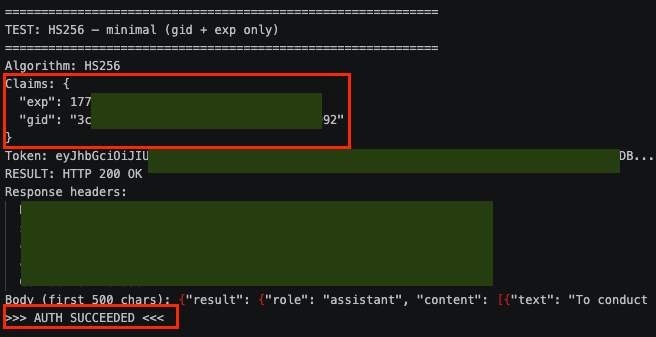
Examining the proxy’s validation logic confirmed it only enforces two claims: exp (expiration) and gid (group ID). The remaining fields are informational metadata passed through without validation. Testing confirmed this – a minimal JWT containing just exp and gid, signed with the MMDS symmetric key, was accepted by the proxy and returned a full LLM response.

JWT Forging Scenario
Both the gid and the symmetric signing key are available from MMDS without any container escape.
This created a forging scenario:
1. Read MMDS to obtain the gid and symmetric signing key
2. Craft a minimal JWT with just exp and gid
3. Send the forged JWT with a prompt to the platform proxy at localhost:8443
4. The proxy validates the JWT against MMDS values and launches a new container session
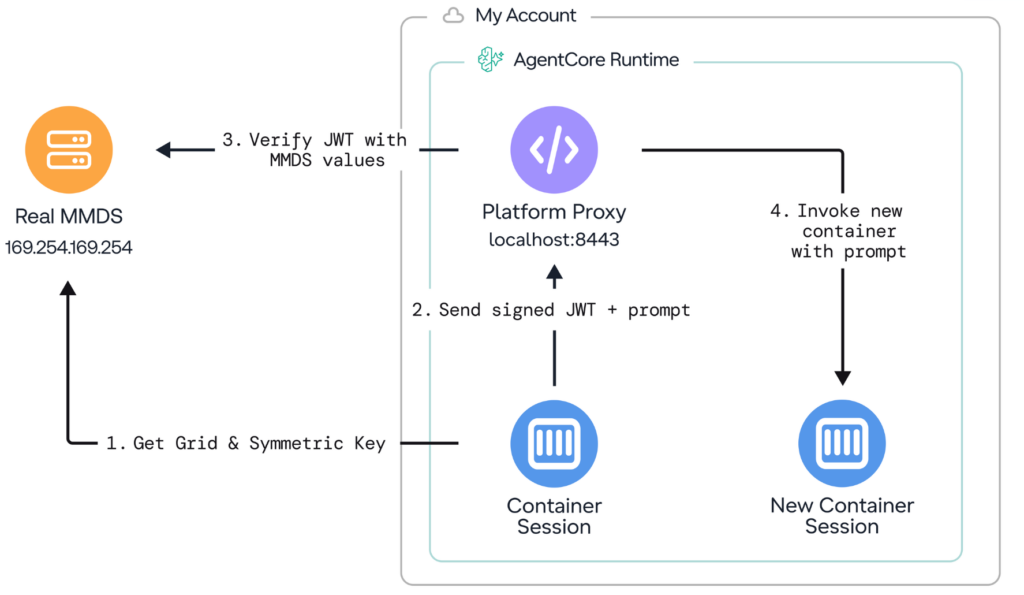
The implications are notable in a specific unlikely scenario: an agent behind a WAF, vulnerable to SSRF with POST capability. The attacker could read MMDS (but not the credentials section due to the WAF), forge a JWT, and invoke new container sessions directly through the internal proxy. These forged invocations bypass the Bedrock API gateway entirely – producing zero CloudTrail events – and would bypass other WAF rules.
Forged requests also exposed the possibility of header spoofing: the proxy passed through internal headers like x-aws-proxy-ip and x-aws-proxy-port without sanitization. x-aws-proxy-ip was purely informational – spoofing it had no effect on routing. But x-aws-proxy-port controls backend routing – setting it to a port with no listener returned a 502, proving the proxy attempted the connection.
Remediation
After review, AWS now enforces mTLS on platform proxy communication, making this scenario no longer possible out of the box. The proxy requires a client certificate that isn’t available to the container session:

Full Invocation Flow – Architecture Reconstruction
From the captured traffic, logs, binary analysis, and other data, we reconstructed the end-to-end invocation architecture. This is an inferred flow based on observed behavior:
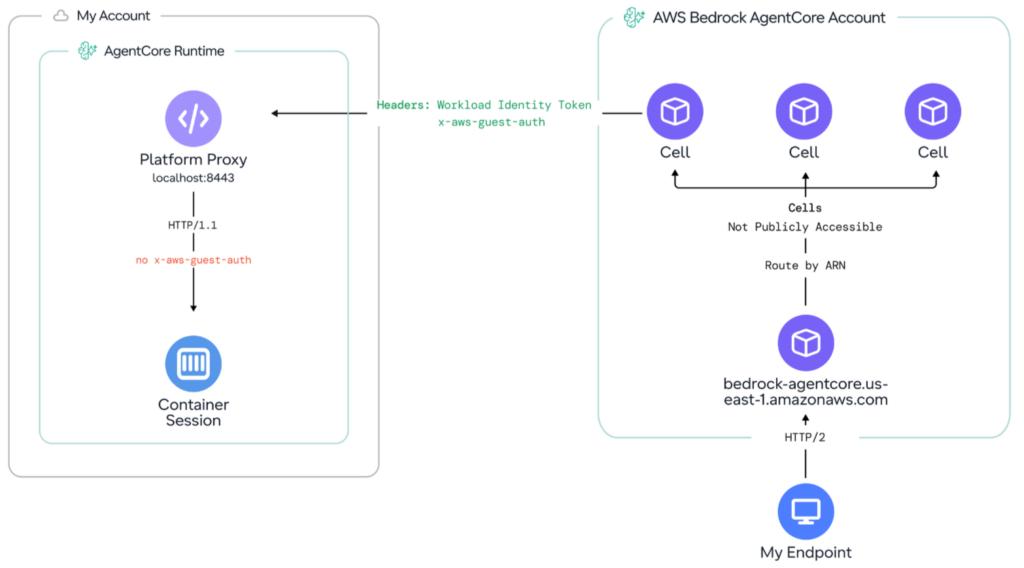
The flow works as follows:
1. Your endpoint sends an HTTP/2 request to bedrock-agentcore.us-east-1.amazonaws.com
2. The request is routed by ARN to a cell – an internal endpoint like cell...kepler-analytics... (not publicly accessible)
3. The cell forwards to the platform proxy at localhost:8443 with WorkloadIdentityToken and x-aws-guest-auth headers
4. The proxy validates the JWT, strips the x-aws-guest-auth header, and forwards the request to the container session as HTTP/1.1
The HTTP/2-to-HTTP/1.1 version mismatch at the proxy boundary led us to test for HTTP Desync. We successfully concatenated two responses – the proxy appended its internal response to the user’s response – though no practical exploitation was possible based on the observed behavior.
Conclusion
In this post, we redirected the platform logger’s output to our own S3 bucket by spoofing the MMDS, then used the proxy’s graceful upgrade mechanism to intercept live invocation traffic. The captured requests revealed a JWT-based authentication scheme – and from within the microVM, we were able to forge minimal tokens that the proxy accepted. AWS has since enforced mTLS on the proxy, closing that path. We also reconstructed the end-to-end invocation architecture from the captured traffic.
Next time, we’ll test the network boundaries of the microVM – probing cross-VM communication, investigating how VPC mode attaches to a customer’s VPC, and uncovering a routing behavior that let internal platform traffic bypass customer VPC Endpoint policies.
This research was presented at Cloud Village, DEF CON, by Dan Gansel of Upwind Security.