

The department model of dividing companies into groups earned its place. Finance gets the finance applications, engineering gets the repositories, HR gets the HRIS, and the boundaries hold because software was bought per function and used per function.
Identity and access management platforms, such as Active Directory and Okta, were built around exactly that. Groups and organizational units are the anchor for every entitlement in the company, and the anchor is occupation.
There were always exceptions. There were few enough of them that the model survived.
It survived because the assumption underneath it was true. People without an engineering title did not write software, did not hold cloud credentials, and could not put anything into production.
Then AI and vibe coding arrived.
An agent converts intent into execution. The person who used to file a request now builds the thing themselves, on a machine you manage, with credentials you issued for something else.
A new mental model for the org structure
The question worth asking about any employee is not which department pays for their seat. It is what happens on their machine on a Tuesday afternoon.
An employee’s risk is set by their behavior with AI, not by what their department is called.
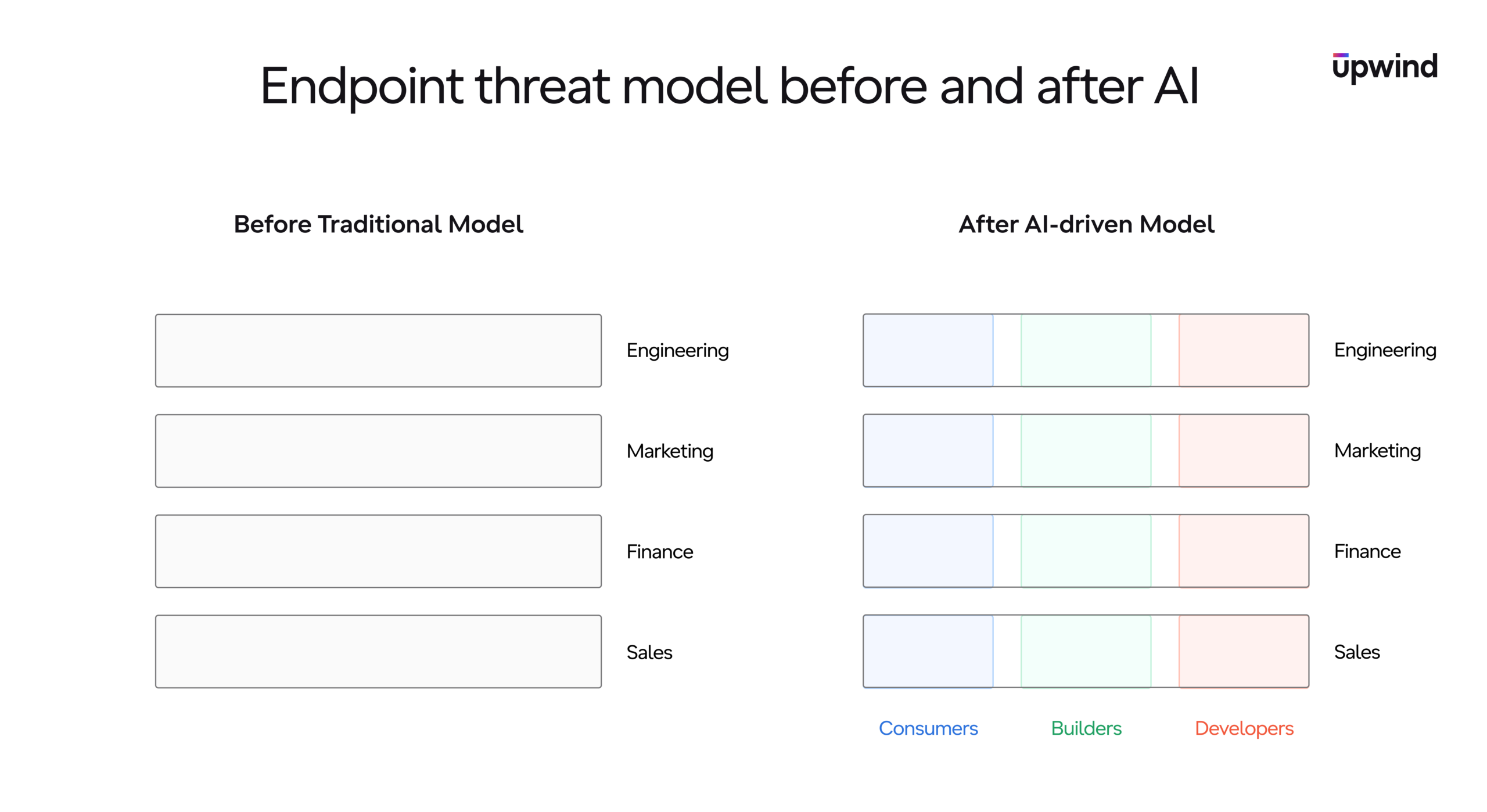
Whether the agent you approved can execute a given action is beside the point. An employee with the intent and the ability to use AI will reach for a private agent the moment the sanctioned one refuses, and that one reports to nobody.
Two people with different titles now sit in the same risk class, and the directory shows them as unrelated.
Departments are still real, they are just not a control
Departments have not stopped mattering. Budget lives there, license procurement lives there, compliance ownership lives there, and none of that is going away.
However, a cost model is not a threat model.
Seat count is not utilization either. Knowing that four hundred people hold an AI license tells you what you spent, not what any of them do with it.
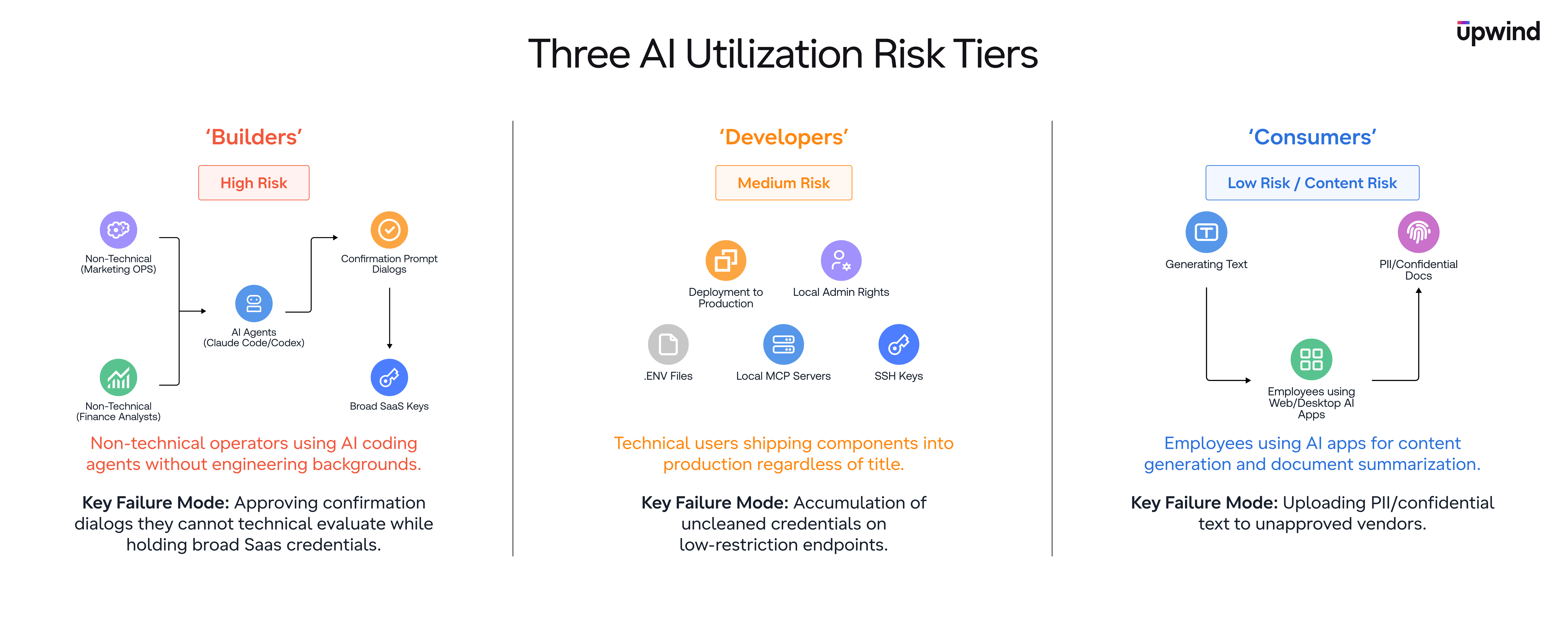
So the grouping that matters for security cuts across every department you have. This article walks through the three groups, what characterizes each one, and where each one breaks the model you are running today.
- Developers: shipping components into production, whatever title they own
- Builders: assembling software they did not write and cannot read
- Consumers: moving content through someone else’s model
Developers: shipping components into production
Start with the group that adopts everything first, breaks everything first, and holds the most.
Define a developer by what they deploy, not by where they report
A developer is not a person who writes code. They are tech savvy, fluent in code, software and architecture, and that is the qualification rather than the definition. What makes someone a developer is the entrepreneurial instinct to build, and the fact that they continuously put components into production and expect to keep doing it.
That definition pulls people into the group who have never been in a standup. It leaves out a few who have.
The privileges follow the behavior. Local administrator on the machine, a cloud account they use to connect or deploy the things they build, access to the data stores that matter, and the standing to grant themselves more when a build is blocked.
Developers are also the ones running local models, testing the agent that shipped last week, and wiring up an MCP server the moment it appears.
Your most exposed developer is not part of the engineering department
Once the group is defined by behavior, it stops matching the engineering org. Revenue operations, data teams, finance automation, anyone who ships something that then runs on its own schedule.
Then look at what is actually sitting on those machines.
A .env file with a live database URL in it. A cloud session token that has not expired since the last deploy. A kubeconfig pointing at production, an SSH key with no passphrase, a credentials file written by a CLI login three months ago.
Every one of those was created for a good reason and never cleaned up. On their own they are hygiene findings.
Underneath an agent with local administrator rights, they are a path from a prompt to your production data with no human step in the middle.
This group also understands agents better than anyone else in the company. They read what the tool proposes, they know what a shell command does, and they will catch the bad suggestion more often than not.
So the failure here is not misunderstanding. It is accumulation, on the least restricted machines you own.
Whatever the fleet looks like today, this group is the reason it will look different next month.
Builders: assembling software they did not write
This is the group that did not exist two years ago, and it is the one carrying the most risk right now.
A builder approves what they cannot evaluate
Builders are the individual contributors running the operational side of the company. Marketing operations, finance analysts, support leads, program managers, all of them now shipping something.
They use Claude Code or Codex without an engineering or sysadmin background, and they are good at it. They install skills, wire MCP servers, and add plugins with no working model of what any of it reaches.
There is no bad intent anywhere in this group. There is a confirmation dialog and a person who wants to keep going.
“It asked if it could run the migration, and I said yes, it seemed to know what it was doing…”
That is the whole failure mode. An agent proposes an off policy action, the human in the loop cannot evaluate the question, and the approval is a formality that looks like a control in your audit log.
Builders hold SaaS keys and no threat model
Their permissions are not toy permissions. Builders sit inside the applications where the company keeps its customers, its contracts, its pipeline and its people data.
Combine broad SaaS access with agent driven execution and no system understanding, and you have your highest risk population.
Consumers: moving content through someone else’s model
The largest group, the quietest group, and the one most security programs write off as low risk.
The risk is the content, not the permission
Consumers generate content. Blog posts, emails, letters and messages are the primary use case, and analysis and summarization are the second, which is where the request arrives as an attachment.
An HR associate uploads the summary of a PIP meeting to get an executive version of it. The vendor on the other end may well be approved, and approved for nothing like this. Personal data describing a named employee’s performance, health or grievance is now held by a third party that was cleared for drafting marketing copy, which is a compliance breach in its own right.
Most of this group has no agent installed at all. They use a web application or a desktop client, which is exactly why endpoint tooling tends to shrug at them.
Three questions you have to answer before the upload completes
- Which vendor is about to receive this content.
- What is inside it.
- Does that combination justify stopping the action.
Only the third is a blocking decision, and you cannot reach it without the first two. A security agent that matches on filenames is guessing at question two and has never asked question one.
Your job is not to stop consumers from using AI. Your role is to know which vendor is about to receive your PII, and to be able to prevent it in real time.
Endpoint security without cloud context cannot judge its own traffic, because the facts that settle the question live somewhere the machine cannot see. This is that gap in its simplest form.
Without wide context of the kind platforms like Upwind Security build, the machine cannot tell whether the destination on the other end of that upload is part of your ecosystem or a vendor nobody has ever reviewed. Same file, same prompt, two completely different incidents.
So education might do real work for this group, and it is the cheapest control you own.
However, it is not hermetic. Under a deadline, with a demo in two hours, policy is the first thing to go, and the person who nodded through the training uploads the file anyway.
These are the employees with the least understanding of what a model does with an upload, and they are the most likely to change behavior when someone explains it once, plainly.
Enforcement: applying AI security through utilization groups
A taxonomy that lives in a slide is a taxonomy. It becomes a control when the machine knows which group it is serving.
The three groups need three different postures on the same fleet, often on the same day, sometimes for the same person.
A developer’s machine should be inventoried hard, covering models, agents, MCP servers, tool permissions and approval settings, then left alone in the flow of work. A builder’s machine needs the approval path treated as a privileged operation, because that is where an unqualified yes becomes a production change. A consumer’s machine needs one thing above all others, which is a verdict on where files and prompts are going.
That is the mindset change AI forces, looking at employees through AI utilization and applying security through that lens. Not the directory group, which describes who signs the person’s review, but the utilization group, which describes what happens when their agent is wrong.
Assign the policy to what the AI can do, not to the department that pays for it.
The signals already exist, and together they build the full picture. Which agents are installed, which MCP servers are connected, which credentials sit on the box, which data stores the machine has reached in the last thirty days.
Full visibility across the organization comes before any action. See what your teams own, sort the fleet into these buckets, classify each machine, and only then start deploying policy.
Every company already has these three groups. The only open question is whether the security teams can see them.
Departments describe the company. Utilization describes the risk.