

Recent events in the world of cybersecurity have brought an influx of attention to a technology known as kernel extensions, and the serious risks that can arise when third-party programs that utilize this technology experience bugs and incompatibilities. So today, we thought it would be useful to dive into the two main approaches for building “agents” or sensors that need privileged access to system resources to provide customers with security functionality – traditional kernel extensions (kexts) and the more modern approach that utilizes what’s known as “eBPF” (Extended Berkely Packet Filter). In this post we’ll examine the differences between the two technologies in terms of design, performance, flexibility and security – and also the relative level of operational risk to your environment.
Agents Based on Kernel Extensions
Kernel extensions are used to provide functionality or hardware support that otherwise would not be a part of the underlying operating system (OS) kernel. In most modern operating systems or virtualized environments, kernel extensions are used to perform tasks or access parts of the system hardware and higher-level functions such as network protocols and file systems that software that runs in what’s known as “user space” cannot.
In most operating systems, access to networking and file systems are restricted in order to maintain a stable and secure system. Kernel extensions are able to access these functions and the underlying hardware because they run as part of “kernel space” and can be effectively added to or removed from the base kernel.
Kernel extensions also have more authority than other programs, which can cause problems that are difficult to troubleshoot or recover from. For example, a poorly coded security agent running as a kernel extension could cause the entire system to crash, or even be put into a nearly unrecoverable state requiring tricky, manual recovery steps – as we saw in recent days.
<strong>$ lsmod    \ List all running kernel modules</strong>
<strong>$ insmod   \ Insert a module </strong>
<strong>$ rmmod    \ List Kernel Modules in Linux</strong>
<strong>$ modprobe \ intelligently insert and remove modules</strong>
Due to these security and operating concerns, kernel extensions have increasingly fallen out of favor in the technology community – both for server and desktop based OSes. For example, MacOS is transitioning away from kernel extensions to “system extensions” that run in user space. There is now significant investment in alternative technologies, including the technology Upwind uses for our runtime sensors (agents), which is known as eBPF.
eBPF Agents
eBPF is a revolutionary technology, originating from the open-source Linux world eBPF allows programs to access privileged context such as the operating system kernel – but in a sandboxed way that’s significantly safer and lighter weight than traditional kernel extensions. It is used to safely and efficiently extend the capabilities of the kernel without requiring changing the kernel source code or loading kernel modules/extensions.
It’s worth understanding how eBPF programs work, which is also different from kernel extensions. These lighter-weight eBPF-based applications run according to events that trigger them. An application (or the kernel) passes a threshold known as a hook point. Hooks are predefined and can include events such as network events, system calls, function entry and exit, and kernel tracepoints. If there is no predefined hook for a certain requirement, you can create a user or kernel probe (kprobe or uprobe).
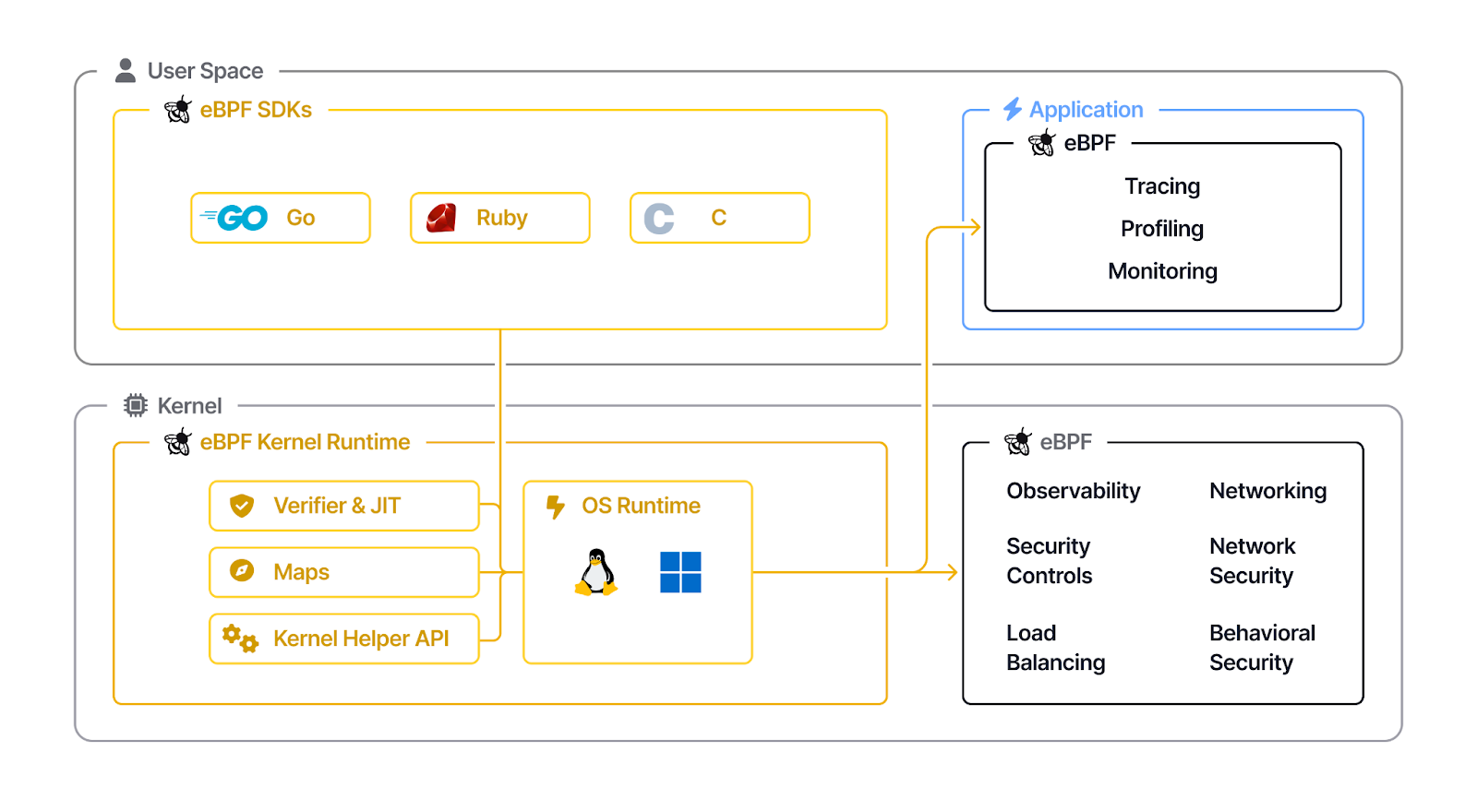
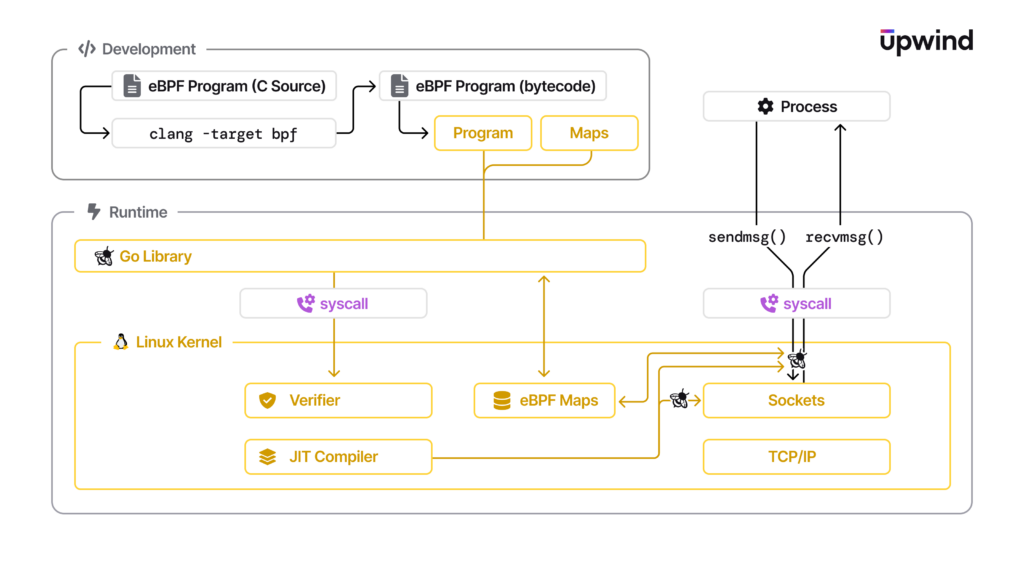
Once a hook is identified, the BPF system call can be used to load the corresponding eBPF program into the Linux kernel. This usually involves using an eBPF library. When a program is loaded into the kernel, it has to be verified to ensure it is safe to run.
Validation takes into account conditions such as:
- The process loading the eBPF program holds the required capabilities (privileges). Unless unprivileged eBPF is enabled, only privileged processes can load eBPF programs.
- The program does not crash or otherwise harm the system.
- The program always runs to completion (i.e. the program does not sit in a loop forever, holding up further processing).
Comparing eBPF and Kernel Extensions
eBPF offers distinct advantages over traditional kernel extensions, including improved safety, better performance, flexibility in deployment, dynamic loading capabilities, easier maintenance, and enhanced security controls. An overview of these advantages is shown in the table below.
| Advantages | eBPF | Kernel Extensions |
| Safety | eBPF programs run in a sandbox, preventing kernel / OS crashes and instability due to errors. | Kernel extensions can crash the kernel if poorly written or unoptimized. |
| Performance | eBPF programs are JIT-compiled, providing competitive performance. | Kernel extensions can be fast if well-optimized but risk instability. |
| Flexibility | eBPF is flexible and versatile, suitable for various use cases, including networking and security. | Kernel extensions are limited to specific kernel interfaces and require deep kernel knowledge. |
| Dynamic Loading | eBPF allows dynamic loading and unloading of programs without kernel restarts. | Kernel extensions typically require a kernel restart to update or remove. |
| Maintenance and Debugging | eBPF is easier to maintain and debug due to user-mode development and modern tooling. | Kernel extensions involve complex kernel-level development and debugging. |
| Security | eBPF provides more fine-grained control over program behavior, enhancing security. | Kernel extensions can potentially introduce security vulnerabilities. |
| Containers | eBPF provides the ability to extract all containers’ network traffic from the host level at low overhead | Potential inaccurate correlation of network traffic of running containers with actual sources and destinations |
In conclusion, eBPF-based agents have numerous advantages that make them a safer, more efficient option in comparison to agents that use kernel extensions. Upwind’s eBPF sensors are lightweight, high-performance and provide real-time visibility and protection, without the risk of system crashes.
Learn More
To learn more about how Upwind uses eBPF, visit the Upwind Documentation Center, or schedule a demo.