

Every IAM policy you write depends on condition keys – they’re the precision layer that turns “can call S3” into “can call S3 only from our VPC, using our identity, on resources we own.” They’re the backbone of least-privilege, data perimeters, and SCP guardrails.
But here’s the thing: for every request, the IAM engine assembles a request context – a set of key-value pairs – and your Condition block is matched against it. AWS documents individual keys, but the context as a whole isn’t surfaced. What does the engine actually assemble for a given request? How is it structured? What else is in there beyond the documented keys? We wanted to answer those questions.
We decided to find out. We built a technique that uses the IAM engine as its own oracle, tested roughly 36 million candidate key names across more than 150 AWS services, and found 36 undocumented condition keys.
The patterns are consistent across many services – too consistent to be accidental. Some of these keys expose live platform state that nothing in the public documentation can touch. And some of them, AWS already depends on in their own managed policies.
How We Found Them
The known technique
The idea of using IAM as a side channel isn’t new. Researchers like Ben Bridts and others showed that you can extract the value of a documented condition key – like s3:ResourceAccount – by attaching a session policy with a StringLike condition and observing whether the API call succeeds or is denied. Denied means the value matched; allowed means it didn’t. One binary signal per guess.
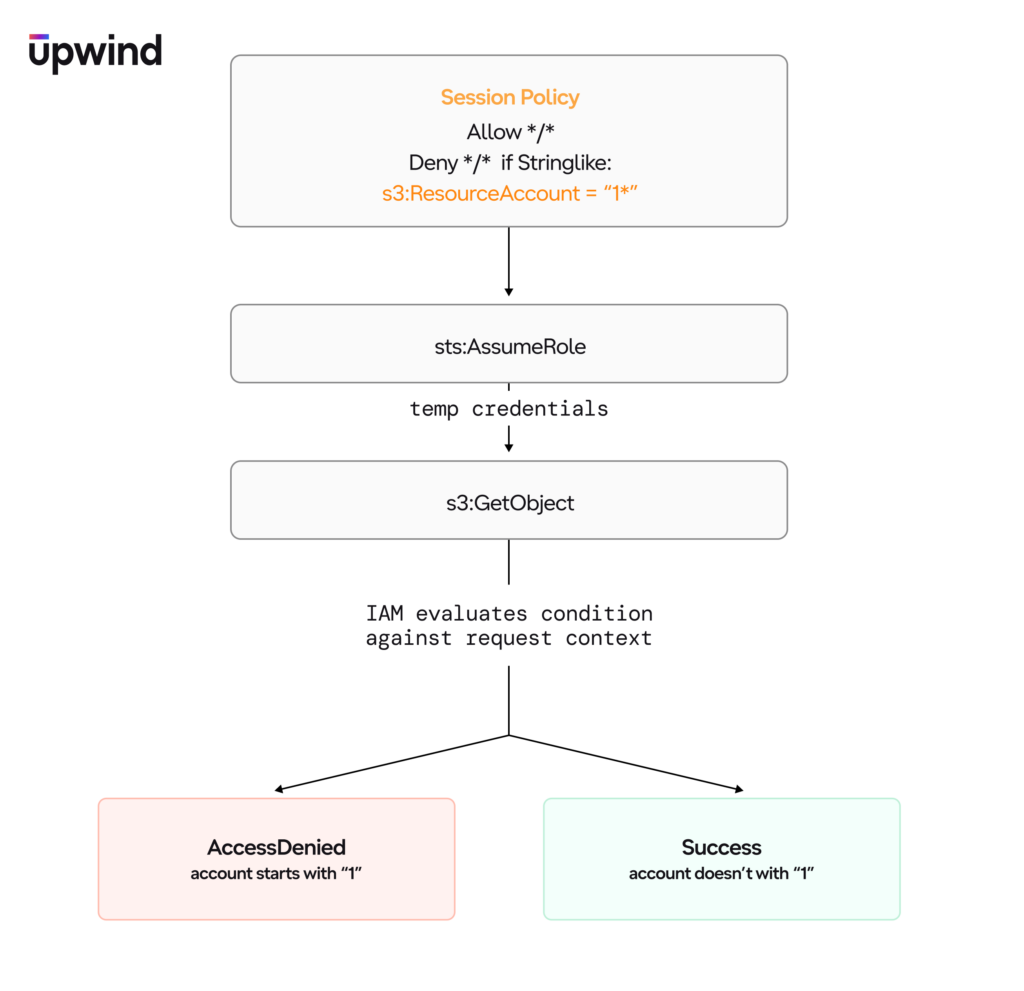
Repeat that with prefix probing (1*, 10*, 11*, 12*…) and you can enumerate the value digit by digit – roughly 30 probes to extract a 12-digit account ID.
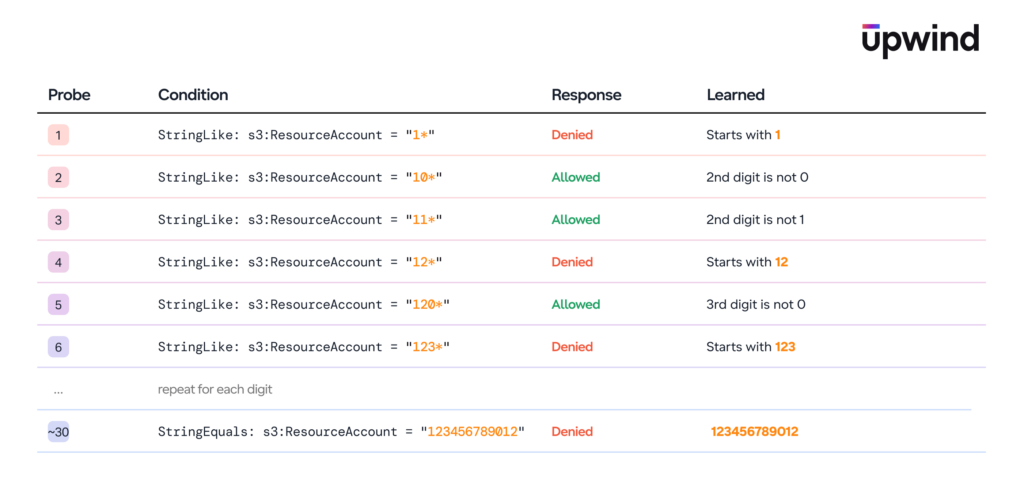
This technique works because of a property of session policies: they take effect instantly via sts:AssumeRole, they intersect with the role’s identity policy, and the only variable is the condition you’re testing. No IAM propagation delay, no resource modification, trivially parallelizable.
But the existing technique has a limitation: it only works with condition keys you already know about. You pick a documented key like s3:ResourceAccount, and you extract its value. You can’t discover new keys this way – you can only read values from keys whose names are already public.
We found two primitives that turn value extraction into key discovery.
Primitive 1: IAM accepts any condition key name
IAM’s policy editor accepts any condition key – even nonsense like aws:ABCDTESTSourceVpc. It won’t reject it – it is an intentional design behavior for forward compatibility. The engine itself is the only authority that distinguishes real keys from fake ones.
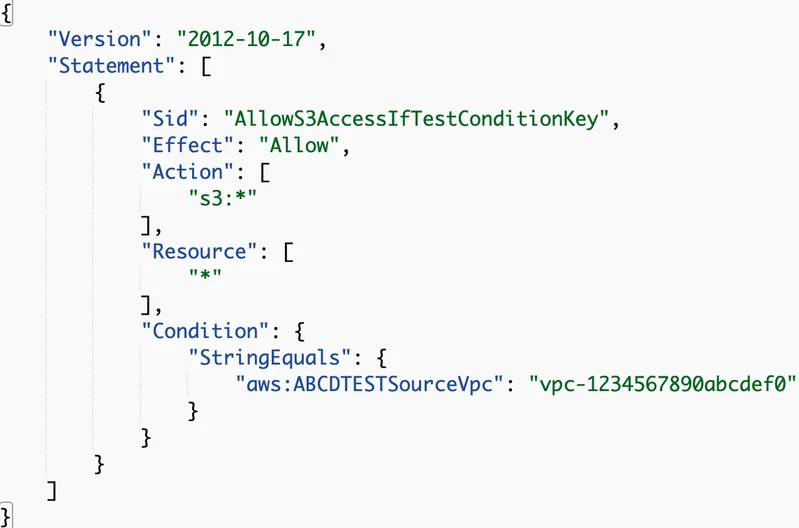
This means you can put an arbitrary candidate key name in a session policy, and the engine will evaluate it. If the key exists in the request context, the condition fires. If it doesn’t exist, the condition is silently ignored.
Primitive 2: The Null operator checks key existence
IAM’s Null condition operator checks whether a condition key is present in the request context – “false” means “deny if this key exists and has a value,” “true” means “deny if this key is absent.”

Combining them: the oracle
Put these together and you get a key discovery oracle. The probe is a session policy:
{
  "Version": "2012-10-17",
  "Statement": [
    {"Effect": "Allow", "Action": "*", "Resource": "*"},
    {
      "Effect": "Deny", "Action": "*", "Resource": "*",
      "Condition": {"Null": {"<candidate-key>": "false"}}
    }
  ]
}
The Null check asks: “is this key present in the request context?” If the subsequent API call is denied, the key exists. If it’s allowed, it doesn’t. One binary signal per candidate key name – not per value guess, but per key name. That’s the difference: the known technique extracts values from known keys; this discovers keys nobody knew existed.
Every run is calibrated: a known-present key (aws:PrincipalArn) must deny, a known-absent key (aws:TotallyFakeKey999) must allow.
Phase 1: Guessing names (22 keys)
We turned that single probe into a search. Phase 1 was brute force and creativity:
- Pattern generation from botocore models – cross-referencing API parameter names, documented key patterns, and service-specific naming conventions. Found
aws:PrincipalId, aws:ResourceArn, aws:ResourceRegion. - AI-invented candidates – domain knowledge about IAM internals, authentication flows, and AWS infrastructure, generated as candidate key names. Found a
ws:TokenAge, aws:action, aws:resource, aws:service, s3:BucketName, s3:CallerAccount. - Exhaustive brute-force – every possible string from 1 to 5 characters in the
aws:* namespace, and 1-3 characters ins3:*. Over 12 million candidates. Foundaws:arn, aws:type, aws:name, aws:namespace– ultra-short key names hiding in plain sight that no pattern generator would try. - Multi-service scanning – 45 AWS services via list operations. Found
dynamodb:TableName, sqs:QueueName, sns:TopicName, events:RuleName, redshift:ClusterName, ecr:RepositoryName.
At peak throughput, the brute-force rig ran 5 AWS regions x 80 workers = 400 concurrent threads, processing ~540,000 keys per minute using direct HTTP signing instead of the boto3 SDK.
Phase 1 found 22 keys, then hit hard diminishing returns. Larger AI batches (10K candidates) and mass-generated lists (727K candidates from deep botocore extraction) returned nothing new.
Phase 2: Reading AWS’s own artifacts (14 more keys)
Phase 2 stopped guessing and started reading.
Managed policy mining: We extracted every condition key from the Condition blocks of all 1,577 AWS managed IAM policies and cross-referenced against four documentation sources. Two keys appeared in managed policies but in zero public documentation:
aws:PrincipalOrgMasterAccountId– used inAWSSSOServiceRolePolicy(the service-linked role for IAM Identity Center)lakeformation:GlueARN– used in Lake Formation managed policies
CloudFormation schema analysis: We parsed primaryIdentifier and readOnlyProperties from 1,598 CloudFormation resource type schemas, converting them to candidate condition key names. The schemas are a structured, machine-readable source of canonical property names that AWS maintains. This found kms:KeyId, ecs:ClusterName, route53:HostedZoneId, apigateway:Resourcepath, codedeploy:ApplicationName, es:DomainName.
Resource-specific operation testing: Phase 1’s multi-service scan used list operations (ListBuckets, DescribeInstances). Phase 2 discovered that many keys only populate on resource-targeting operations – kms:DescribeKey populates kms:KeyId but kms:ListKeys doesn’t. Broader resource-specific testing found cloudtrail:TrailName, elasticfilesystem:FileSystemId, acm:CertificateId, ssm:DocumentName.
Hypothesis-driven testing: After finding aws:PrincipalOrgMasterAccountId, we hypothesized a resource-side counterpart following the Principal*/Resource* duality seen in documented keys. Tested 27 variations – only aws:ResourceOrgMasterAccountId was present.
What we didn’t find
We tested thousands of candidates for keys that security practitioners would love to have – Lambda runtime, Bedrock inference parameters, TLS data, estimated cost, source IP country, and many more. None of them exist in the request context for the API calls we tested.
That said, a key being absent on one operation doesn’t mean it’s absent everywhere. The request context changes depending on which API call you make and how the service implements its IAM integration. We covered a lot of ground – but the search space is enormous, and every service has its own quirks. Some of these keys may well exist on operations or in contexts we didn’t try.
What We Found
36 undocumented condition keys – 13 global, 23 service-specific. The count matters less than what they reveal about how the engine actually works. They sort into three groups, and together they paint a new picture of the request model.
Group 1: The request decomposition
This was the biggest surprise. When you write "Action": "s3:GetObject" in a policy, you think of it as an atomic string. The engine doesn’t. It breaks it apart:
Action decomposition:
| Key | Example (S3 GetObject) | What it holds |
|---|---|---|
aws:action | s3:GetObject | Full IAM action (service:operation) |
aws:service | s3 | Service namespace only |
aws:name | GetObject | Operation name only |
Resource decomposition:
| Key | Example (S3 GetObject) | Example (EC2 DescribeInstanceAttribute) |
|---|---|---|
aws:ResourceArn | arn:aws:s3:::bucket/key | arn:aws:ec2:region:account:instance/i-xxx |
| aws:resource | bucket/key | instance/i-xxx |
aws:type | object | instance |
Principal and metadata:
| Key | Value |
|---|---|
aws:PrincipalId | {RoleId}:{SessionName} |
aws:arn | Context-dependent (see anomalies below) |
aws:namespace | Account ID (not service namespace) |
aws:ResourceRegion | Resource’s AWS region |
aws:TokenAge | Seconds since token issuance (numeric) |
aws:PrincipalOrgMasterAccountId | Organization management account ID |
aws:ResourceOrgMasterAccountId | Resource owner’s management account ID |
Every Action you write in policy is a flattened projection of this three-part decomposition. Every Resource ARN is broken into its path and type. The engine has always worked on the decomposed form – you’ve just never been able to condition on it.
That opens up policy patterns that are impossible today. aws:name lets you match on the operation name across all services – a single condition that catches every Delete* or Create* call, regardless of which service it belongs to. We’ll cover the policy use cases in a follow-up post.
Group 2: The {service}:{ResourceName} pattern
The largest group, and the one that made us realize this isn’t a handful of leftover internals – it’s a systemic design pattern. Almost every key follows the same naming convention: {service}:{PrimaryResourceName}.
| Key | Service | Value |
|---|---|---|
s3:BucketName | S3 | Bucket name |
lambda:FunctionName | Lambda | Function name |
iam:RoleName | IAM | Role name |
dynamodb:TableName | DynamoDB | Table name |
sqs:QueueName | SQS | Queue name |
sns:TopicName | SNS | Topic name |
events:RuleName | EventBridge | Rule name |
redshift:ClusterName | Redshift | Cluster name |
ecr:RepositoryName | ECR | Repository name |
kms:KeyId | KMS | Key UUID |
ecs:ClusterName | ECS | Cluster name |
route53:HostedZoneId | Route 53 | Hosted zone ID |
codedeploy:ApplicationName | CodeDeploy | Application name |
es:DomainName | Elasticsearch | Domain name |
cloudtrail:TrailName | CloudTrail | Trail name |
elasticfilesystem:FileSystemId | EFS | File system ID |
acm:CertificateId | ACM | Certificate UUID |
ssm:DocumentName | SSM | Document name |
Nineteen services, one convention. Once we spotted the pattern, it became predictive – CloudFormation schema analysis correctly guessed 5 of 11 previously-found service keys and surfaced 6 new ones. That predictive power is the tell: this is infrastructure, not accidents. The IAM engine knows the primary resource name for almost every service, and it puts it in the request context every time.
Group 3: The ones that don’t fit
Then there are the keys that break every pattern we just described. These are the edge cases that prove the request context isn’t a clean abstraction – it’s a living system with quirks.
s3:CurrentPolicyStatus – reports whether a bucket’s policy currently evaluates as public or nonpublic. This is live policy state exposed as a condition key. The value changes dynamically and immediately when you modify a bucket policy.
apigateway:Resourcepath – exposes an internal REST API routing path (/restapis/{id}, /account), not a resource name. A different pattern entirely – request-path-based rather than resource-identifier-based.
s3:CallerAccount – the caller’s account ID. Redundant with aws:PrincipalAccount (documented). Its existence suggests services may populate their own copies of common context values.
lakeformation:GlueARN – only surfaces during Lake Formation credential vending. AWS’s own managed policy gates on it.
s3:Objectpath – confirmed present on s3:GetObject.
The three-tier visibility hierarchy
Not all undocumented keys are treated equally in terms of visibility. We discovered three tiers:
| Tier | Description | Count | Example |
|---|---|---|---|
| 1: Documented | In public docs, passes ValidatePolicy | – | aws:PrincipalArn, s3:authType |
| 2: Recognized but undocumented | Passes ValidatePolicy, absent from all docs | 1 | aws:PrincipalOrgMasterAccountId |
| 3: Undocumented but evaluated | Fails ValidatePolicy, absent from all docs, but IS populated | 35 | Everything else |
We confirmed this by brute-forcing 8,059 candidates against Access Analyzer’s ValidatePolicy API. Only aws:PrincipalOrgMasterAccountId occupies Tier 2 – the single key AWS recognizes in their tooling but hasn’t documented. Every other undocumented key fails ValidatePolicy entirely.
The tier distinction matters because it means IAM Access Analyzer, Policy Simulator, and every third-party policy linting tool will flag any policy using these keys as invalid – even though the engine evaluates them.
The rough edges
The patterns above are real, but they aren’t perfectly uniform. The same key can behave differently across services, some keys aren’t populated where you’d expect them, and naming doesn’t always mean what you think. The details matter if you’re writing policies against these – a condition that works on one service might silently do nothing on another.
We documented the specific inconsistencies we found across services in detail. The short version: test any key against the specific operation you care about before relying on it in policy. The patterns are strong enough to guide discovery, but not strong enough to assume uniform behavior.
The bigger picture
The individual keys are useful – some enable genuinely new policy capabilities that the documented set cannot express today. We’ll cover those in detail in a follow-up post.
But the real discovery is the engine’s internal architecture. IAM decomposes every request into a structured context with action, resource, and principal dimensions – each broken into constituent parts. These decomposed values are the engine’s native vocabulary. Documented condition keys are the subset AWS chose to expose; these 36 are part of the rest.
Understanding the model changes how you read every policy you own. The Action and Resource elements aren’t the whole story – they’re a flattened view of a richer decomposition that’s always been there, evaluated on every request, invisible to everyone who doesn’t probe for it.
And now that the technique is out there, anyone can do this. The oracle is a session policy and a Null check – no special tooling, no privileged access, nothing beyond what IAM gives you for free. Every AWS customer can probe their own request context and discover what the engine actually sees. We found 36 keys. There are almost certainly more, on services and operations we didn’t cover. The search is open.
Until then, this is what we have. Looking forward to hearing about new condition keys found using this technique!