A vertical list of colored bars with icons. The top bar is orange with a gear and shield. The sixth bar is pink with a warning icon, highlighted by a mouse cursor. The logo upwind is in the top left corner.

Identify Emerging Vulnerabilities & Threats in Your Environment With Upwind’s Security Feed

Denise Ashur August 15, 2024

Identify Emerging Vulnerabilities & Threats in Your Environment With Upwind’s Security Feed

We are excited to announce the release of the Upwind Security Feed – a native feed accessible from directly within the Upwind platform, providing you with constantly updated information about new and emerging attacks, zero days, and security trends that are relevant to your environment and should be investigated further.

The Upwind Security Research team is constantly monitoring for new vulnerabilities and threats (such as a recent ArgoCD vulnerability we discovered), including zero-day vulnerabilities. Now, you can access that information directly within the Upwind platform – including a built-in analysis of where your environment could be susceptible to critical threats, emerging attacks, and zero-day vulnerabilities. 
AD_4nXcOqQsguVXSqG7SCmwYxCioAWvW216iizCsM2h-yMA0MV1Yhm6oI_PdUBaei7hhYzlspTqkUh2jjdRr9xS-YFdkOuW-lWEPRXNWdZJ1_lI7iUJ5KWPtCaExYAt4LyXB4_7GN8spKqC2Uhs2h7ZbzFqWdvhI?key=RtpjanCKnJeEg-4ysU47aA

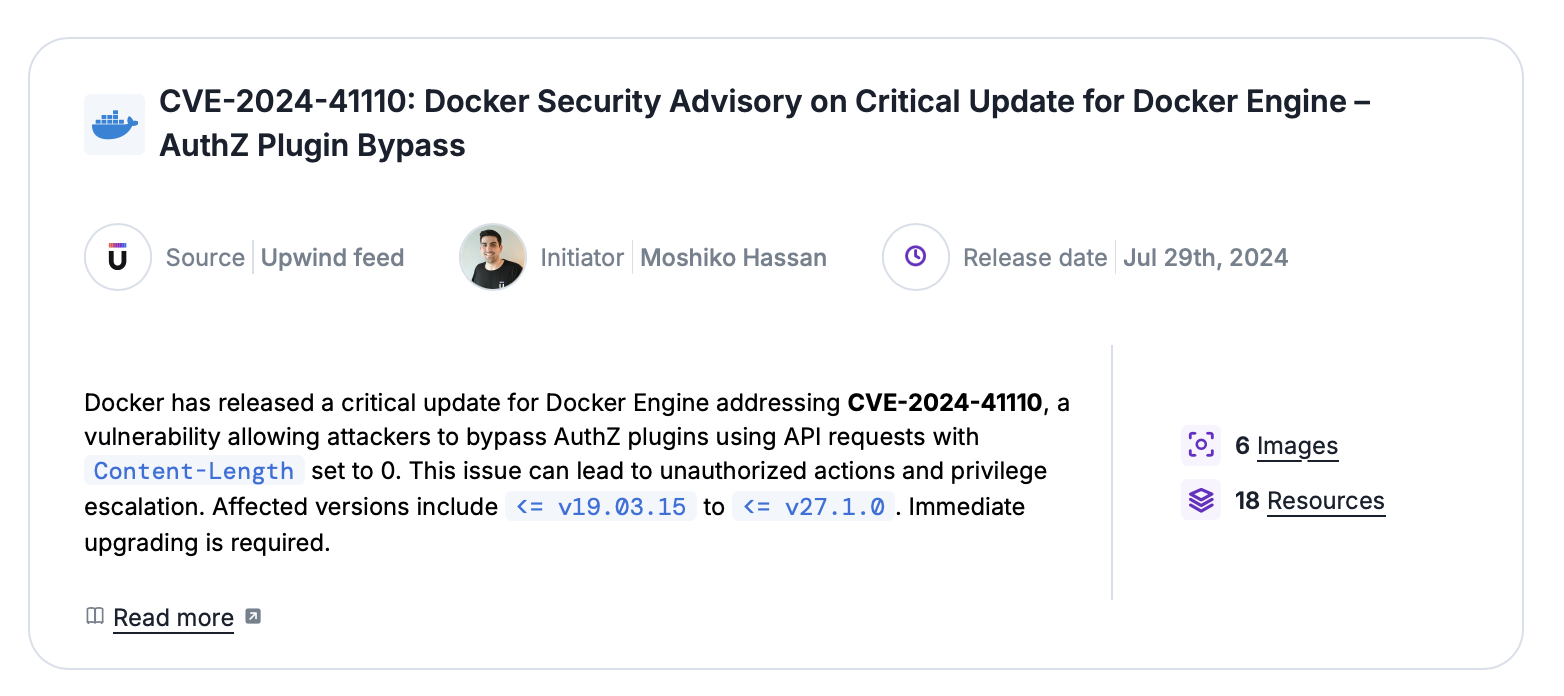
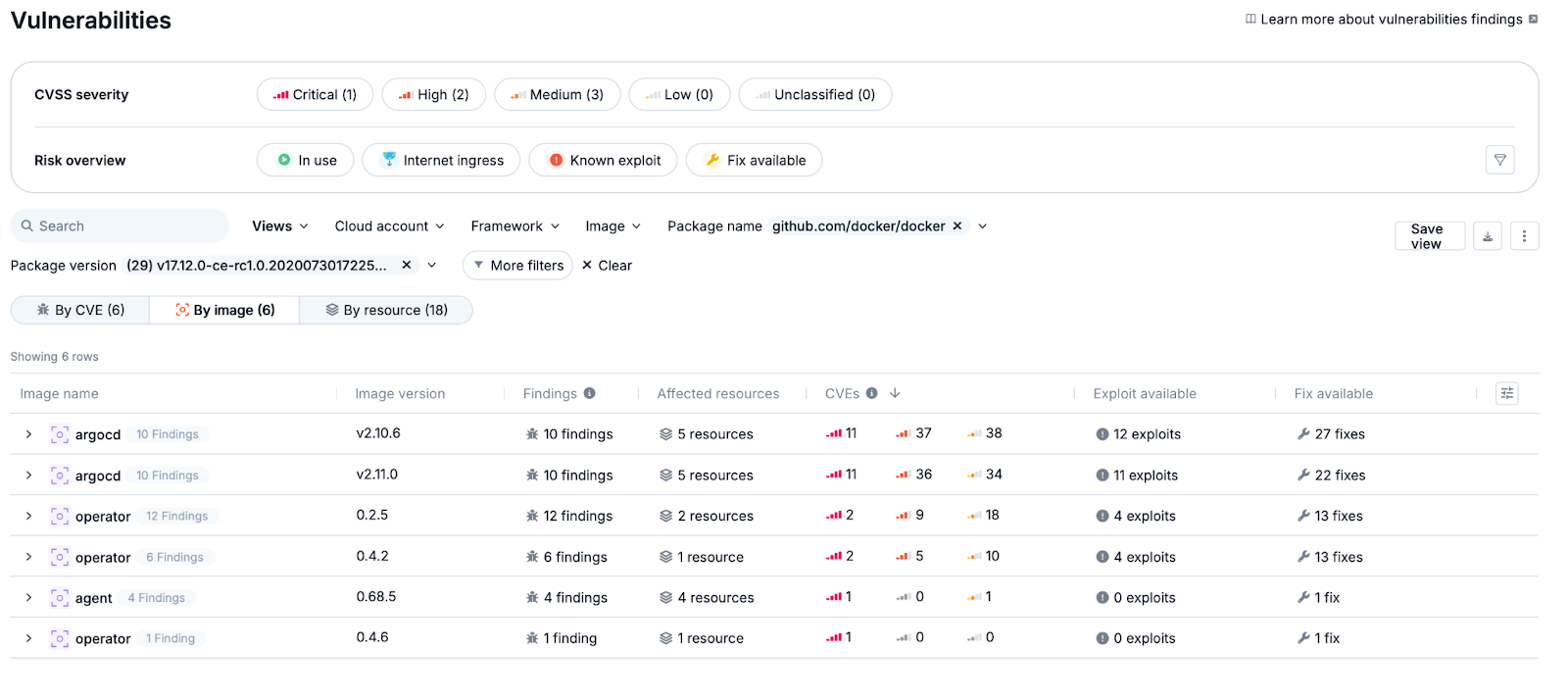
Each finding in the Security Feed will include relevant information about the threat or vulnerability, as well as a link to the Upwind website which has a more detailed analysis. You can also streamline your investigations by immediately viewing the images, associated packages and infrastructure resources in your environment that are subject to this vulnerability or threat, enabling you to quickly find and fix these risks in your environment. 
AD_4nXdXVvoUxckMqu543teKV2s4YZFKlEMFHKcdXSSOz5-ceIVP0ibpAjeIttmGAm-24b9f2KgsdVdZv6OzDijAxSQGeKzxqfdAP1P54V6QdTRmpm8SxcyHlG6B6tjrFBa4-a7f10xc0uHalW3lpCqsmrht814h?key=RtpjanCKnJeEg-4ysU47aA

Use this new capability to be the first to know about new vulnerabilities, emerging threats, and zero days, automatically identifying where they exist in your environment, and ensuring a proactive approach to remediation. 

For Upwind users who want to learn more about the Security Feed, you can view additional information by visiting the console. For all others, please reach out to us to schedule a demo. 
Contents

Further Reading

What IAM Sees That You Don't

What IAM Sees That You Don’t

Every IAM policy you write depends on condition keys - they're the precision layer that turns "can call S3" into "can call S3 only from our VPC, using our identity, on resources we own." They're the backbone of least-privilege, data perimeters, and SCP guardrails. But here's the thing: for every request, the IAM engine assembles…
Let Me Speak to Your Manager (Account)

Let Me Speak to Your Manager (Account)

The management account is the most privileged account in any AWS Organization. It controls SCPs, creates and deletes member accounts, manages IAM Identity Center, and is itself exempt from SCPs. Getting its 12-digit account ID is the first step in targeting it. The documented way to get it is organizations:DescribeOrganization - but security-conscious environments restrict…
Configuration-Focus

Introducing the new Configurations experience in Upwind

Compliance should not be a fire drill! Ask a security team how audit season goes and you will often hear a version of the same story. Someone pulls a list of cloud accounts. Someone else exports findings into a spreadsheet that is already outdated by the time it is shared. Screenshots get pasted into a…
Add the Upwind RSS Feed to Slack
Connect the Upwind RSS Feed to your Slack.
Follow the how-to here.
Threat RSS
Add the Upwind RSS Feed to Slack
Connect the Upwind RSS Feed to your Slack.
Follow the how-to here.
Main RSS