One of Upwind’s core advantages begins the moment runtime data is collected. That’s the moment teams stop guessing and start securing based on what’s actually happening in their clusters. From there, they gain meaningful visibility into workload behavior, identify real risks, and apply security policies based on observed activity rather than assumptions. To help teams realize that value faster, Upwind has introduced a redesigned Kubernetes sensor installation experience that eliminates friction and accelerates time-to-insight.
The Cluster Survey
Our new sensor installation process for Kubernetes enables teams to activate runtime security capabilities within minutes. Whether using CLI, Helm, or Terraform, our new guided flow simplifies setup by adapting to each environment and providing install-ready commands.

The Cluster Survey is central to this new process. It automatically scans your Kubernetes environment to detect key characteristics and optimize installation parameters. The survey identifies resource requirements such as CPU and memory, recommends the appropriate number of replicas, and proactively flags issues like proxy limitations or metadata access restrictions before they impact deployment.
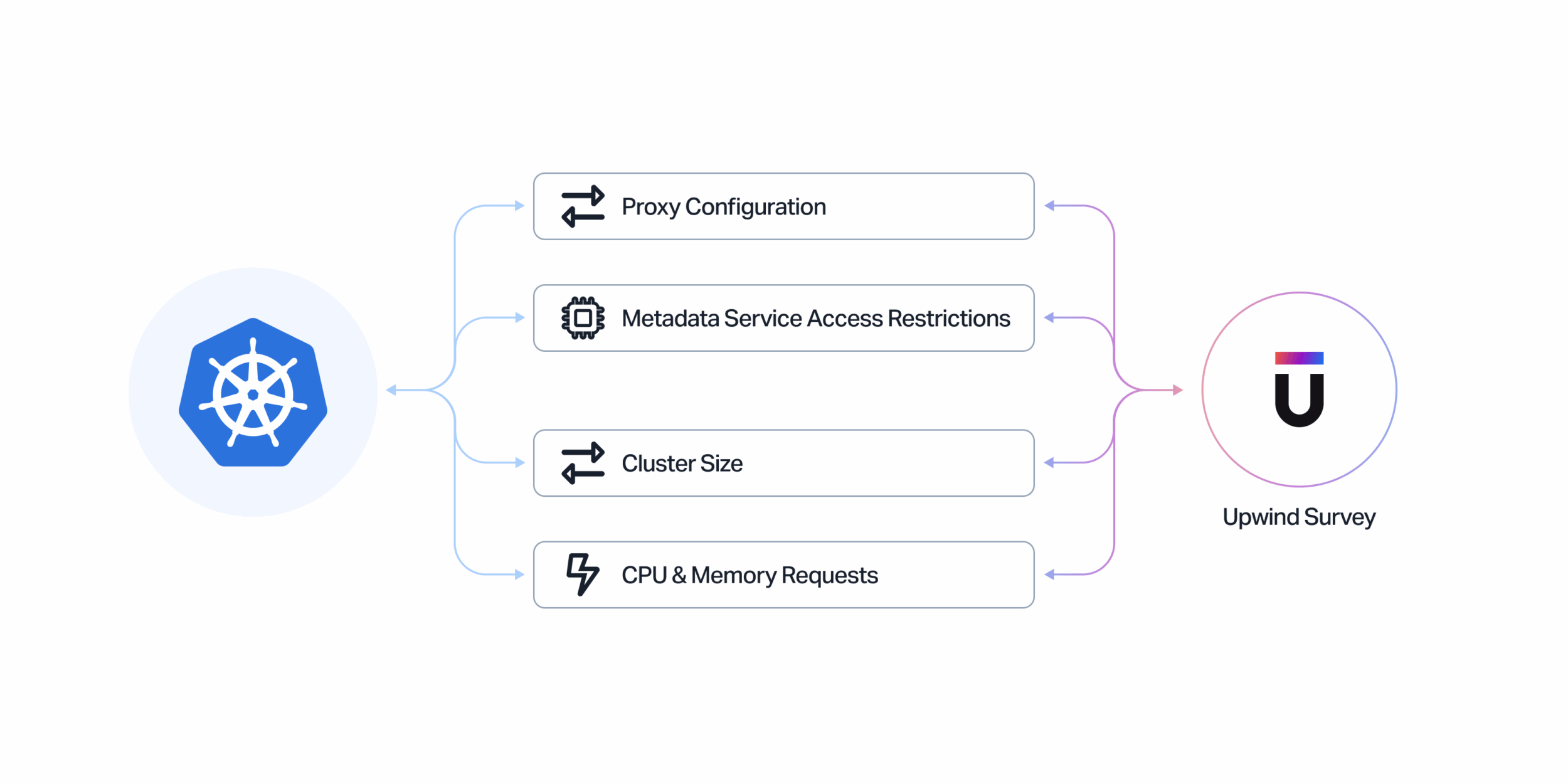
For users who prefer not to run the automatic scan, a manual input option is available. By entering a few cluster details, teams receive a customized install command with intelligent defaults. This ensures the same speed and accuracy without requiring automation.
-Gal Aviv, CTO & GM, Digital Turbine
“At the scale of our infrastructure, we know we can only trust a few agent-based security products. Upwind’s eBPF sensor is the only one that met our standards.”
Deployment Options That Match Your Workflow
Recognizing that organizations manage infrastructure in different ways, Upwind supports multiple installation methods, each designed to accommodate various preferences and operational models:
- Upwind CLI: Ideal for teams seeking automation, the CLI runs the Cluster Survey, configures system requirements, and installs the sensor with a single command. It’s the fastest route to runtime visibility, with data streaming into the platform within minutes.
- Helm and Terraform: For teams managing infrastructure as code, Helm and Terraform workflows integrate seamlessly with the new installation process. The Cluster Survey generates configuration recommendations tailored to the cluster, enabling quick deployment without modifying existing practices.
- Manual Setup: Whether CLI usage is restricted or teams need more granular control, the manual path provides a guided experience tailored to those needs. Users can input basic configuration details and receive a pre-filled installation command – removing uncertainty while preserving control.
Regardless of the method, the outcome remains consistent: Upwind sensors deployed quickly, real-time insights activated, and meaningful protection established – all in a fraction of the time traditional solutions require.
Immediate Value Through Runtime Awareness
This initiative is not solely about simplifying installation – it’s about accelerating access to Upwind’s core value: real-time, runtime-driven security.
Once Upwind’s sensors are installed, teams immediately begin receiving actionable data on workload activity. This includes detailed visibility into service communications, data flows, and behavioral anomalies that could indicate risk. Unlike static security approaches, Upwind enables continuous monitoring based on live production behavior.
“Upwind’s risk prioritization has completely changed the way we approach security. Understanding our greatest risks and what caused them has greatly improved our workflows, cut down on unnecessary labor, and given us the ability to ensure our security practice is proactive rather than reactive.”
-Matan Koresh I SecOps, Anzu
This visibility allows security and platform teams to:
- Detect threats with greater speed and accuracy
- Eliminate blind spots across workloads and services
- Administer security policies grounded in real-world usage patterns
The result is a more adaptive, resilient security posture, achieved in a fraction of the time.

Now Available in the Upwind Platform
Upwind’s new Kubernetes sensor installation experience is available today. Designed to reduce setup complexity and help teams operationalize runtime security faster, it supports organizations of all sizes in achieving immediate, meaningful outcomes through runtime data.
See It in Action
If you’re running Kubernetes and looking to accelerate your time to value, we invite you to experience the new installation flow firsthand. Schedule a demo to see how Upwind turns runtime signals into real protection, fast.