

A new vulnerability enters the backlog. A workload is exposed. A misconfiguration affects production. An identity behaves unexpectedly. A customer asks for evidence. An audit or pentest is coming up. Each moment requires the same understanding of what is real, what is urgent, what is connected, and what should happen next.
The Upwind MCP Server helps teams answer those questions from the AI tools they already use, including Claude, Cursor, and internal copilots. By bringing Upwind’s realtime intelligence into these workflows, teams can ask direct questions about what is running, exposed, reachable, active, or vulnerable, then use that context to prioritize, investigate, and act faster.
This guide gives you 10 practical ways to apply the Upwind MCP Server across everyday cloud security workflows, from prioritizing vulnerabilities and investigating threats to preparing for audits, reducing exposure, and accelerating remediation.
01 Supply Chain Attack – Package Exposure Check
When a new supply chain campaign surfaces (e.g., the @antv/* npm attack), the first question is: are we exposed, and which versions are running in prod? This prompt runs parallel SBOM lookups across all packages in the IOC list and returns a structured exposure table.
MCP Tools Used
mcp__upwind-server__sbom_packages_listmcp__upwind-server__sbom_packages_get_details
Prompt
Upwind SBOM Supply Chain Exposure Check.

Use mcp__upwind-server__sbom_packages_list to search for each of the
following packages by name. Run all searches in parallel.

For any packages found, use mcp__upwind-server__sbom_packages_get_details
to retrieve the resources (deployments, clusters, instances) running them.

For each package found, report:
  - Versions currently deployed
  - Whether the deployed version matches the suspected vulnerable range
  - Clusters / resources running it
  - Whether Upwind reports any active CVEs against it

Output as a table:
Package | Version in Env | Vulnerable Version | Status | Resources

After the table, produce an executive summary formatted for a team briefing
Packages to check:
• <package-name> - suspected versions: <x.y.z, x.y+1.z>
• <package-name> - suspected versions: <x.y.z>
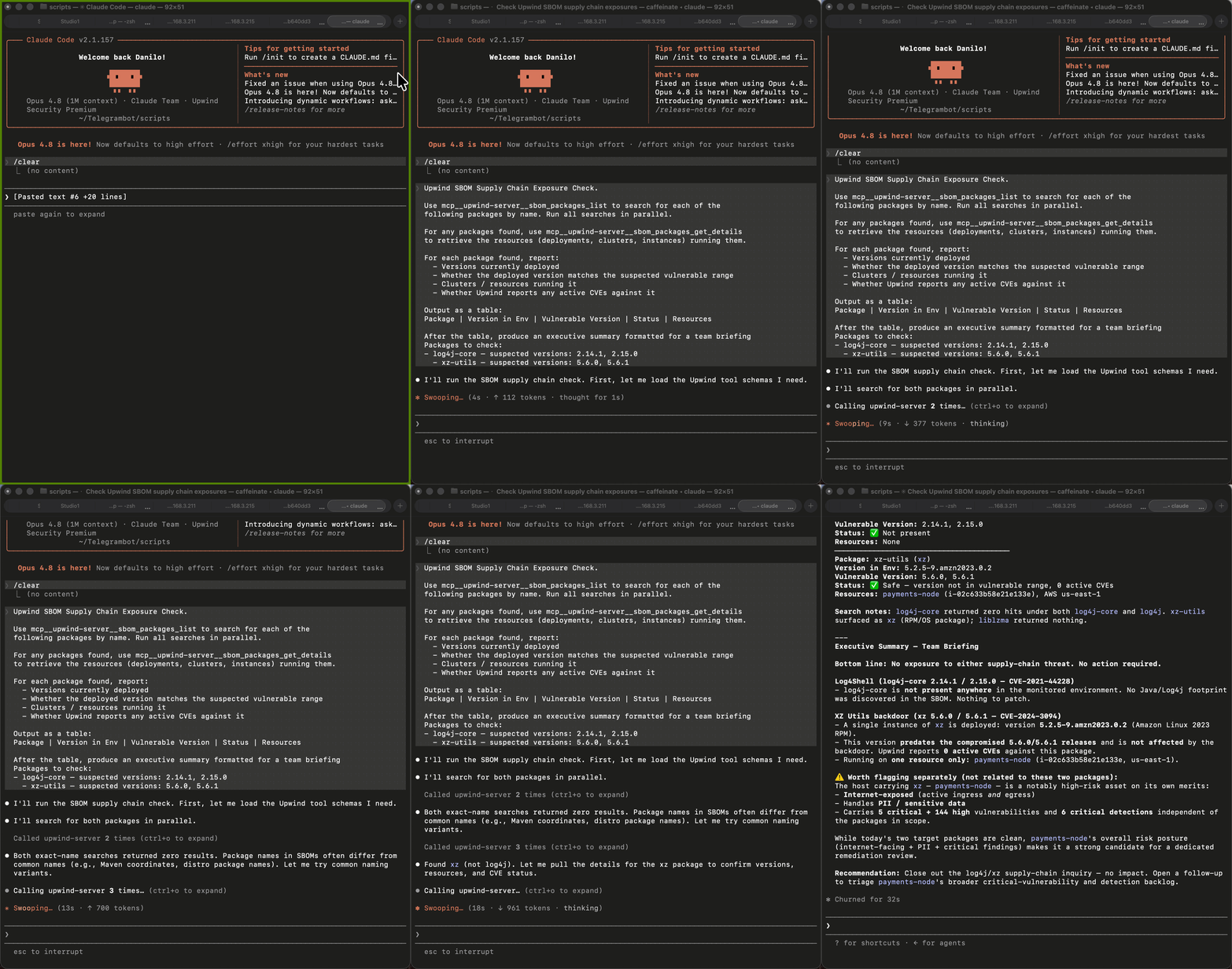
Example Output
| Package | Version in Env | Vulnerable Version | Status | Resources |
| jest-canvas-mock | 2.5.2 | 2.5.3, 2.6.3, 2.7.3 | Below Range | web-frontend (prod) |
| echarts-for-react | 3.2.7 | 3.0.7, 3.1.7, 3.2.7 | Vulnerable Match | analytics-svc (prod) |
| timeago.js | Not Found | 4.1.2, 4.2.2 | Not Found | – |
Three packages were checked against the Upwind SBOM inventory for known vulnerable versions. echarts-for-react 3.2.7 was identified as a direct vulnerable match in analytics-svc (prod). jest-canvas-mock 2.5.2 is below the vulnerable range and not directly affected. timeago.js was not found in any inventoried environment. One confirmed exposure was identified; no affected clusters or deployments were found for the remaining two packages.
Why it matters: Replaces 20 manual SBOM queries with a single parallel sweep so you can self-serve validation immediately after receiving an MDR advisory and quickly update your teams with a status.
02 Active Threat Story Investigation
A new Threat Story appears in the feed. You need the full picture: what happened, which resources are affected, what lateral movement looks like, and what to remediate first – without clicking through multiple UI screens.
MCP Tools Used
mcp__upwind-server__threat_stories_listmcp__upwind-server__threat_stories_get_detailsmcp__upwind-server__inventory_get_asset
Prompt
Upwind Threat Story Deep Dive.
1. Use mcp__upwind-server__threat_stories_list to retrieve all Threat
   Stories from the past 14 days with severity CRITICAL or HIGH.
2. For the most recent story, use mcp__upwind-server__threat_stories_get_details
   to retrieve full context: timeline, MITRE tactics, affected resources,
   process execution chain, and network connections.
3. For each affected resource, use mcp__upwind-server__inventory_get_asset
   to pull workload context: image, cluster, namespace, owner.
4. Summarize:
   - Attack timeline (first seen → last seen)
   - MITRE ATT&CK mapping
   - Blast radius (resources × namespaces × clusters)
   - Recommended remediation steps, ordered by priority
Example Output
| Field | Value |
| First Seen | 2026-05-19 07:14 UTC |
| MITRE Tactics | Execution, Persistence, Exfiltration |
| Affected Resources | 3 pods across 2 namespaces |
| Recommended Action | Isolate analytics-svc, rotate secrets |
Why it matters: Reduces threat triage by 95%, from 20 minutes of UI navigation to a 60-second structured summary ready to paste into an advisory or incident ticket.
03 CVE Zero-Day Blast Radius
A critical CVE drops. You need to know exactly which workloads, images, and clusters are affected across every monitored cloud account with runtime exposure context, not just static package matches.
MCP Tools Used
mcp__upwind-server__vulnerabilities_listmcp__upwind-server__vulnerabilities_get_detailsmcp__upwind-server__sbom_packages_get_details
Prompt
Upwind CVE Blast Radius Analysis.
CVE to investigate: <CVE-YYYY-XXXXX>
1. Use mcp__upwind-server__vulnerabilities_list with filter
   cve_id=<CVE> to retrieve all findings across all monitored cloud accounts.
2. For each finding, use mcp__upwind-server__vulnerabilities_get_details
   to retrieve: affected package + version, CVSS score, fix availability,
   runtime exposure status (is the vulnerable function actually called?),
   and network reachability.
3. Use mcp__upwind-server__sbom_packages_get_details to map each
   affected package to its running workloads and clusters.
4. Output a prioritized remediation table. Sort by:
   runtime exposure (exposed first) → CVSS → fix available.

Columns: Workload | Cluster | Package@Version | CVSS | Runtime Exposed | Fix Available
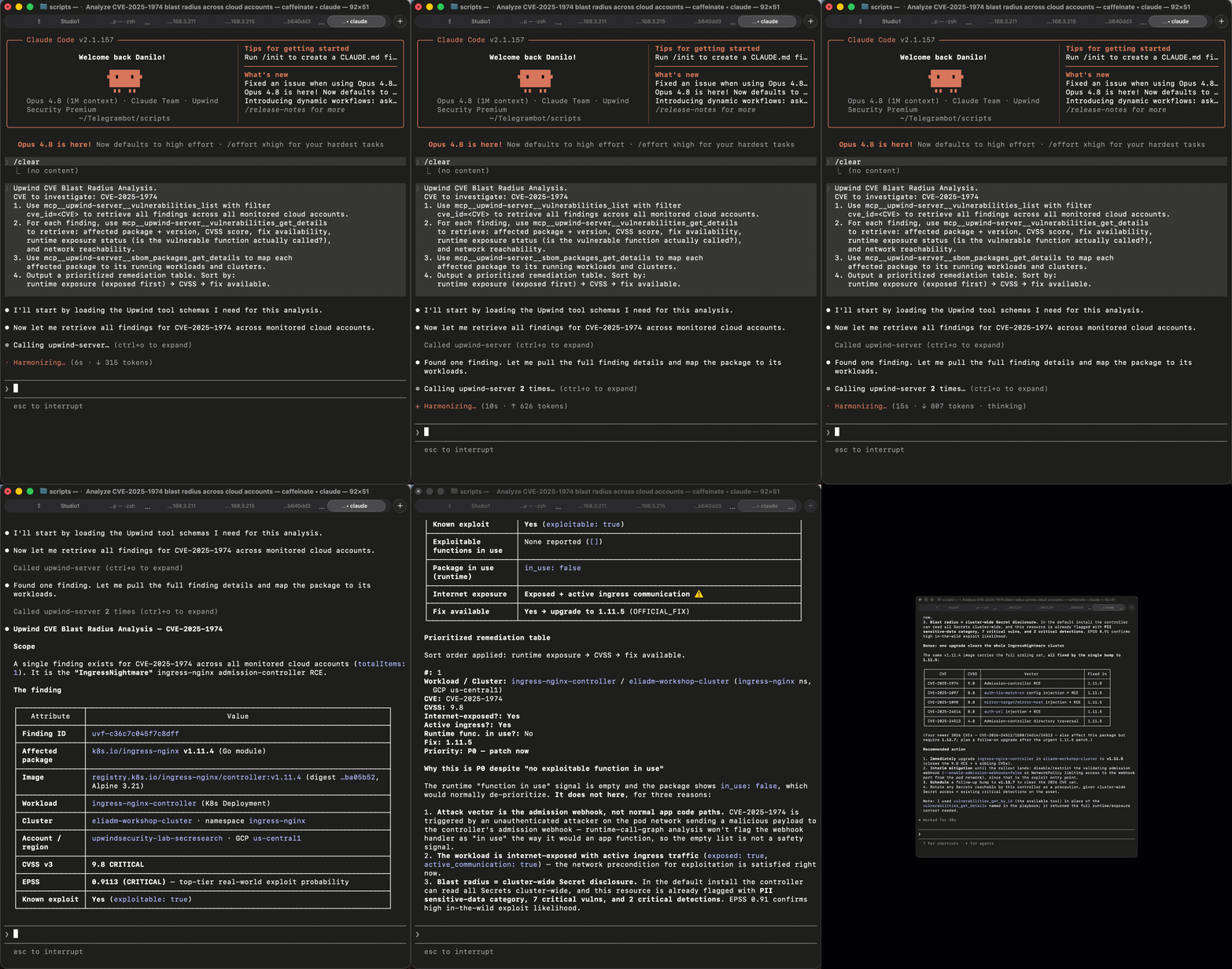
Example Output
| Workload | Cluster | Package@Version | CVSS | Runtime Exposed | Fix Available |
| api-gateway | prod-us-east | [email protected] | 10.0 | Yes | Yes → 2.17.1 |
| worker-svc | prod-eu-west | [email protected] | 10.0 | No | Yes → 2.17.1 |
| batch-job | staging | [email protected] | 10.0 | No | Yes → 2.12.4 |
Why it matters: Not every critical CVE creates real risk. See which vulnerable workloads are actually running and exposed, to focus on the few issues that need action instead of chasing hundreds of theoretical findings.
04 Unauthenticated API Endpoint Audit
Before a pentest, red team engagement, or attack surface review, you need a complete list of externally reachable APIs with weak or missing authentication ranked by risk.
MCP Tools Used
mcp__upwind-server__api_security_endpoints_listmcp__upwind-server__api_security_endpoints_get_details
Prompt
Upwind API Attack Surface Audit.
1. Use mcp__upwind-server__api_security_endpoints_list to list all
   API endpoints with auth_state=NONE or auth_state=UNKNOWN.
2. Filter for endpoints with method POST, PUT, DELETE, or PATCH.
3. For each result, use mcp__upwind-server__api_security_endpoints_get_details
   to retrieve: internet accessibility, sensitive data exposure indicators,
   associated workload, and last observed traffic.
4. Rank by risk:
   - Internet-accessible + no auth + write method = CRITICAL
   - Internet-accessible + no auth + read method = HIGH
   - Internal + no auth + write method = MEDIUM
Output: Endpoint | Method | Auth State | Internet Facing | Sensitive Data | Risk | Workload
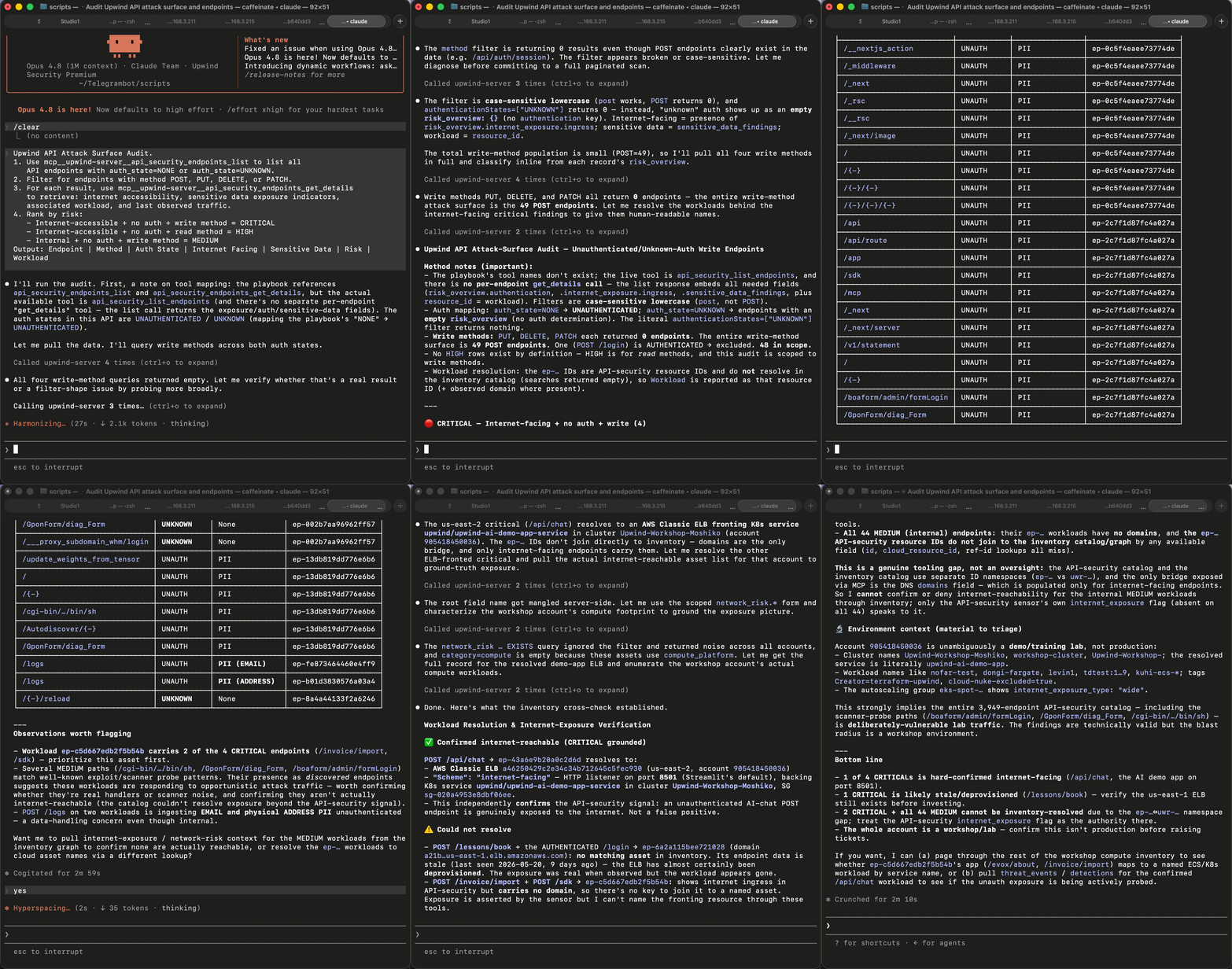
Example Output
| Endpoint | Method | Auth | Internet Facing | Risk |
| /api/v1/admin/users | DELETE | NONE | Yes | CRITICAL |
| /api/v2/export | POST | NONE | Yes | CRITICAL |
| /internal/config | PUT | UNKNOWN | No | MEDIUM |
Why it matters: Exposed APIs are often where attackers and red teams start. Quickly identify internet-facing, unauthenticated, or sensitive API paths so they can understand the real attack surface without running a manual API inventory sweep.
05 IAM & Misconfiguration Priority Queue
Hundreds of configuration findings exist in every environment. This prompt filters to the ones that actually create exploitable risk, public exposure and overpermissive IAM, and returns a ranked fix list ordered by potential impact.
MCP Tools Used
mcp__upwind-server__configurations_listmcp__upwind-server__configurations_get_detailsmcp__upwind-server__inventory_get_asset
Prompt
Upwind IAM & Exposure Misconfiguration Triage.
1. Use mcp__upwind-server__configurations_list with filters:
   - category=PUBLIC_EXPOSURE or category=IAM
   - status=FAILED
2. For each finding, use mcp__upwind-server__configurations_get_details
   to retrieve: check description, failure details, resource type,
   framework mapping (CIS / NIST / SOC2), and remediation guidance.
3. Use mcp__upwind-server__inventory_get_asset to pull runtime context
   for each affected resource: is it active? internet-reachable? recently deployed?
4. Score each finding:
   - Public exposure + active resource = CRITICAL
   - Overly permissive IAM + admin-level access = HIGH
   - Everything else = MEDIUM or lower
Output: Finding | Resource | Framework | Runtime Active | Exposure | Priority | Fix
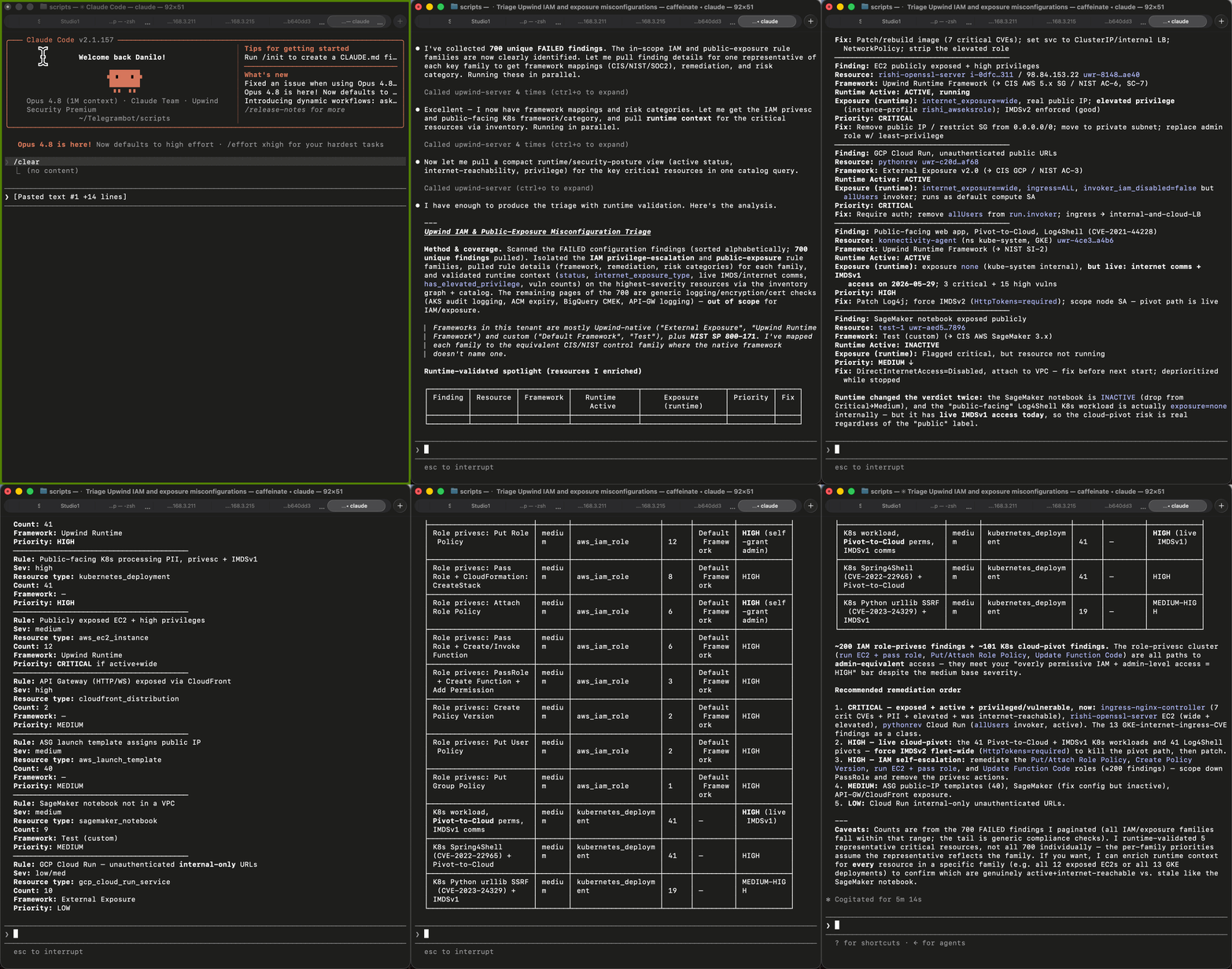
Example Output
| Finding | Resource | Exposure | Runtime Active | Priority |
| S3 bucket public read | logs-archive | Internet | Yes | CRITICAL |
| IAM role | lambda-processor | Internal | Yes | HIGH |
| SG: 0.0.0.0/0 port 22 | bastion-host | Internet | No | HIGH |
Why it matters: Turns a 400-item findings list into a 10-item action plan. Instead of treating every misconfiguration equally, teams can focus on the small set of findings that affect running, exposed, or reachable resources.
06 Compliance Gap Report
For an audit, CISO briefing, or customer security review, you need a structured breakdown of which compliance checks are failing, grouped by resource type and framework, with failure counts and remediation owners.
MCP Tools Used
mcp__upwind-server__configurations_listmcp__upwind-server__configurations_get_details
Prompt
Upwind Compliance Gap Analysis.
1. Use mcp__upwind-server__configurations_list with filter:
   - policy=UPWIND_FRAMEWORK (or: CIS_KUBERNETES, SOC2, NIST_800-53)
   - status=FAILED
2. Group results by resource_type.
3. For each group, use mcp__upwind-server__configurations_get_details
   to retrieve: check name, rule ID, severity, failure count, remediation steps.
4. Output a compliance matrix:
   Framework | Control | Resource Type | Failures | Severity | Remediation
5. Add a summary section:
   - Total failing controls by framework
   - Top 3 resource types with most failures
   - Estimated remediation effort (quick wins vs. structural changes)
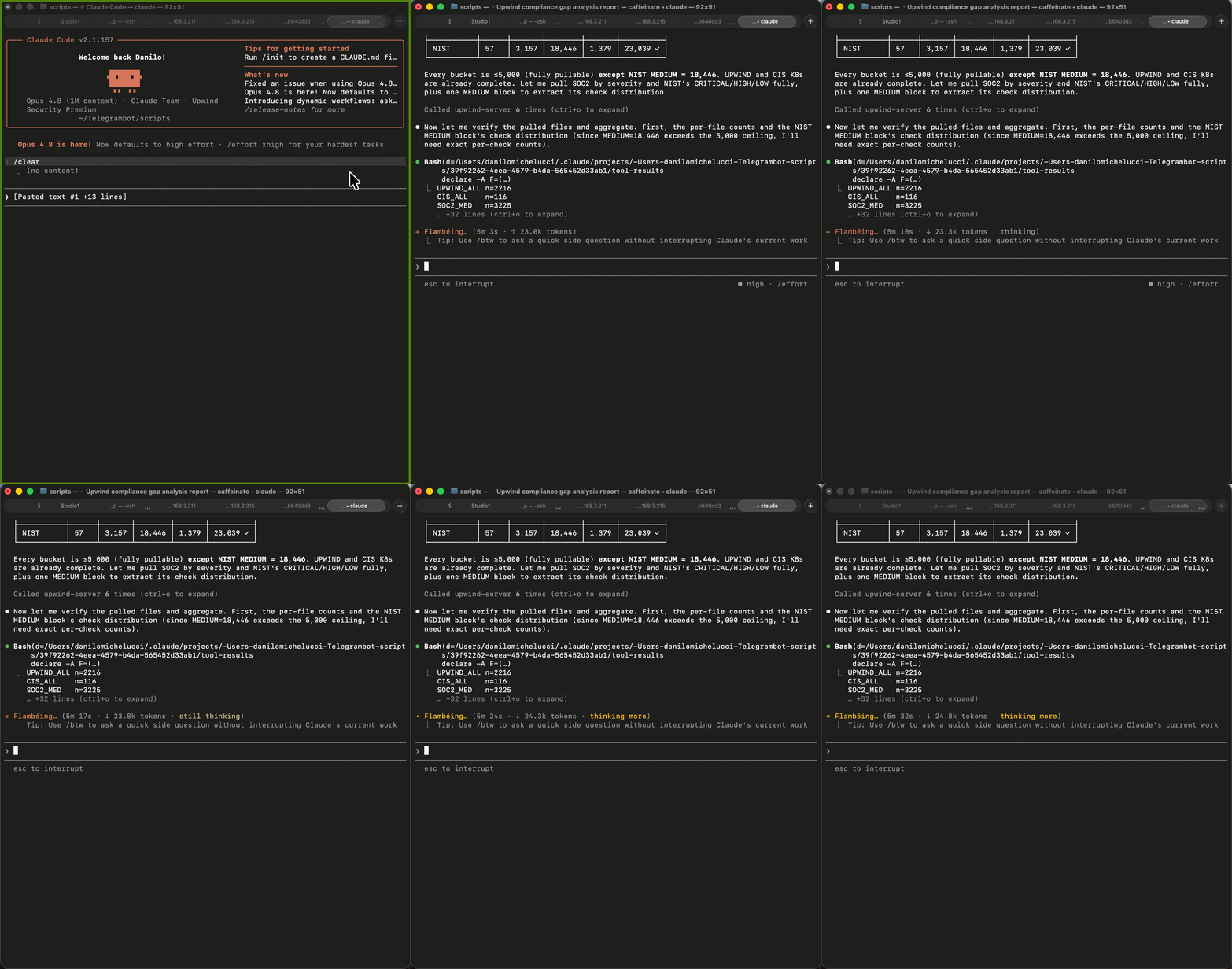
Example Output
| Framework | Control | Resource Type | Failures | Severity |
| CIS Kubernetes | 1.2.1 API audit logs | kubernetes_cluster | 3 | HIGH |
| SOC2 | CC6.1 Encryption at rest | aws_s3_bucket | 7 | MEDIUM |
| Upwind Framework | No MFA on root | aws_iam_user | 1 | CRITICAL |
Why it matters: Teams can generate audit-ready output from a single query, giving security leaders the key risk and compliance metrics they need while giving engineering a clear list of fixes to prioritize.
07 Detection Coverage Audit
Are your alerting workflows actually covering all severity tiers? This prompt audits your workflow definitions for gaps, duplicates, and disabled rules, the same class of issue as a CloudTrail policy gap.
MCP Tools Used
mcp__upwind-server__workflows_listmcp__upwind-server__workflows_get_details
Prompt
Upwind Detection Workflow Coverage Audit.
1. Use mcp__upwind-server__workflows_list to retrieve all configured workflows.
2. For each workflow, use mcp__upwind-server__workflows_get_details
   to retrieve: trigger conditions (severity, event type, resource type),
   destination (Slack, Jira, PagerDuty, etc.), enabled/disabled status,
   and last updated timestamp.
3. Analyze coverage:
   - Are CRITICAL and HIGH severity threats covered by at least one workflow?
   - Are there severity tiers with NO active workflow?
   - Are any workflows disabled (isEnabled: false)?
   - Are there duplicate triggers (same event type → multiple destinations)?
4. Output two tables:
   Table A - Coverage matrix: Severity × Event Type × Destination × Status
   Table B - Gaps and duplicates with recommended fixes
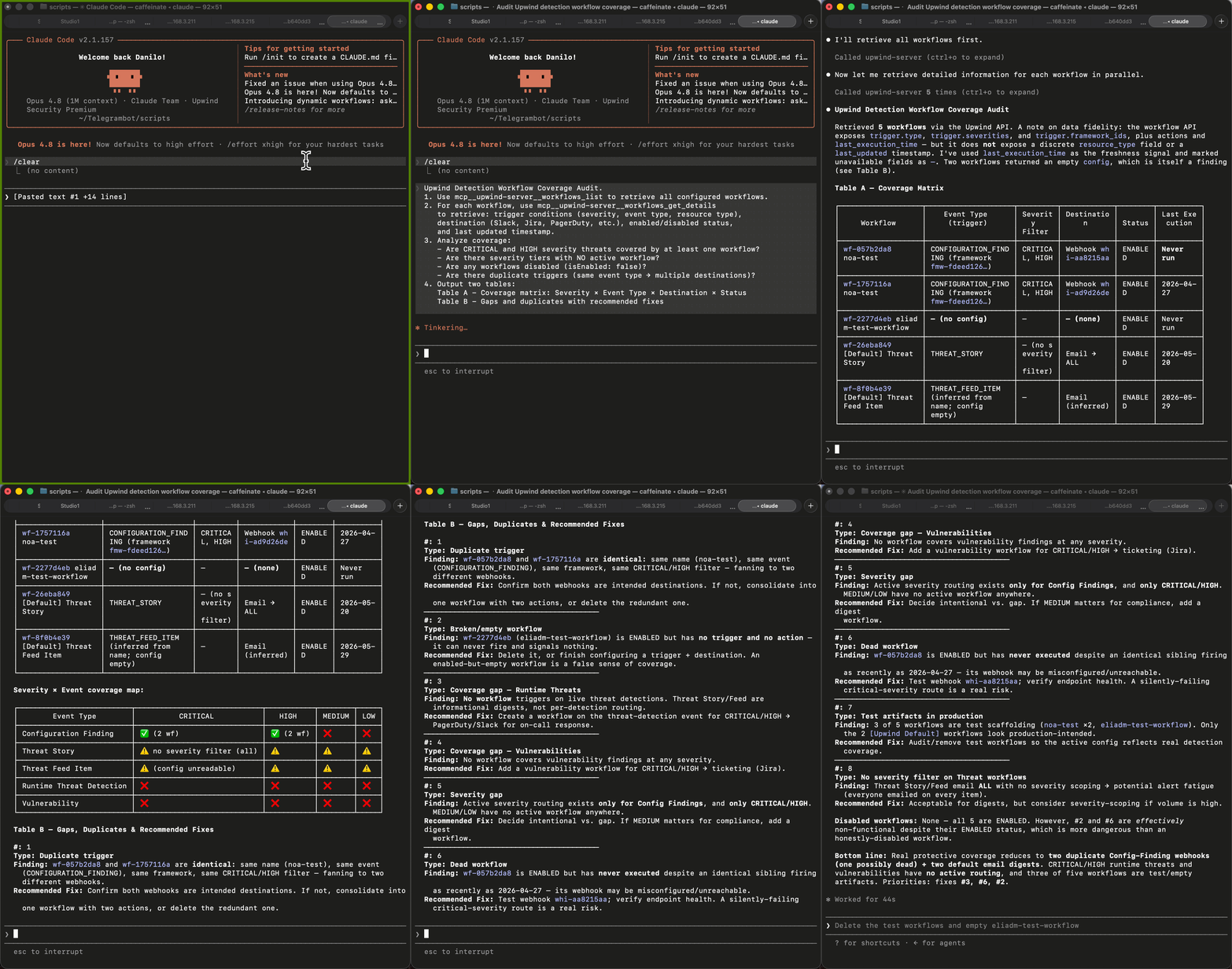
Example Output
| Severity | Event Type | Destination | Enabled | Gap? |
| CRITICAL | Threat Detection | PagerDuty | Yes | – |
| HIGH | Threat Detection | Slack | Yes | – |
| MEDIUM | Vuln Finding | – | – | No workflow |
| LOW | Config Finding | – | – | No workflow |
Why it matters: Finds the isEnabled: false class of gap automatically. Teams can quickly confirm which detection workflows are active, missing, duplicated, or disabled, helping them reduce alerting blind spots and improve response readiness. One prompt catches what a manual workflow review misses.
08 Cloud Account Coverage & Sync Health
Before any security review or escalation, verify complete cloud coverage so teams know every account is connected, synced, and covered by scanners. Blind spots in account connectivity mean detection gaps.
MCP Tools Used
mcp__upwind-server__cloud_accounts_listmcp__upwind-server__cloud_accounts_get_details
Upwind Cloud Account Coverage Audit.

1. Use mcp__upwind-server__cloud_accounts_list to retrieve all
   monitored cloud accounts.
2. For each account, use mcp__upwind-server__cloud_accounts_get_details
   to retrieve: connection status, last successful sync timestamp,
   scanner deployment status (Cloud Scanner enabled?), and any connection errors.
3. Flag accounts that:
   - Have not synced in the last 24 hours
   - Have connection errors
   - Are missing Cloud Scanner coverage
   - Were added in the last 7 days (verify onboarding)
4. Output:
   Table: Account | Provider | Last Sync | Scanner | Status | Action Required
   Summary: Total accounts | Healthy | Degraded | Offline
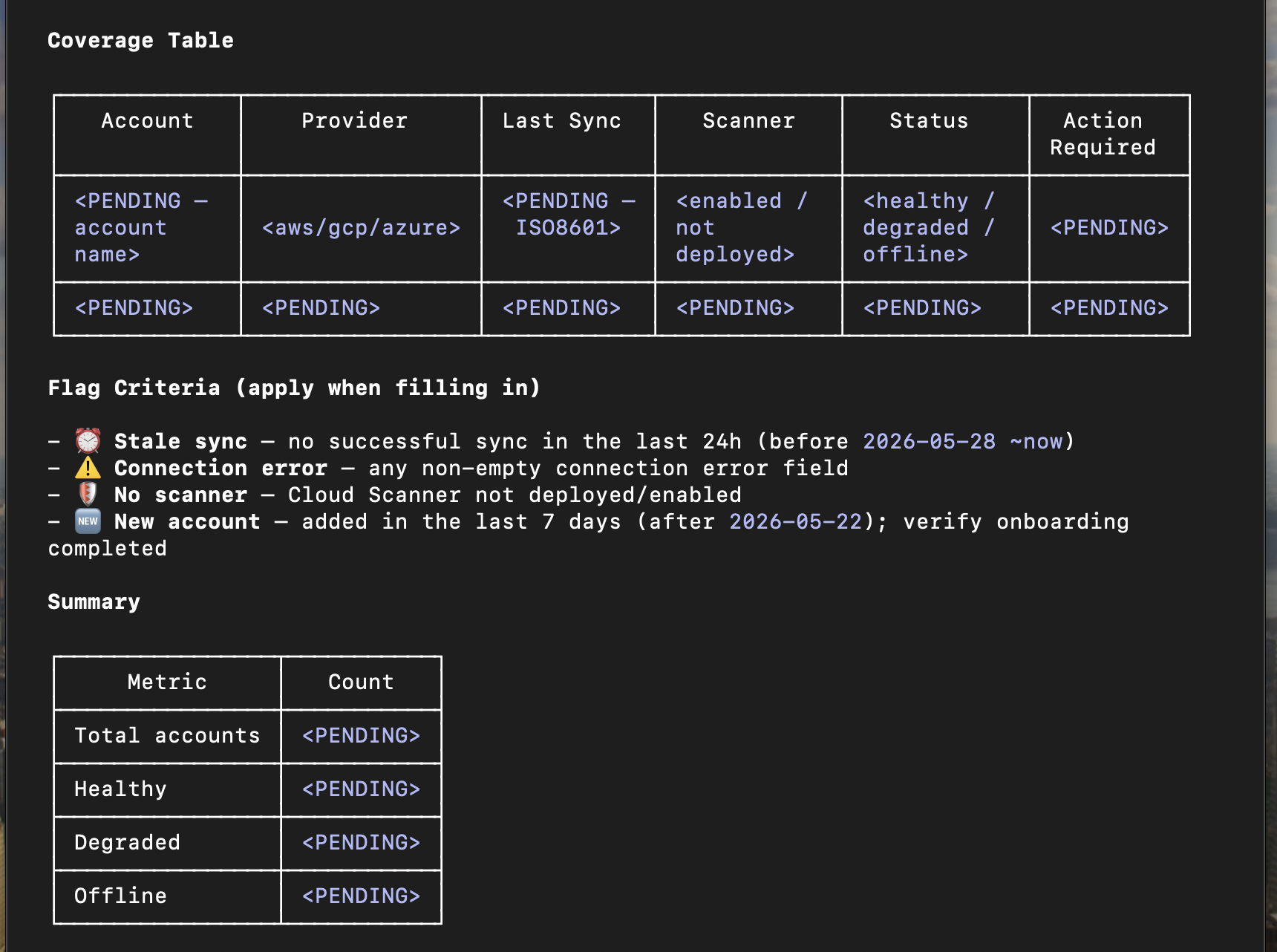
Example Output
| Account | Provider | Last Sync | Scanner | Status |
| prod-us-east | AWS | 2 min ago | Healthy | |
| prod-eu-west | AWS | 26 hours ago | Sync Lag | |
| dev-azure-01 | Azure | Never | X | Offline |
Why it matters: Teams can confirm detection coverage is active and complete before an audit or security review, helping them reduce blind spots and prove critical workflows are ready to respond.
09 Inventory Graph – Cloud Service Relationship Mapping
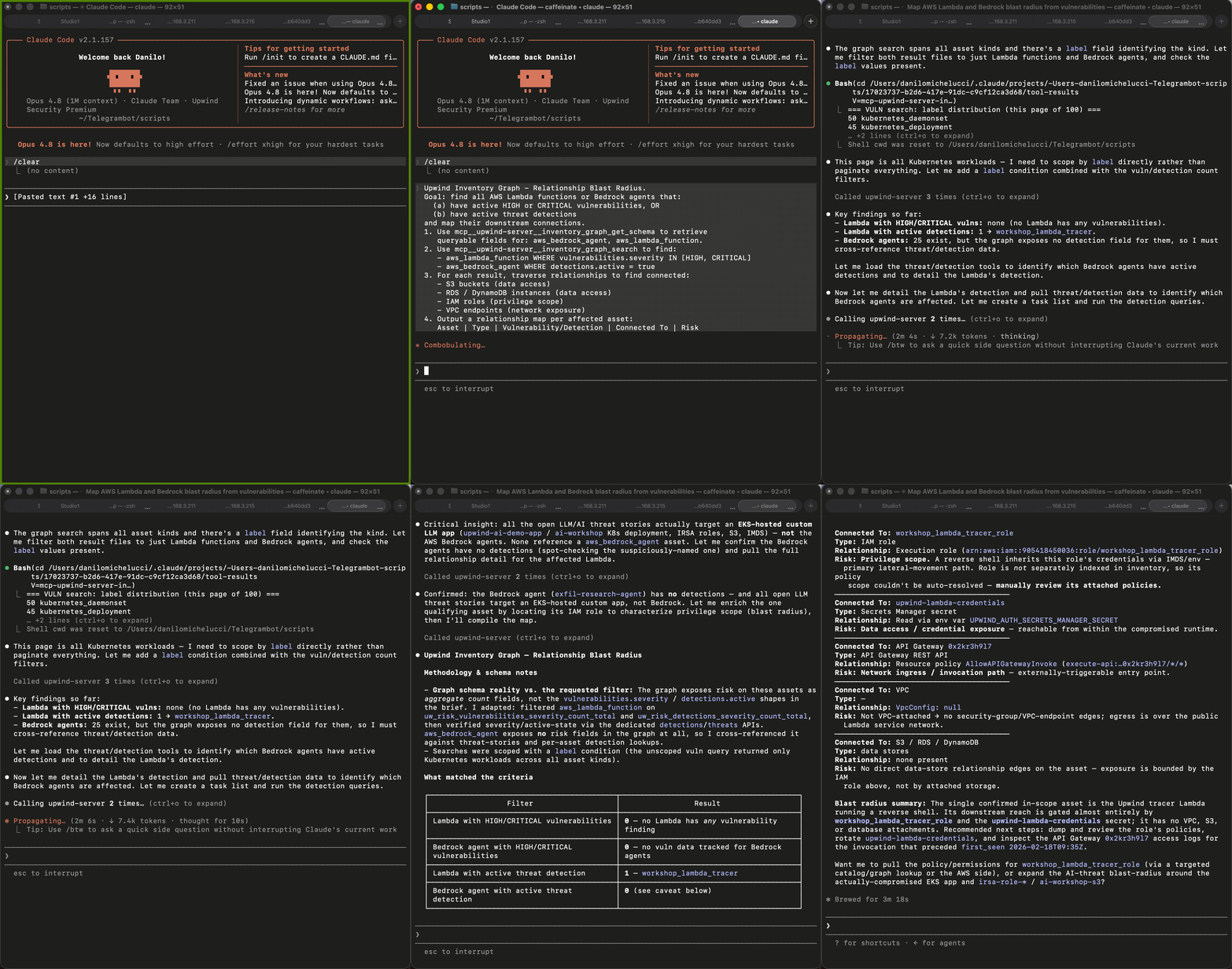
Upwind’s inventory graph is built for relationship-aware queries across the cloud estate. When teams need to understand blast radius, this prompt traces how AI/ML services, Lambda functions, and vulnerable workloads connect, surfacing paths and dependencies that a flat inventory view would miss.
MCP Tools Used
mcp__upwind-server__inventory_graph_get_schemamcp__upwind-server__inventory_graph_searchmcp__upwind-server__inventory_catalog_search
Upwind Inventory Graph - Relationship Blast Radius.
Goal: find all AWS Lambda functions or Bedrock agents that:
  (a) have active HIGH or CRITICAL vulnerabilities, OR
  (b) have active threat detections
and map their downstream connections.
1. Use mcp__upwind-server__inventory_graph_get_schema to retrieve
   queryable fields for: aws_bedrock_agent, aws_lambda_function.
2. Use mcp__upwind-server__inventory_graph_search to find:
   - aws_lambda_function WHERE vulnerabilities.severity IN [HIGH, CRITICAL]
   - aws_bedrock_agent WHERE detections.active = true
3. For each result, traverse relationships to find connected:
   - S3 buckets (data access)
   - RDS / DynamoDB instances (data access)
   - IAM roles (privilege scope)
   - VPC endpoints (network exposure)
4. Output a relationship map per affected asset:
   Asset | Type | Vulnerability/Detection | Connected To | Risk
Example Output
| Asset | Type | Finding | Connected To | Risk |
| inference-fn | Lambda | CVE-2024-1234 (CRITICAL) | s3://model-data, prod-rds | CRITICAL |
| rag-agent-01 | Bedrock Agent | Active C2 detection | DynamoDB:user-table | CRITICAL |
| batch-processor | Lambda | CVE-2024-5678 (HIGH) | s3://logs-archive | HIGH |
Why it matters: Flat asset views show what exists, but they do not always show how risk moves. Upwind’s graph connects assets, identities, services, and exposure paths so teams can understand impact and act on the risks that matter most.Only Upwind can answer this. Flat CSPM tools see individual assets; Upwind’s graph sees the connections. This is the query that wins bakeoffs.
10 ShiftLeft CI/CD Scan – Developer Remediation Brief
A ShiftLeft scan fingerprint lands in your CI/CD pipeline output. This prompt translates it into a developer-facing remediation brief: what fired, what to fix first, and the exact action required.
MCP Tools Used
mcp__upwind-server__shiftleft_get_scan_eventsmcp__upwind-server__shiftleft_get_signalsmcp__upwind-server__vulnerabilities_get_details
Upwind ShiftLeft Developer Remediation Brief.
Scan fingerprint: <fingerprint-from-ci-output>
1. Use mcp__upwind-server__shiftleft_get_scan_events with the fingerprint
   to retrieve all scan events, pass/fail results, and timestamps.
2. Use mcp__upwind-server__shiftleft_get_signals to retrieve all
   signals that fired: signal type, severity, affected package, file, line.
3. For signals tied to known CVEs, use mcp__upwind-server__vulnerabilities_get_details
   to retrieve CVSS score, exploit availability, and fix version.
4. Produce a developer remediation brief:
   - Summary: X signals fired, Y critical, Z fixable immediately
   - Quick wins: signals with a fix in the same major version
   - Structural changes: signals requiring architecture/dependency changes
   - Ignore list: no fix available + low runtime exposure
Output: Signal | Package@Version | Fix Version | CVSS | Priority | Action
Example Output
| Signal | Package@Version | Fix Version | CVSS | Priority |
| Known Vuln | [email protected] | 4.17.21 | 7.4 | HIGH – bump version |
| Known Vuln | [email protected] | 0.21.4 | 9.1 | CRITICAL – bump version |
| Exposed Secret | hardcoded API key | – | N/A | CRITICAL – rotate & vault |
Why it matters: Turns a scan fingerprint into a 3-tier developer action plan, making ShiftLeft findings actionable for engineers who need clear remediation priorities without extra security context.
From Cloud Security Context to Action
The Upwind MCP Server brings AI into the cloud security workflows teams already run every day, from exposure checks and vulnerability prioritization to compliance reporting, detection coverage, blast radius analysis, and remediation planning.
Across each use case, the goal is the same: help teams quickly understand whether they need to act, why it matters, and what should happen next. Upwind connects AI assistants to realtime intelligence, helping teams reduce manual investigation, focus on real risk, and move faster from signal to response.
The next step is choosing where to apply it first.
Focus on the risks that actually matter
Cloud security teams do not need more findings in more places. They need context that helps them decide which risks require action and which can wait.
The Upwind MCP Server extends Upwind’s realtime intelligence into AI agents and connected workflows, helping teams investigate threats, analyze assets, review findings, and prioritize remediation based on what is actually happening in production.
Instead of chasing every possible issue, teams can focus on the risks that are active, exposed, reachable, and tied to real impact.
Learn more by visiting the Upwind MCP Server documentation.