

This post was written in early August 2026, ahead of our fwd:cloudsec Europe talk. On August 25, AWS launched the Access Troubleshooter (currently in public preview), a first-party feature that surfaces the request context for denied requests. We’ve updated this post to account for it.
When the IAM engine evaluates your request, it matches your policy’s Condition block against a request context – a set of key-value pairs that describes everything about the call: who’s making it, what they’re calling, which resource, from where, with what session properties. Until very recently, you couldn’t see the full context. You’d get AccessDenied and debug blind.
AWS’s new Access Troubleshooter (currently in public preview) changes that picture. When a supported API denies your request, the error message now includes an authorization ID you can pass to GetRequestAuthorizationDetails, which returns the evaluated policies, matched statements, and the requestContext – the actual condition keys and values the engine saw. This is a significant step forward, and we’re glad it exists (more on that below).
But the troubleshooter answers one question: why was this request denied? We wanted to answer a different one: what does the IAM engine see when it evaluates any request? Not just denials. Not just supported services. Not just documented keys. The full context, proactively, for any API call you can make.
We built a method that does exactly that. Given any IAM role and any API call, it extracts the actual request context the engine evaluates – every condition key and its real value for that specific request.
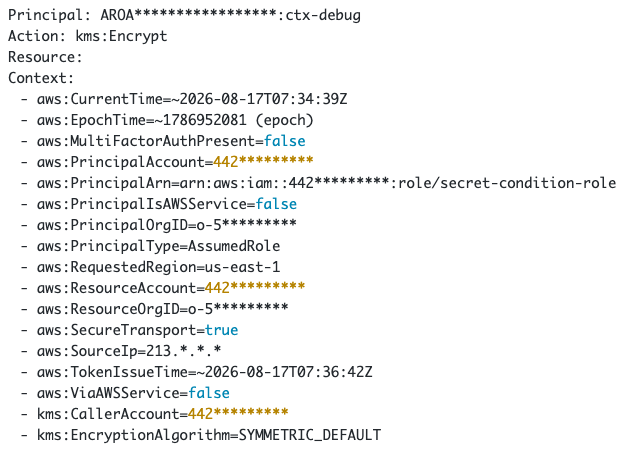
That’s a real run against kms:Encrypt. Every line is a condition key that exists in the request context for that call, with its actual value. This is what the engine sees. Now you can see it too.
The technique
The core mechanism is session policy probing. You attach a session policy during sts:AssumeRole that contains a condition – if the subsequent API call is denied, the condition matched; if it succeeds, it didn’t. One binary signal per probe. We covered this technique in depth in What IAM Sees That You Don’t, where we used it to discover 36 undocumented condition keys. Here, we apply it differently: instead of discovering new key names across millions of candidates, we’re extracting key values for a known set of keys on a specific API call.
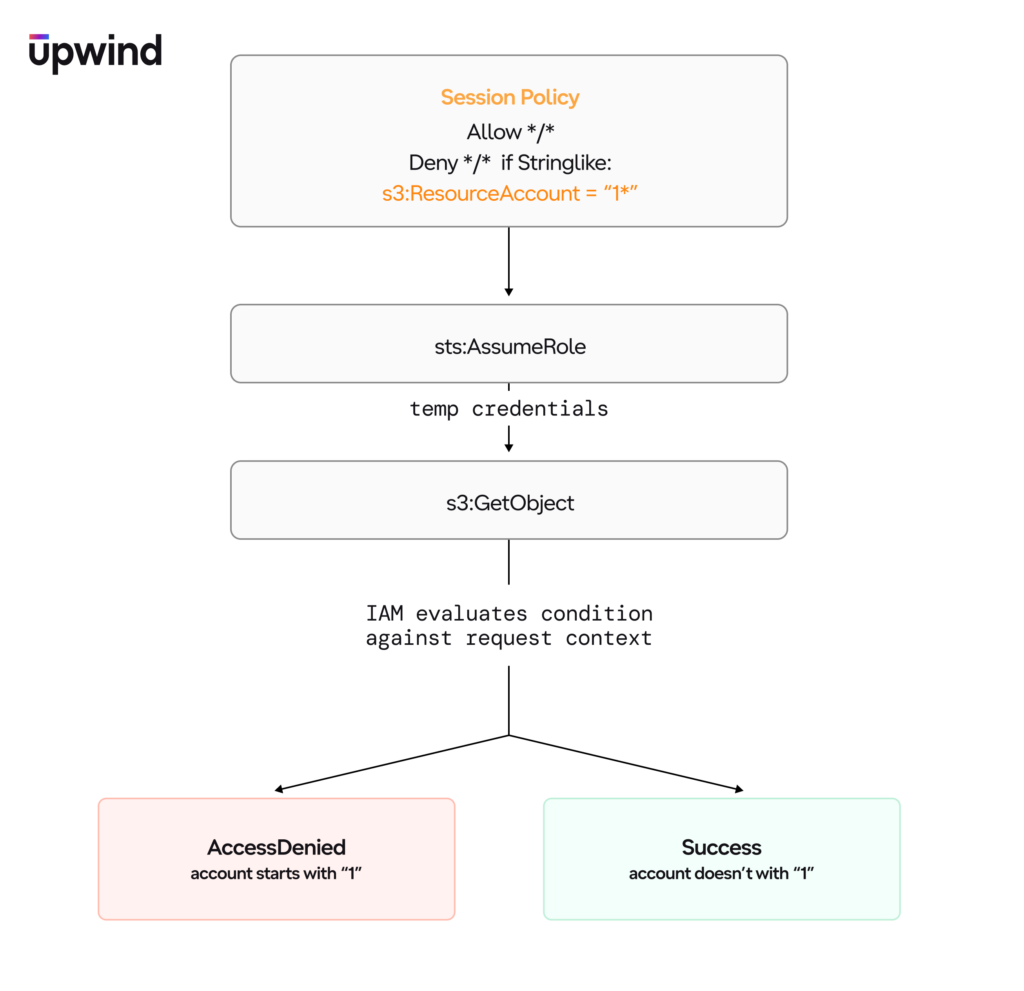
The tool runs in two phases:
Phase 1: Presence scan
First, determine which keys are actually populated for this specific call. Every key in the registry – documented and optionally undocumented – gets a Null probe:
Deny */* if Null: {aws:SourceIp}: "false"Denied means the key is present. Allowed means it’s absent. One probe per key. This is the ground truth – the tool doesn’t assume a key is present just because the documentation lists it. Some documented keys aren’t populated on every operation, and some undocumented keys are.
Phase 2: Value extraction
Only keys confirmed present in Phase 1 are probed for values. For each one, the tool generates an educated guess from known context about the call you’re making, then confirms it with a single operator probe, for example:
Deny */* if StringEquals: {aws:PrincipalAccount}: "444455556666"Denied means the guess was correct. Allowed means try the next one.
Most values are predictable. You know your own account ID, your role ARN, the region, the action you called, the resource you targeted. For these, one probe confirms the value. The tool only falls back to enumeration when the guess misses – and for most keys, it doesn’t.
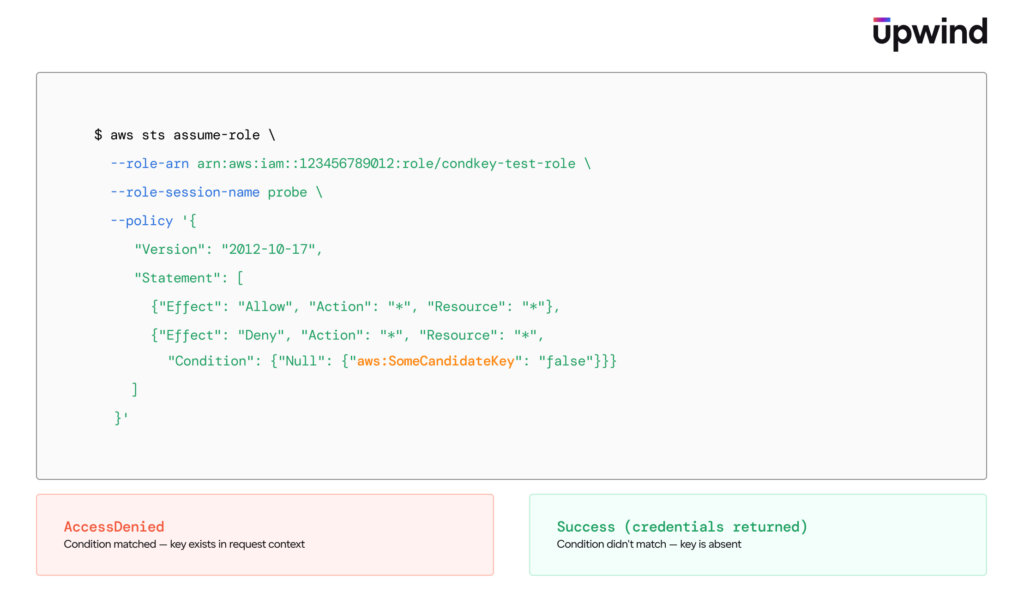
Under the hood, every probe is an sts:AssumeRole call with a session policy, followed by the target API call. The session policy intersects with the role’s identity policy, so the probe condition is the only variable. No IAM resources are modified. No propagation delay. Each probe is independent and instant.
What it reveals
The output is a flat list of every condition key populated for that exact API call, with values. The Access Troubleshooter now covers the denial-debugging case well for supported services – but this technique opens up use cases that a denial-triggered API can’t reach:
Proactive policy authoring. You’re writing a new condition-based policy and want to know what keys are available and what values they hold for a specific API call – before you deploy and before anything fails. The troubleshooter requires a denial to exist. This technique lets you inspect the context for requests that succeed, so you can validate your conditions upfront.
Debugging unexpected allows. A condition-based deny policy isn’t firing and requests are getting through when they shouldn’t be. The troubleshooter can’t help – there’s no denial, so there’s no authorization ID. This technique lets you inspect the request context on the allowed call to see exactly why your condition didn’t match – a key that’s absent when you expected it to be present, a value in a different format than you assumed, etc.
Validating documentation. The presence scan doesn’t trust the docs. A key that’s documented for a service but absent on a specific operation shows up as absent. A key that’s undocumented but populated shows up as present. The tool shows ground truth, not what the docs promise. The troubleshooter returns the keys AWS surfaces in its response – our technique finds every key the engine evaluates, including the ones that aren’t documented.
Discovering undocumented key values. Some keys hold values you wouldn’t predict from the documentation alone. aws:arn holds the principal ARN on S3 but the resource ARN on EC2. aws:type returns object on S3, instance on EC2, etc. The tool shows you what the engine actually returns, not what you’d assume.
Full service coverage. The Access Troubleshooter is in public preview and currently supports most IAM APIs. Our technique works against any AWS service – S3, KMS, EC2, Lambda, SQS – whatever you need to inspect.
Non-deterministic keys
Some keys change between probes. aws:CurrentTime and aws:EpochTime advance with the clock. aws:TokenAge increments every second. The tool handles these by reporting approximate values (~2026-08-17T07:34:39Z) rather than claiming exact matches. For numeric keys like aws:TokenAge, it uses binary search to narrow the range.
These keys are marked in the output so you know the value was approximate at probe time, not an exact confirmation.
How to replicate this
We’re not releasing the prototype yet, but the technique is simple enough to implement yourself. All you need is:
- An AWS account with an IAM role that allows the target action
- The role must trust your calling identity for
sts:AssumeRole - A target resource for the API call (an S3 object, a KMS key, a Lambda function – whatever you want to inspect)
The presence scan is a loop over candidate key names, each wrapped in a Null condition inside a session policy. The value extraction is a second loop over present keys, using StringEquals with an educated guess. A typical scan of ~40-50 keys completes in under a minute. No SDK magic – just sts:AssumeRole with a --policy parameter and an API call to observe the result.
Why this matters
This prototype was built because the request context – the most important input to policy evaluation – was not directly visible. Policy Simulator evaluates policies but doesn’t show you the context it’s matching against. CloudTrail logs the event but not the full condition key set. Every IAM practitioner who’s debugged a condition-based denial has had to reason backwards from documentation, hoping the docs match reality.
The technique uses IAM as its own debugger. It’s a workaround – but it works, across all services, proactively, and without trusting documentation.
And then AWS shipped a first-party answer.
The Access Troubleshooter
On August 25, 2026, AWS launched the Access Troubleshooter. When a supported API denies your request, the error message now includes an authorization ID. Pass it to GetRequestAuthorizationDetails and you get back the evaluated policies, the matched statements, and a requestContext map – the actual condition keys and values the engine saw at the time of the denial.
This is a big deal. The IAM team shipped exactly the kind of visibility the community has been asking for, and they deserve real credit for it. Seeing the request context surface in a first-party API is proof that this problem space matters – that practitioners need to see what the engine sees, not guess at it from documentation.
We’re genuinely happy this exists. For the vast majority of practitioners troubleshooting a straightforward denial on a supported service, the Access Troubleshooter will be the right tool. It’s faster, it’s authoritative, and it doesn’t require any setup.
Where our technique still applies
The Access Troubleshooter and our technique occupy different parts of the problem space. They overlap on denial debugging for supported services, and for that use case, the troubleshooter wins. But the gaps are real:
Proactive inspection. The troubleshooter activates on denial – you need a request to fail before you can inspect its context. Our technique works on any request, including ones that succeed. If you’re authoring a new condition-based policy and want to verify what keys are populated and what values they hold before something breaks, you need proactive inspection, not a post-mortem. And just as importantly: if a request is being allowed when it shouldn’t be – a condition-based deny that isn’t firing, a restriction that’s being bypassed – the troubleshooter won’t help, because there’s no denial to inspect. Our technique lets you see the exact context values the engine is matching against, so you can understand why your deny condition isn’t triggering.
Service coverage. The Access Troubleshooter is in public preview and currently supports most IAM APIs. Our technique works against any AWS service – S3, KMS, EC2, Lambda, SQS – whatever you need to inspect. As the troubleshooter rolls out to more services, this gap narrows.
Determinism. AWS does not guarantee an authorization ID for every denial. Large policy evaluations, unsupported APIs, and service-initiated requests may not produce one. Our technique is deterministic – if you can call the API, you can probe its context.
Undocumented keys. The troubleshooter returns the context keys AWS surfaces in its response. Our technique discovers every key the engine actually evaluates, including undocumented ones – like the ones we found in our previous research. If a key is populated but not documented, our probing will find it.
Cross-organization boundaries. For cross-account requests spanning multiple organizations, GetRequestAuthorizationDetails returns only the details that belong to your own organization. Our technique extracts the full context from the perspective of the calling session, regardless of organizational boundaries.
The Access Troubleshooter is a milestone for IAM observability. We see our technique as complementary – a research and policy-authoring instrument for the cases where you need to understand the engine proactively, across all services, including the parts the docs don’t cover. The fact that AWS shipped this feature validates the core premise: the request context is the most important input to policy evaluation, and it shouldn’t be hidden.
Final note
We want to thank the AWS IAM team directly. IAM is one of the most consequential authorization systems ever built – it governs access decisions for millions of organizations worldwide. The decision to open up the evaluation internals through GetRequestAuthorizationDetails reflects a genuine commitment to helping practitioners understand and secure their own environments. That takes engineering investment, careful design around cross-account trust boundaries, and a willingness to expose internal evaluation logic that could have stayed opaque. The fact that AWS chose to surface it from the inside is the best possible outcome for the community.